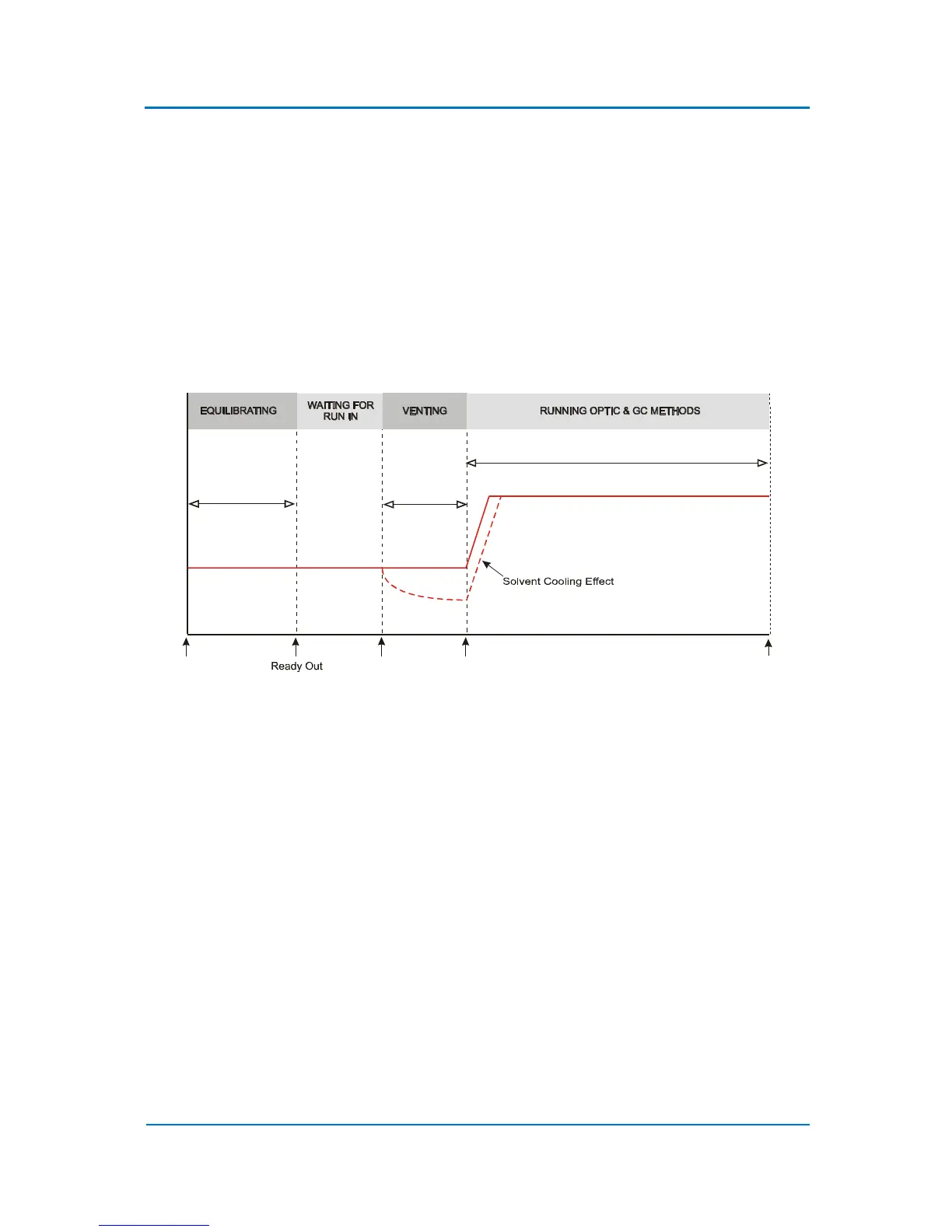
9.2 Solvent Cooling Effect
During the solvent vent injection, the solvent passes across the head of the capillary GC column and
is vented through the split line. The evaporation of solvent can cause considerable cooling of the
inlet liner. Cooling occurs because the heat capacity of the packing of the liner and the liner itself is
low and the heat transfer from the liner to the evaporation site is slow. For some applications the
solvent cooling could be beneficial. OPTIC-4 has the option of switching the inlet heater off while
eliminating the solvent to exploit the effect. This option is available in expert method only. It can be
enabled by setting the ‘Solvent Cooling Effect’ parameter to Yes. The diagram below illustrates a
possible modification (dashed line) of a method temperature profile resulting from the solvent
cooling effect.
Figure 9.2 Solvent Cooling Effect
9.3 Floating Final Temperature
By default, in all OPTIC-4 methods the final inlet temperature is maintained at a constant value until
the end of the method. OPTIC-4 has the option of setting the final temperature to ‘floating’ after a
specified interval (Hold Time) has elapsed. It is enabled by setting the Temperature Control
parameter to ‘Floating’ and the Hold Time to an appropriate value, smaller than the End Time. The
diagram below shows an example of an inlet temperature profile with a floating segment (dashed
line). The graphical display of the method will show a setpoint as the software has to show
something, but temperature will float.



 To Next Page