R2 OUTPUT TIME
R3 OUTPUT TIME
R1 OUTPUT TIME
R2 OUTPUT MODE
PROGRAMMING THE DOOR PANEL
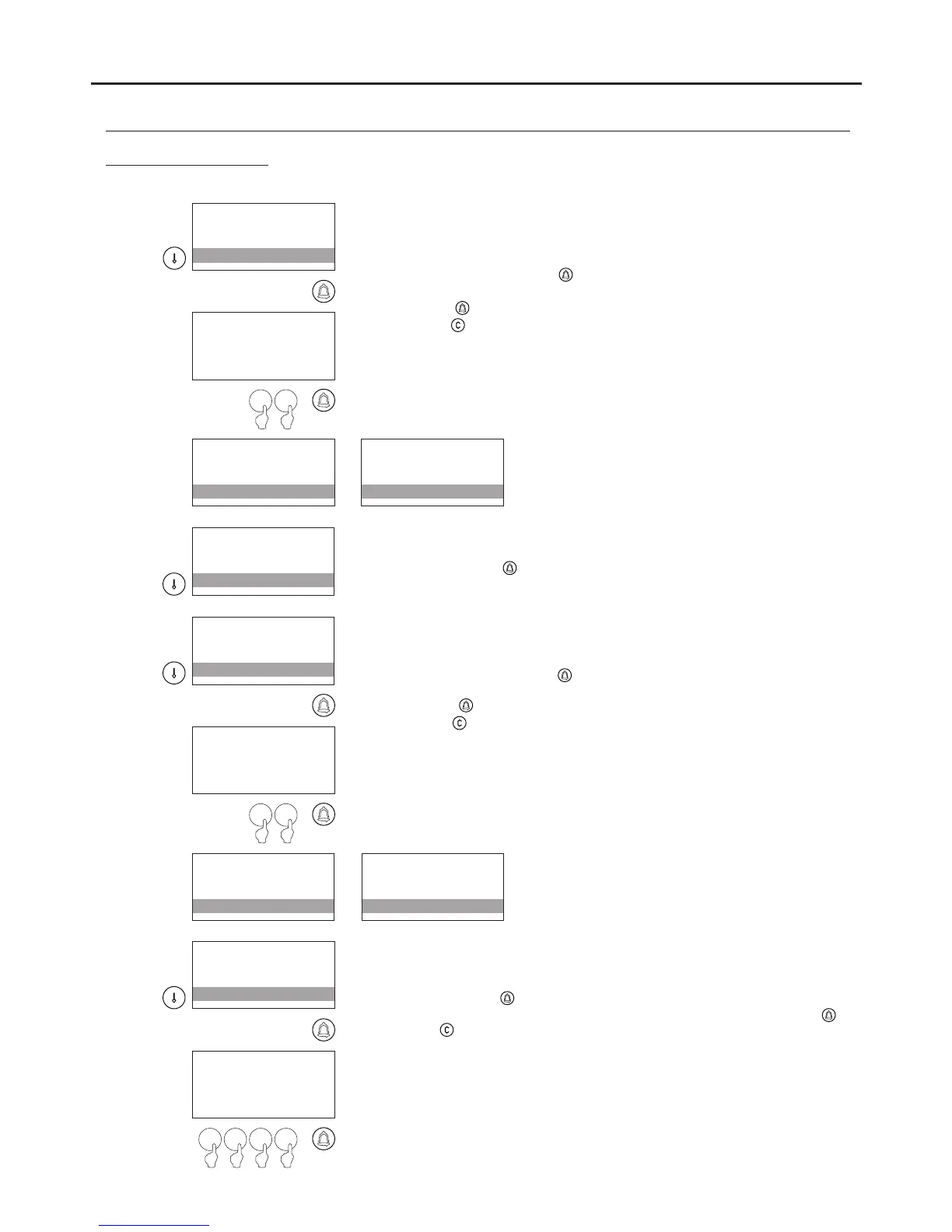
Determines the time in seconds that relay 3 (located on the EL632 /
EL642 module) will be active. This corresponds to the CV1 CV2 output
and will always be configured as IMPULSE. Between 01 and 99
seconds can be selected.
To change the time, press and the message ENTER VALUE will
appear; enter the time to be assigned to relay 3 and confirm by
pressing .
Press the button to restore the previous value.
ENTER VALUE
:03
1 0
R2 OUTPUT TIME
R3 OUTPUT TIME
R1 OUTPUT TIME
R2 OUTPUT MODE
R2 OUTPUT TIME
10s
R1 OUTPUT TIME
R2 OUTPUT MODE
R3 OUTPUT TIME
P OUTPUT MODE
R2 OUTPUT MODE
R2 OUTPUT TIME
P OUTPUT MODE
P OUTPUT TIME
R2 OUTPUT TIME
R3 OUTPUT TIME
Determines whether the behaviour of panic output P (located on the
N3301/AL module) will be IMPULSE or STABLE.
To change, press .
Determines the time in seconds that panic output P (located on the
N3301/AL module) will be active if it is configured as IMPULSE.
Between 01 and 99 seconds can be selected
To change the time, press and the message ENTER VALUE will
appear; enter the time to be assigned to panic output P and confirm by
pressing
.
Press the button to restore the previous value.
.
ENTER VALUE
:03
1 0
P OUTPUT MODE
P OUTPUT TIME
R2 OUTPUT TIME
R3 OUTPUT TIME
P OUTPUT MODE
10s
R2 OUTPUT TIME
R3 OUTPUT TIME
P OUTPUT TIME
C 1 CODEP
R3 OUTPUT TIME
P OUTPUT MODE
Enables the code to activate or deactivate the P1 or P2 button (located
on the N3301/AL module) to be changed depending on the
configuration of CP1 MODE.
To change, press and the message ENTER VALUE will appear; enter
the CP1 code using the numeric keypad and confirm by pressing .
Press to restore the previous value.
The code must have the same number of digits as the previous one,
between 4 and 6, depending on the NUMBER OF DIGITS value
configurable from the SYSTEM SETTINGS menu. The factory setting is 4.
ENTER VALUE
:1111
8 96 7
137
Access control menu
Continued from previous page
AUDIO AND VIDEO DOOR ENTRY SYSTEM - CODED PANEL WITH DISPLAY
Continued overleaf



 To Next Page