GSI TympStar Pro User Manual
D-0129427 Rev. B Page 82 of 162
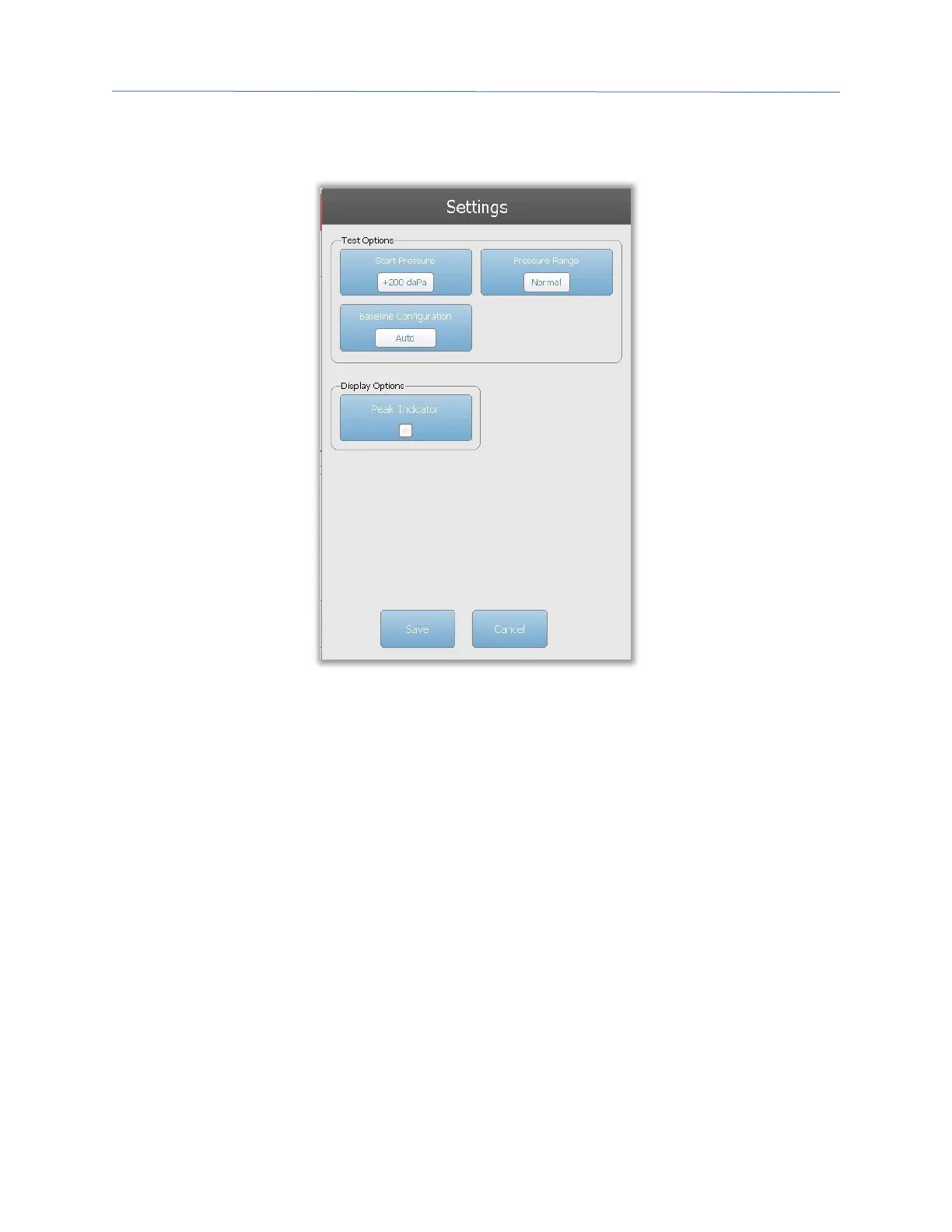
tympanogram parameters that are available to be selected. The tympanogram default
settings are defined in the Config App.
Test Options
Start Pressure
The Start Pressure Test Options button is used to select the starting pressure (daPa) for
collecting a tympanogram. When the button is selected, a dropdown list of options is
presented.
Range
The Pressure Range Test Options button controls the minimum and maximum pressure
that is displayed on the tympanogram. The button label indicates the current setting.
When the button is selected, a submenu displays the options of Normal and Wide. The
Normal range is from +200 daPa to -400 daPa. The Wide range is from +400 daPa to -600
daPa.
Baseline Configuration
The baseline configuration button may be used to select the point at which the
compensated admittance is calculated. When the button is selected, a drop-down list is
presented. When set to Auto, the baseline for a 226 Hz probe tone tympanogram is
calculated at the positive tail and for a 1000 Hz probe tone tympanogram, the baseline is


 To Next Page