4 4 | www.HandiQuilter.com
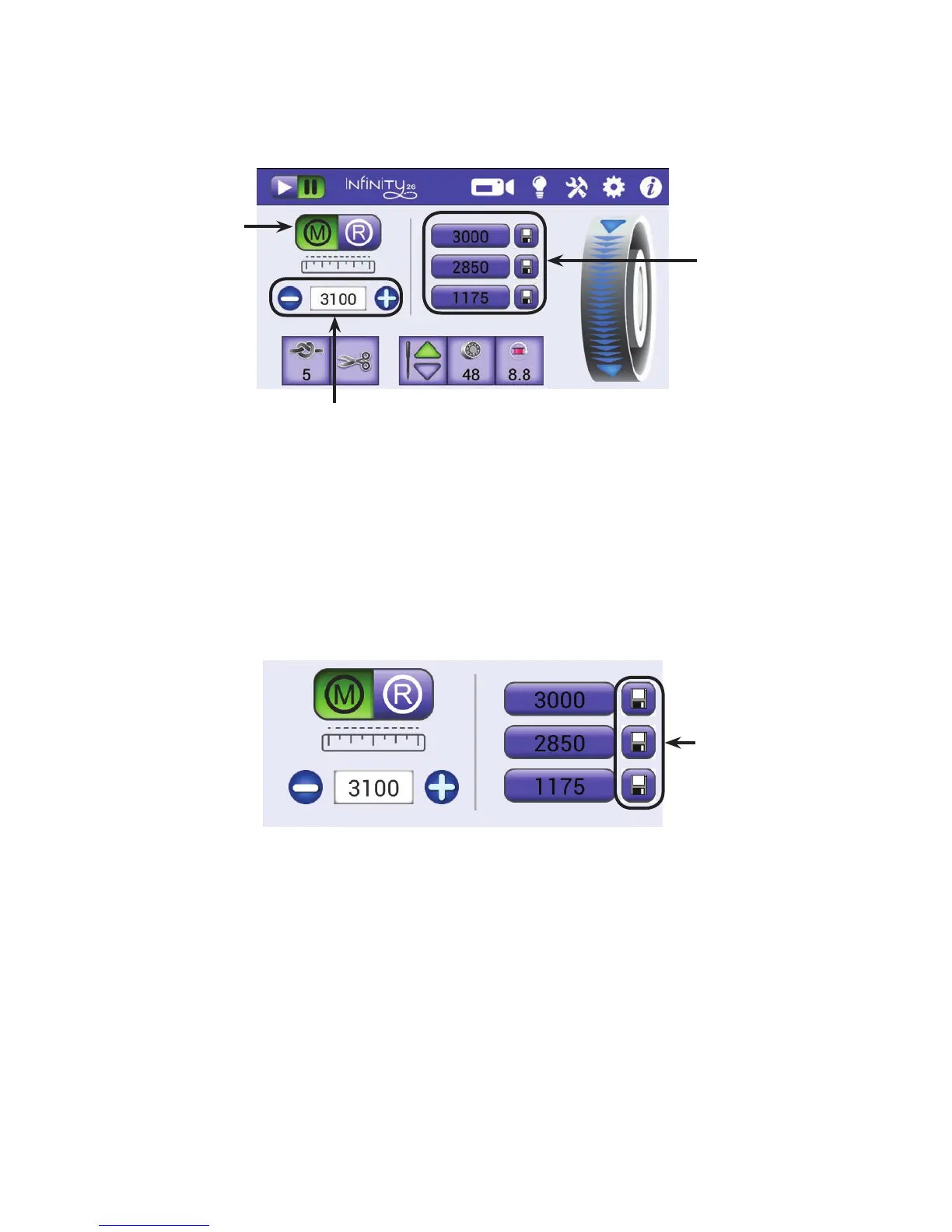
• T o u c h t h e Manual buon and then specify the stches per minute (SPM) by pressing the plus (+)
or minus (–) buons on the screen or selecng one of the stches-per-minute presets. Pressing the
plus (+) or minus (–) buons on the screen to change the stches per minute has the same eect as
pressing the plus (+) or minus (–) buons on the handlebars.
To congure the manual stching mode preset speeds
The manual mode preset speeds are three stches-per-minute speeds, up to 3100 stches per minute
(SPM), that are saved for quick access from the Main screen. Aer you set the speeds, you can choose one
of the presets when in Manual stching mode and it becomes the current speed. Perhaps you want one
speed when doing overall quilng, a dierent speed for ruler work, and yet another speed for
micro quilng.
1 . Select Manual stching mode by touching the Manual buon.
2 . Press the plus (+) buon to increase or the minus (–) buon to decrease the current stches per
minute seng.
3. Touch the save buon next to one of the stches per minute presets to save the current seng as
a preset.
Shows the current stches-per-minute seng.
Press the plus (+) or minus (–) buons to increase or
decrease the seng.
To save it as a preset, touch one of the save buons.
The Manual Mode
buon is selected.
Touch one of the
stches-per-minute
presets to quickly
change the current
stches-per-minute
seng.
Touch to save
the current SPM
seng as a preset.











 To Next Page