Version 2.0, February 2012. Copyright 2012 Hitron Technologies
69
Version 2.0, February 2012. Copyright 2012 Hitron Technologies
69
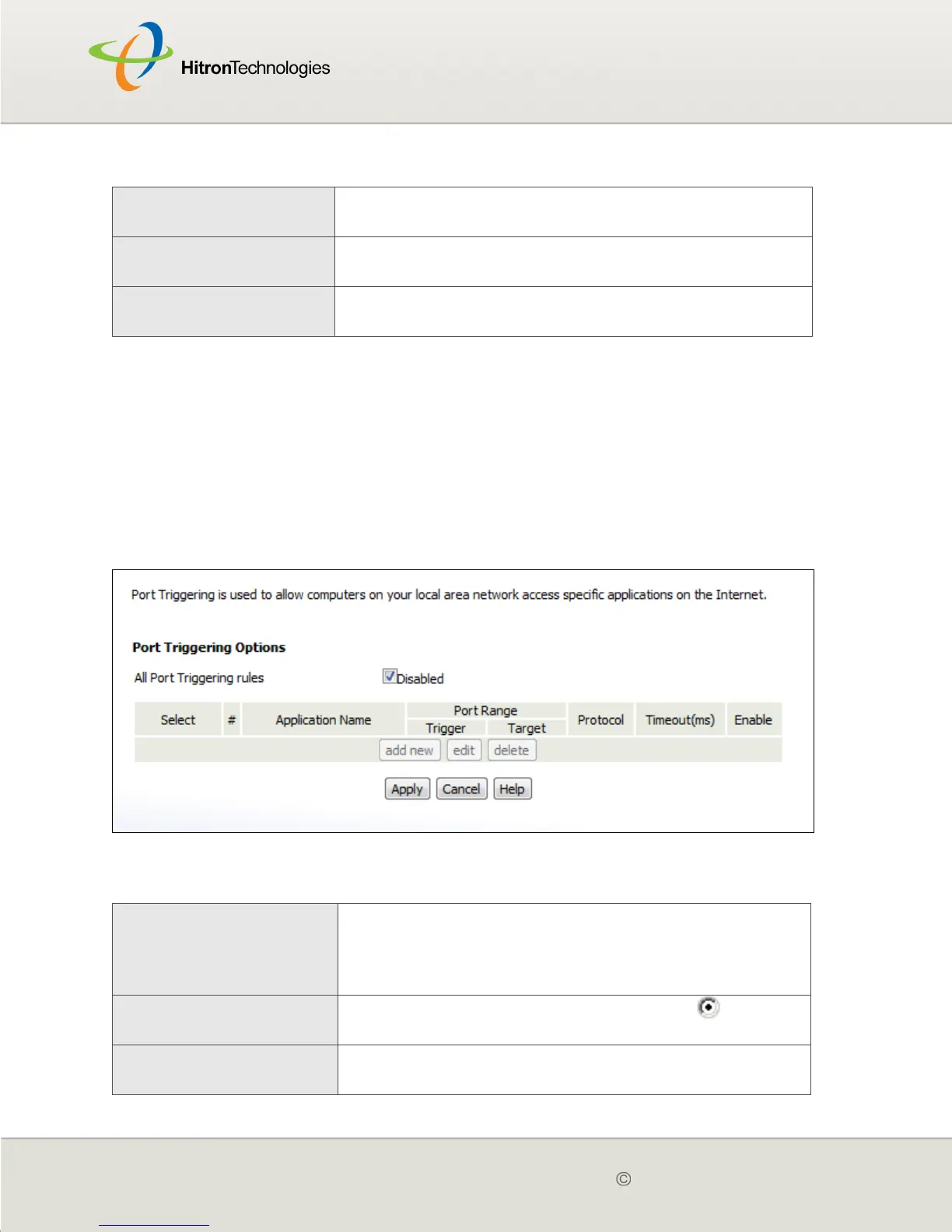
4.5 THE PORT TRIGGERING SCREEN
Use this screen to configure port triggering. You can turn port triggering on or off and
configure new and existing port triggering rules.
Click Firewall > Port Triggering. The following screen displays.
Figure 21: The Firewall > Port Triggering Screen
The following table describes the labels in this screen.
Apply Click this to save your changes to the fields in this
screen.
Cancel Click this to return the fields in this screen to their last-
saved values without saving your changes.
Help Click this to see information about the fields in this
screen.
Table 21: The Firewall > Port Triggering Screen
All Port Triggering Rules Use this field to turn port triggering on or off.
Select the checkbox to enable port triggering.
Deselect the checkbox to disable port triggering.
Select Select a port triggering rule’s radio button ( ) before
clicking Edit or Delete.
# This displays the arbitrary identification number
assigned to the port triggering rule.
Table 20: The Firewall > Forwarding > Add/Edit Screen



 To Next Page