USER INTERFACE
3.32
ThinPrep
®
Integrated Imager Operator’s Manual
USER PREFERENCES
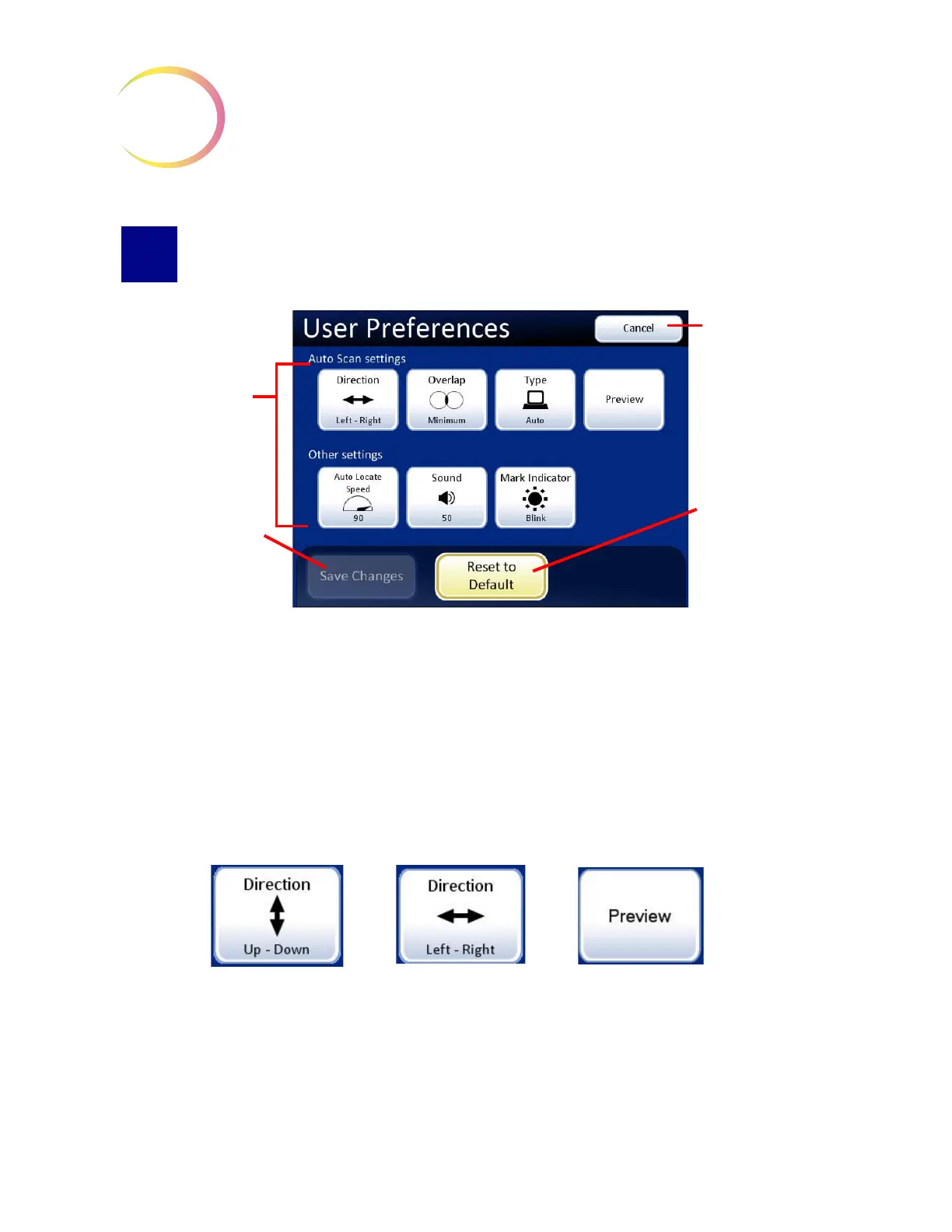
Figure 3-50 User Preferences Screen
The User Preferences allow the cytotechnologist to customize preferences for Slide Review. These are
settings for direction of scan, overlap, Auto Scan and maximum speed for Auto Locate, plus audible
beep volume and mark indicator. Once settings have been adjusted, they will remain from session to
session until they are changed again. The preferences are associated with each user ID. If there are
multiple users of an Integrated Imager, the preferences associated with the ID the will be uploaded at
Login.
Auto Scan Settings
Direction
Figure 3-51 Select Stage Movement Direction
The direction of the stage movement during Auto Scan may be selected. Press the
Direction
button
to toggle between the choices of Direction Up-Down or Direction Left-Right. (
Figure 3-51.) To view
the selection through the eyepieces, ensure the 10X objective is in position, load a slide in the slide
holder for reference, and press the
Preview
button.
User preferences
Save Changes
, to
save changes and
return to main
screen
Cancel
, to aban-
don any changes
and return to main
screen
Reset to Default
returns settings to
factory default.



 To Next Page