ThinPrep
®
Integrated Imager Operator’s Manual
3.7
USER INTERFACE
Edit/retire an account
To view or edit the status of a user account, at the User Accounts display, touch the field for that
account.
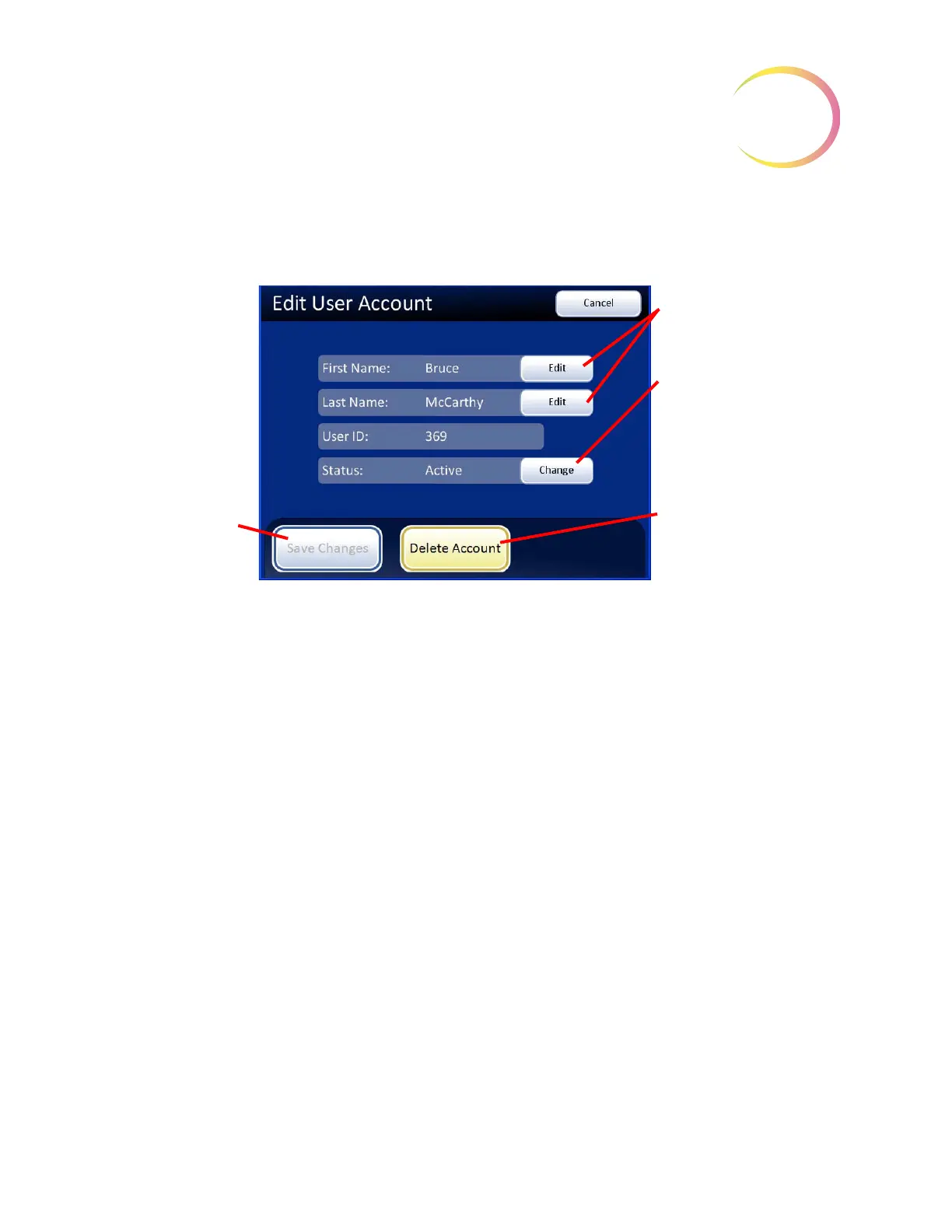
Figure 3-9 Edit User Account Screen
To edit the first or last name, press the
Edit
field on that name. The on-screen keyboard will appear.
Make the desired changes and press the
Done
button.
To retire a User ID, touch the
Change
field on the Status line. The status will change to Retired.
Note:
The three-digit User ID cannot be changed once it is created. It can only be retired.
A User Account cannot be edited or deleted once a slide data record is associated with it (by
imaging or reviewing one or more slides).
Touch the
Edit
buttons
to change the name.
Touch the
Change
button to change the
User ID status.
The
Delete Account
button only works if
there is no slide data
record associated with
the account.
Save Changes
button will save
changes made.



 To Next Page