Trident HD Specimen Radiography System User Guide
Chapter 4: User Interface
Page 30 MAN-05478-002 Revision 003
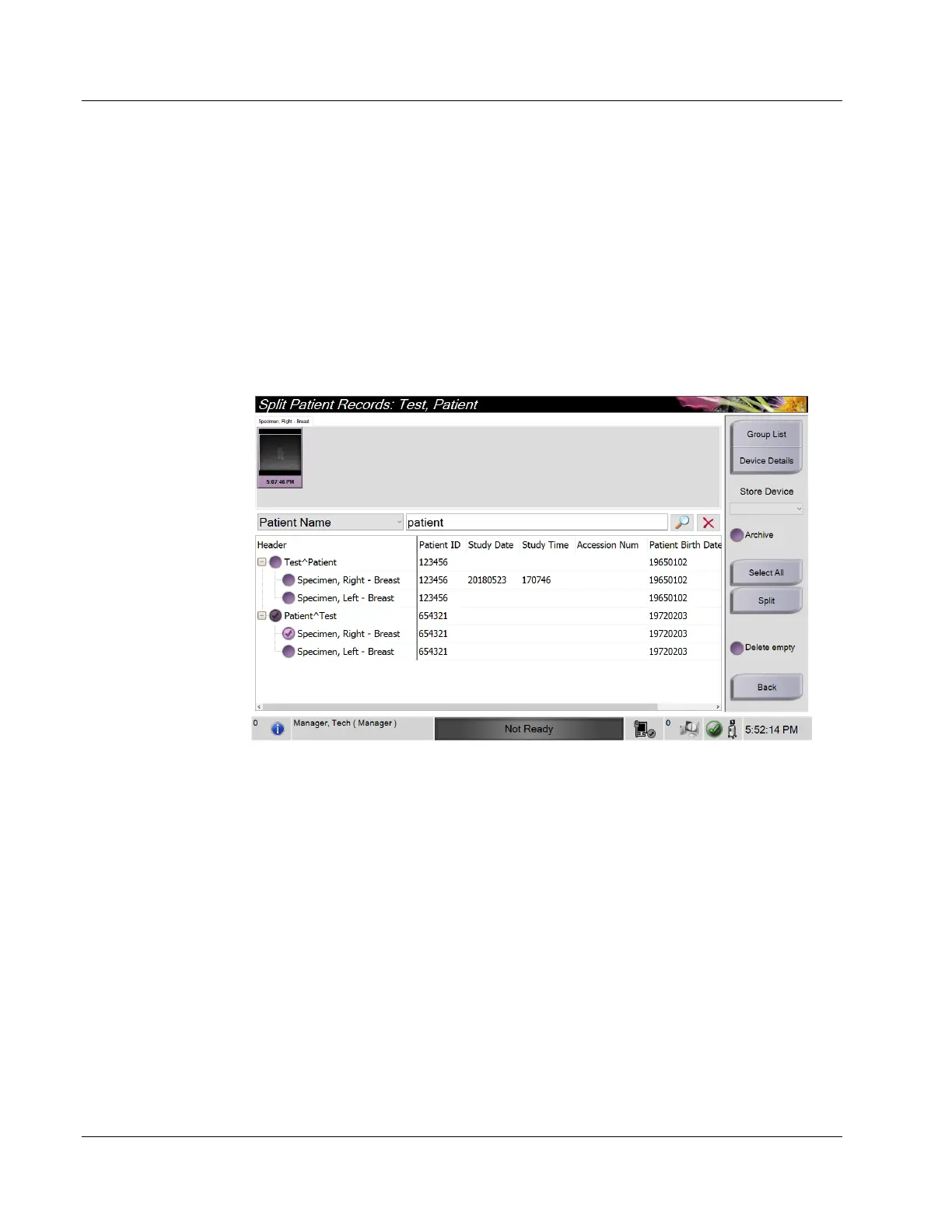
Images Acquired in the Wrong Patient
1. In the Select Patient screen, select the patient that has the images that need to be
moved.
2. Select the Split button. The Split Patient Records screen opens.
3. Select the images to move. If all images are being moved, select Select All.
4. Select your search criteria (for example, Patient Name or Accession Number) using
the drop-down list below the images.
5. Enter the search criteria and select the Search button (the magnifying glass).
6. When the Patient name appears, select the correct procedure.
Figure 17: Select the Correct Patient to Split Patient Records
7. If ALL images are being moved and you want to delete the incorrect patient from the
Patient List, select Delete Empty.
8. If you want to archive the images or save them to a stored device, select Archive.
Verify that the correct outputs are selected.
9. Select Split, then select OK in the Split Successful message.















 To Next Page