Trident HD Specimen Radiography System User Guide
Chapter 9: System Administration Interface
MAN-05478-002 Revision 003 Page 71
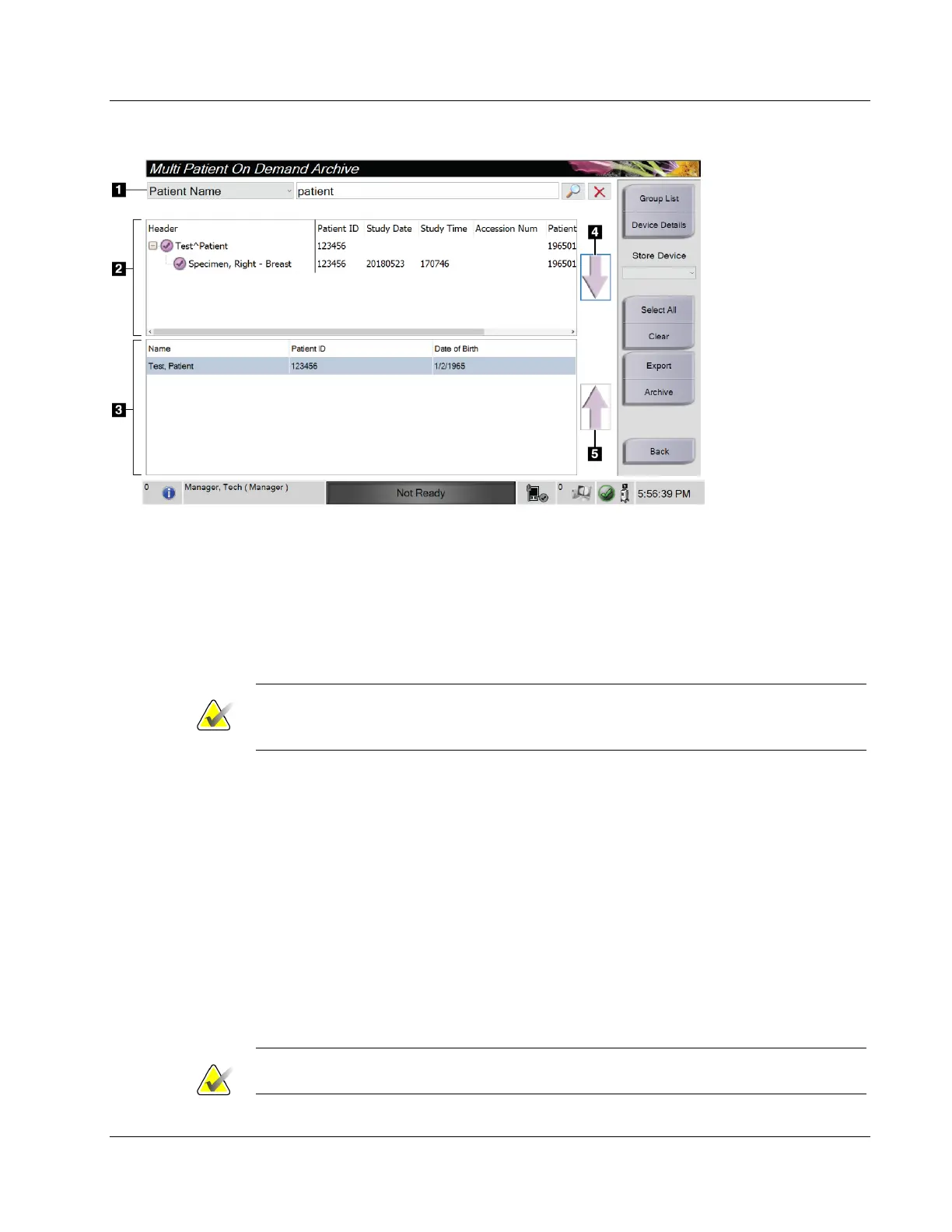
Figure 38: Multi Patient On Demand Archive Screen
Figure Legend
1. Search parameters
2. Patient List area
3. Patients To Be
Archived area
4. Add selection in
the Patient List
area to the
Patients To Be
Archived area
5. Remove the
selection from the
Patients To Be
Archived area
To Archive:
1. Select the patients and the procedures to archive.
• Select patients from the patient list, or do a search with the search parameters
(item 1) and select patients from the search results.
Note
The Select All button (in the right panel of the screen) selects all the patients in the
Patient List area. The Clear button (in the right panel of the screen) clears selections.
• Select the procedures for each patient.
• Select the Down Arrow (item 4) on the screen to move the selected patients to the
Patients To Be Archived area (item 3).
• Select the Up Arrow (item 5) on the screen to remove the selected patients from
the Patients To Be Archived area (item 3).
2. Select a storage device.
• Select an option from the Store Device drop-down list.
-OR-
• Select the Group List button, then select an option.
3. Select the Archive button. The list in the Patients To Be Archived area copies to the
selected archive devices.
Note
Use the Manage Queue utility in the taskbar to review the archive status.















 To Next Page