Trident HD Specimen Radiography System User Guide
Chapter 4: User Interface
Page 34 MAN-05478-002 Revision 003
4.3 Procedure Screen
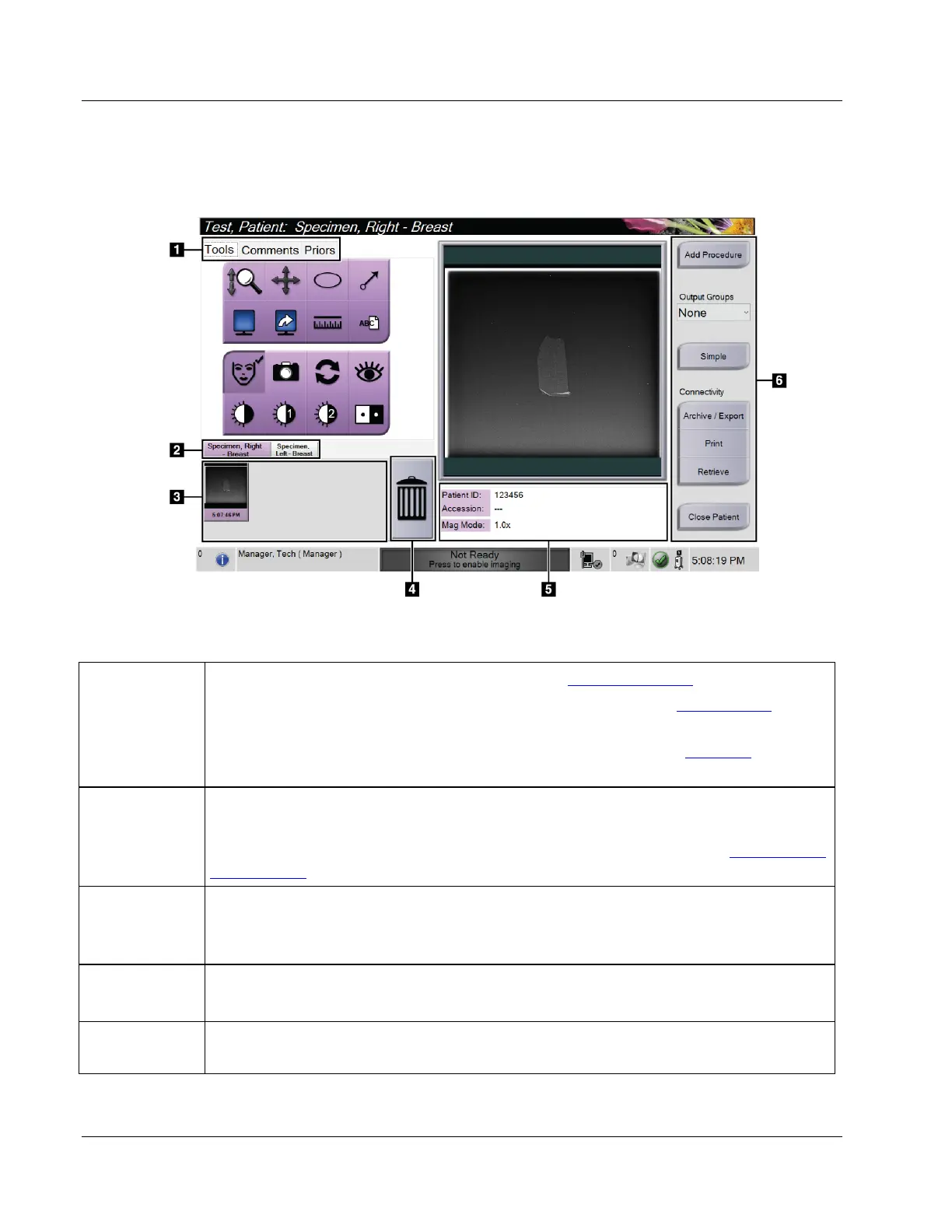
Figure 19: Procedure Screen
Table 4: The Procedure Screen
1. Tabs
Select the Tools tab to review the images — refer to Image Review Tools on page 46
.
Select the Comments tab to add comments to the images — refer to Comments Tab on page
47.
Select the Priors tab to review prior images for the patient — refer to Priors Tab
on page
48.
2. Procedure
Tabs
Shows the current procedures for
the patient. Select the tab to select the desired procedure
for the patient.
Note: The tabs can be changed to display one or two lines of text — refer to Set Multi Line
Procedure Tabs on page 68.
3. Thumbnails Shows small icons of images related to the selected patient.
A thumbnail image with a camera icon is a snapshot image. A snapshot image differs in
size and resolution from the original image.
4. Trash Icon Deletes a selected thumbnail image.
Note: You cannot recover deleted images.
5. Procedure
Information
Shows the Patient ID, Accession Number, and Magnification Level.















 To Next Page