Trident User Guide
Chapter 5: The Images
MAN-02098 Revision 008 Page 39
5.2.1.3 The Annotations Tab
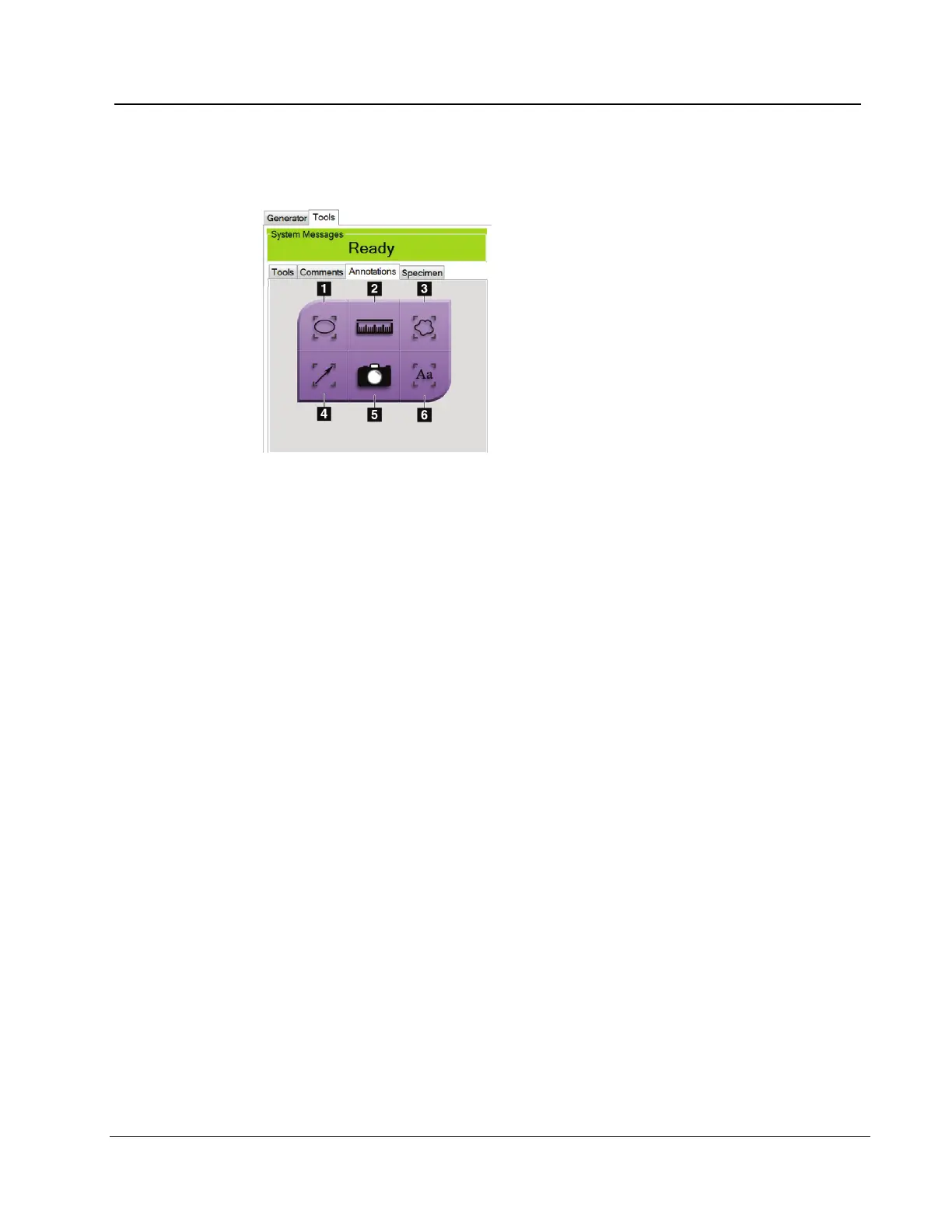
Figure 22: Annotations Tab
Figure Legend
1. Draws an elliptical pattern in the image. You can
change the size and move this pattern within the
display area, and you can add the text to this pattern.
2. The Ruler tool displays a measurement of the
distance between two points. To move the
measurement line, click and drag the line to the new
location.
3. Draws a free-form in the image. You can move this
pattern within the display area, and you can add the
text to this pattern.
4. Creates an arrow to point to an area of interest. You
can change the size, move the arrow within the
display area, and add the text to this pattern.
5. The Camera button captures a snapshot of the image
display area and adds the snapshot to the current
procedure.
6. Creates a text box. Click in the box, then use the
keyboard to add the text. You can move this text
within the display area.
• To move a pattern that you created in the display, click and hold the line of the
pattern then move to the new location.
• To change the size a pattern that you created in the display, click and hold an end dot
of the pattern then drag.
• To add text to the text box of a pattern, click in the box then use the keyboard to add
text. Wherever you can move this box within the display area, the text stays connected
to that pattern.














 To Next Page