System Settings and Adjustments
View Status & Diags
View Status
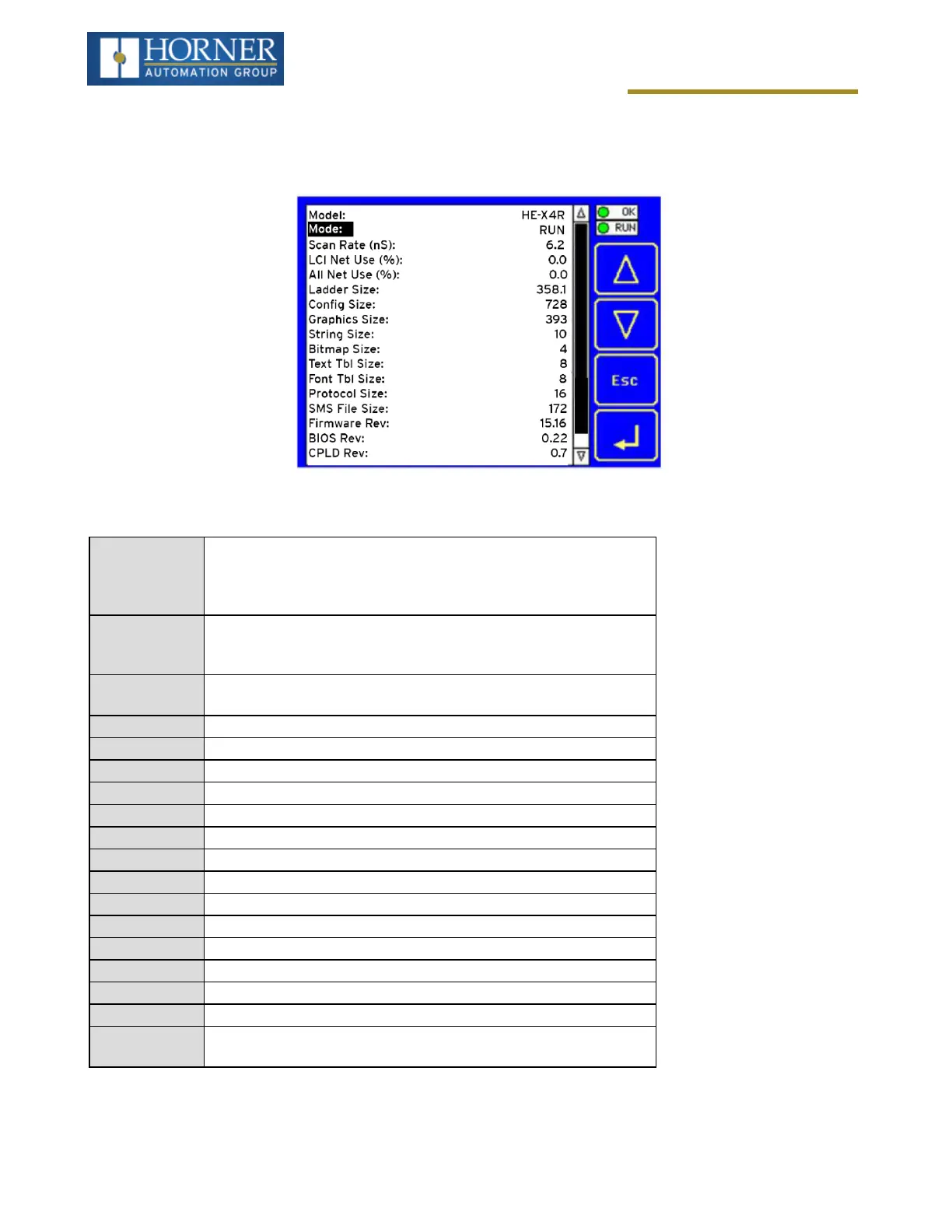
The View Status Sub-Menu displays up to 18 System Settings. Only the Mode System Setting is editable.
Model
Xxyyz = 5 or 6 character model number of this X4 unit
x is 1 for models that have a CAN port; 0 = no CAN port
yy indicates the installed I/O module; 00 = no I/O module
z indicates the installed COM module; N = no COM module
Mode
Idle = X4 is in Idle mode
DoIO = X4 is in Do I/O mode
Run = X4 is in Run mode
Scan Rate(mS)
0.0 = X4 is not in Run mode
0.1 to 999.9 = Average number of mS for each ladder scan
Lcl Net Use % 0.0 to 100.0 = CAN network bandwidth % used by this X4 node
All Net Use % 0.0 to 100.0 = CAN network bandwidth % used by all nodes
Ladder Size 2 (Number of bytes in application ladder program)
Config Size 8 (Number of bytes in application I/O configuration)
Graphics Size 8 (Number of bytes in application graphic screens)
String Size 8 (Number of bytes in application string table)
Bitmap Size 8 (Number of bytes in application bitmaps)
Text Tbl Size 8 (Number of bytes in application text tables)
Font Tbl Size 8 (Number of bytes in application font tables)
Protocol Size 8 (Number of bytes in application downloaded protocols)
SMS Msg Size 8 (Number of bytes in application SMS protocol configuration)
Firmware Re: 14.18 (xx.yy of current firmware version)
BIOS Rev 0.22 (Basic I/O System)
CPLD Rev 0.3 (x.y of current CPLD—Complex Programmable Logic Device)
Self-Test
Ok = All power-on self-tests passed
Fault = One or more power-on self-tests failed
Page 29 of 163


 To Next Page