System Settings and Adjustments
Touch Screen Calibration
The touch screen is calibrated at the factory and rarely needs modification. However, if actual touch locations do not
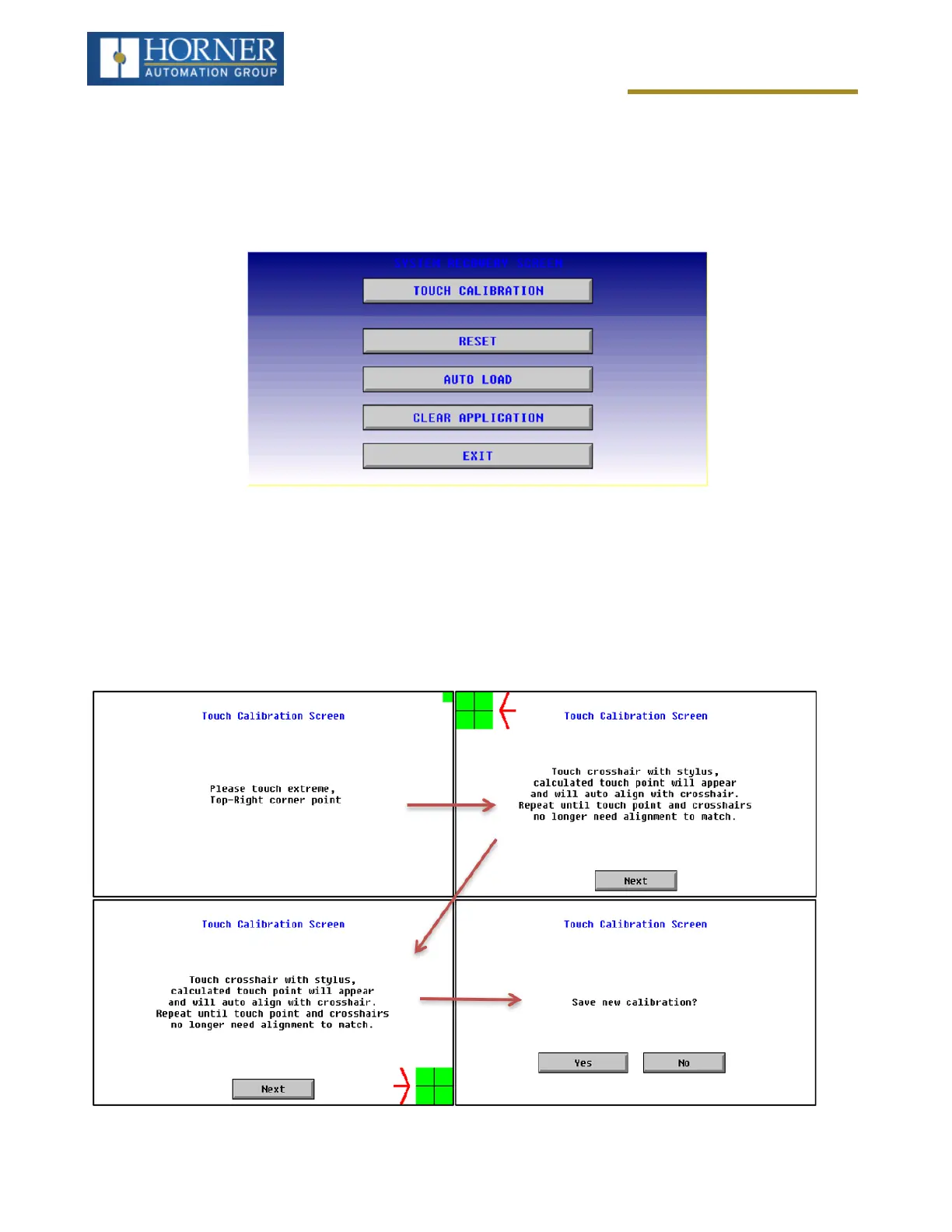
appear to correspond with responding objects on the display, field adjustment is available. Ensure SYS_fn Enable
is set to YES in System Menu. To access the field adjustable touch screen calibration dialog, press and hold both
the SYS and F1 key for longer than 2 seconds and a dialog similar to the figure below will appear.
NOTE: Advanced options, accessed by holding the system key down, may be locked out from user access. If hold-
ing the SYSTEM key does NOT respond, verify that the system menu’s Set Fkeys sub-menu’s parameter SYS_Fn
is enabled.
For best results in screen calibration, use a stylus with a plastic tip. When the crosshair appears, touch the center of
the crosshair as exactly as possible and release. A small “+” should appear and will move closer to the center of the
crosshair. Once it has done so and disappeared again, repeat the process until “+” appears in the center of the
crosshair. Then move on to the next step.
Page 46 of 163



 To Next Page