General I/O Configuration
Scaling Analog Inputs & Examples
To access the Advanced Math Scaling function, select Home > View > Project Toolbox. This will open a side bar,
and then select Advanced Math > Scale.
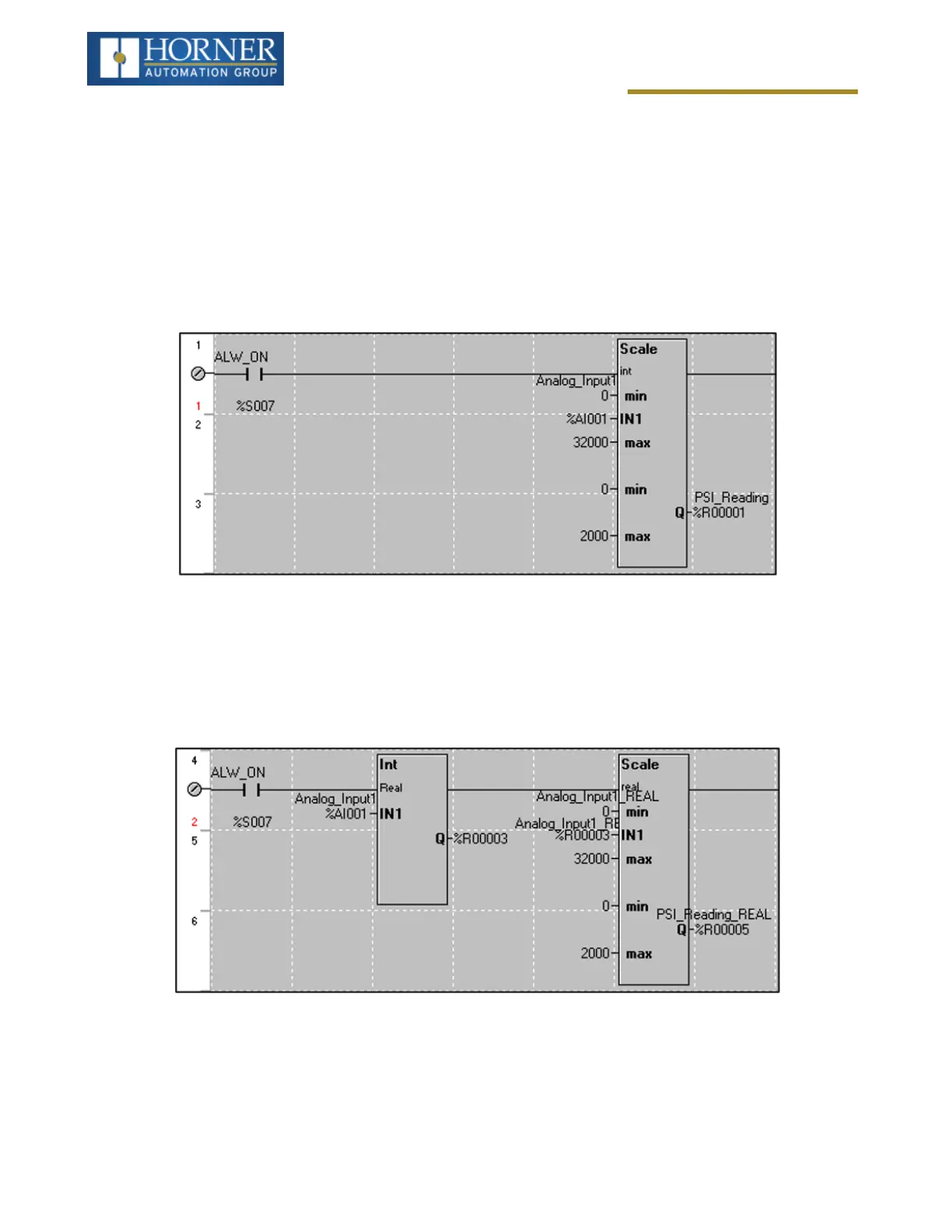
Example 1
The Cscape Scale function, found in the Advanced Math functions, allows for very easy conversion of the raw input
value into a meaningful reading. For example, a pressure transducer may be specified as a 4-20mA signal to signify
a 0-2000 psi pressure reading. With the analog channel set to the 4..20mA range, the raw analog input value, which
is in INT format ranges from 0 to 4mA to 32000 for 20mA. Use the Scale function to obtain an Integer pressure read-
ing using the 0-32000 raw input range and the sensor’s 0-2000psi output range.
Example 2:
If readings with fractions are required, the raw Integer input value must first be translated in REAL, or Floating Point
Format, see note below. . The Cscape INT-to-REAL Conversion function may be used to convert the raw input
value from INT to REAL format in an intermediate memory location. The SCALE function, specified as REAL type,
may be used to scale the converted raw value into a reading that supports digits beyond the decimal place, i.e.
475.25psi.
Page 75 of 163



 To Next Page