General I/O Configuration
I/O Calibration
This controller has a field calibration option in the System Menu. The calibration option can be used to achieve bet-
ter accuracy than factory specifications and to compensate for calibration offsets that could occur with additional
connectors and environmental conditions. Calibration is stored in non-volatile memory and is retained even if the
backup battery fails or is removed.
NOTE: Calibration of analog can only be performed when the controller is in idle mode.
Analog output values will change so precautions show be taken such that changes in these outputs will not affect
the system or the safety of those around the equipment. The calibration process applies changes to the analog
inputs, so care must be taken that the calibration process will not adversely affect the operation of the attached
equipment.
Calibration should be performed by trained personnel with equipment that is designed for precise analog cal-
ibration. Ideally this equipment is also calibrated to a traceable standard.
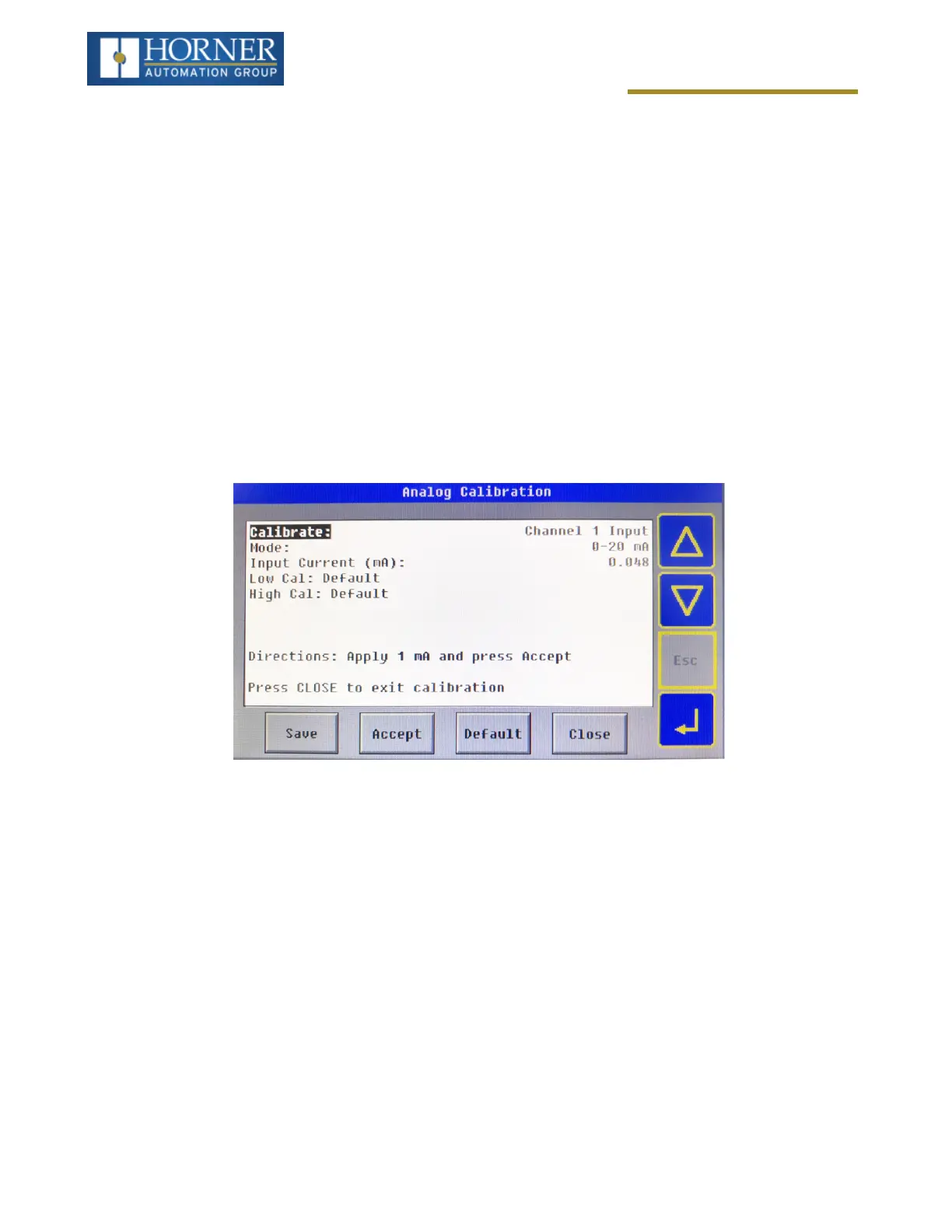
The “Calibrate Analog” item is a sub-menu that, when selected, allows entering the field calibration for analog inputs
and outputs.
The “Calibrate:” options allows selecting the individual input and output channels. Start by pressing select and using
the up and down arrows to select the appropriate channel to calibrate. Next, the mode for the analog (if applicable)
is selected using the “Mode:” option.
n
The “Save” button is used to save the calibration.
n
The “Accept” button is used to accept calibration values in the process.
n
The “Default” button is used to restore calibration to factory defaults.
n
The “Close” button is used to exit the calibration screen.
Page 80 of 163



 To Next Page