4-19
Multimedia Traffic Control with IP Multicast (IGMP)
How IGMP Operates
1. Enter either of the following walkmib command options:
walkmib hpSwitchIgmpPortForcedLeaveState
- OR -
walkmib 1.3.6.1.4.1.11.2.14.11.5.1.7.1.15.3.1.5
The resulting display lists the Forced Fast-Leave state for all ports in the
switch, by VLAN. (A port belonging to more than one VLAN will be listed
once for each VLAN, and if multiple VLANs are not configured, all ports
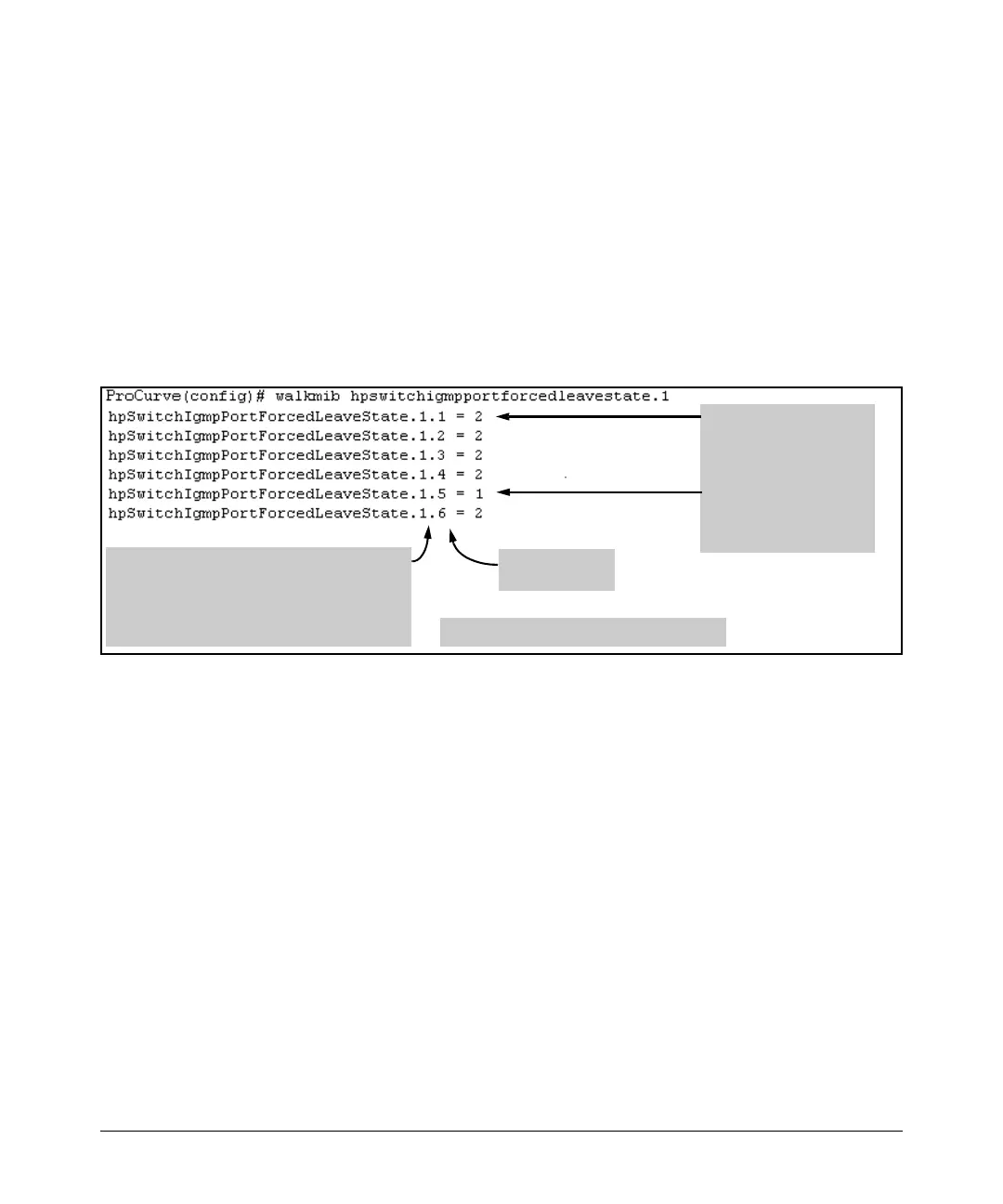
will be listed as members of the default VLAN.) The following command
produces a listing such as that shown in figure 4-4:
Figure 4-4. Example of a Forced Fast-Leave Listing where all Ports are Members of the Default VLAN
To List the Forced Fast-Leave State for a Single Port. (See the “Note
on VLAN Numbers” on page 4-18.)
Go to the switch’s command prompt and use the getmib command, as shown
below.
Syntax:
getmib hpSwitchIgmpPortForcedLeaveState.<vlan number><.port number>
- OR -
getmib 1.3.6.1.4.1.11.2.14.11.5.1.7.1.15.3.1.5.<vlan number><.port number>
For example, the following command to list the state for port A6 (which,
in this case, belongs to the default VLAN) produces the indicated listing:
The 2 at the end of a port
listing shows that Forced
Fast-Leave is disabled on
the corresponding port.
The
1 at the end of a port
listing shows that Forced
Fast-Leave is enabled on
the corresponding port.
Ports 1-6: 6- Port 109/1000T Module in Slot A
Internal VLAN Number for the Default VLAN
Note: Internal VLAN numbers reflect the sequence
in which VLANs are created, and are not related to
the unique VID assigned to each VLAN. (See the
“Note on VLAN Numbers on page 4-18.)
Sequential Port
Numbers


 To Next Page
 Loading...