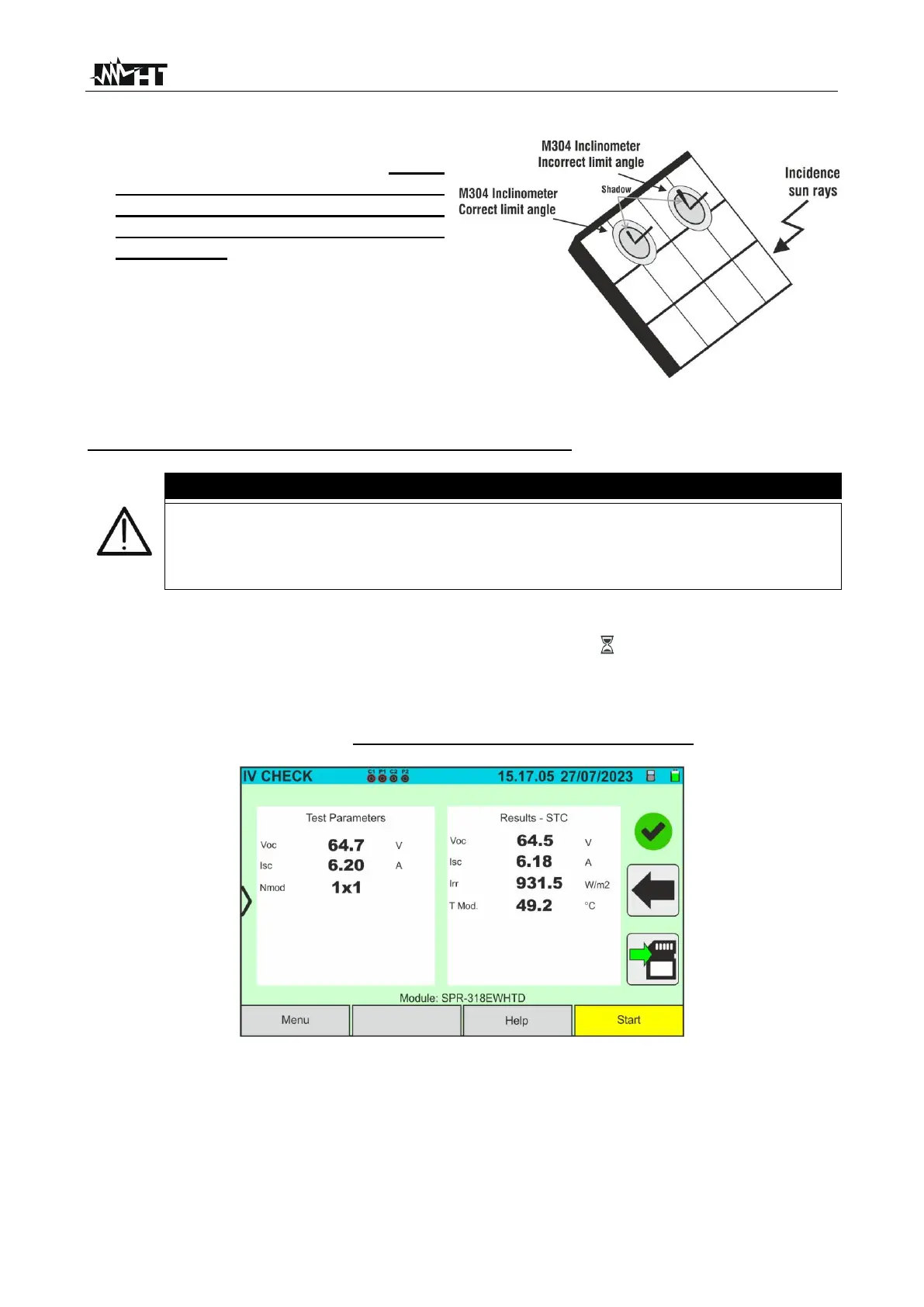
16. Assemble the stem onto the disk of the
optional accessory M304 and keep it
resting on the module’s surface. Check
that the shadow of the stem on the
disk falls within the internal “limit
concentric circle” of the disk itself
(see picture). If this is not the case, the
angle between the sun's rays and the
module surface is too high and
therefore the measurements taken by
the instrument are NOT reliable.
Repeat the operations at other times
of the day
SOLAR03 unit in direct connection with the instrument
When START/STOP (or Start on the display) is pressed, the instrument may
give various error messages (see § 6.4.5) and, as a result, fail to perform the
test. Check and, if possible, eliminate the cause of the problem before
proceeding.
17. Press the START/STOP key (or Start on the display) to activate the test. If there are
no error conditions, the instrument will show the icon “ on the display for a few
moments together with the message "Measuring..." The test can take up to
approximately 20 seconds, depending on the open circuit voltage and module
parameters. The following screen will appear on the display in the event of a positive
test result (for convenience, reference is made to monofacial modules)
Fig. 58: Example of a positive IVCK test result - STC values
18. If the result is negative, the following screen is shown:



 To Next Page