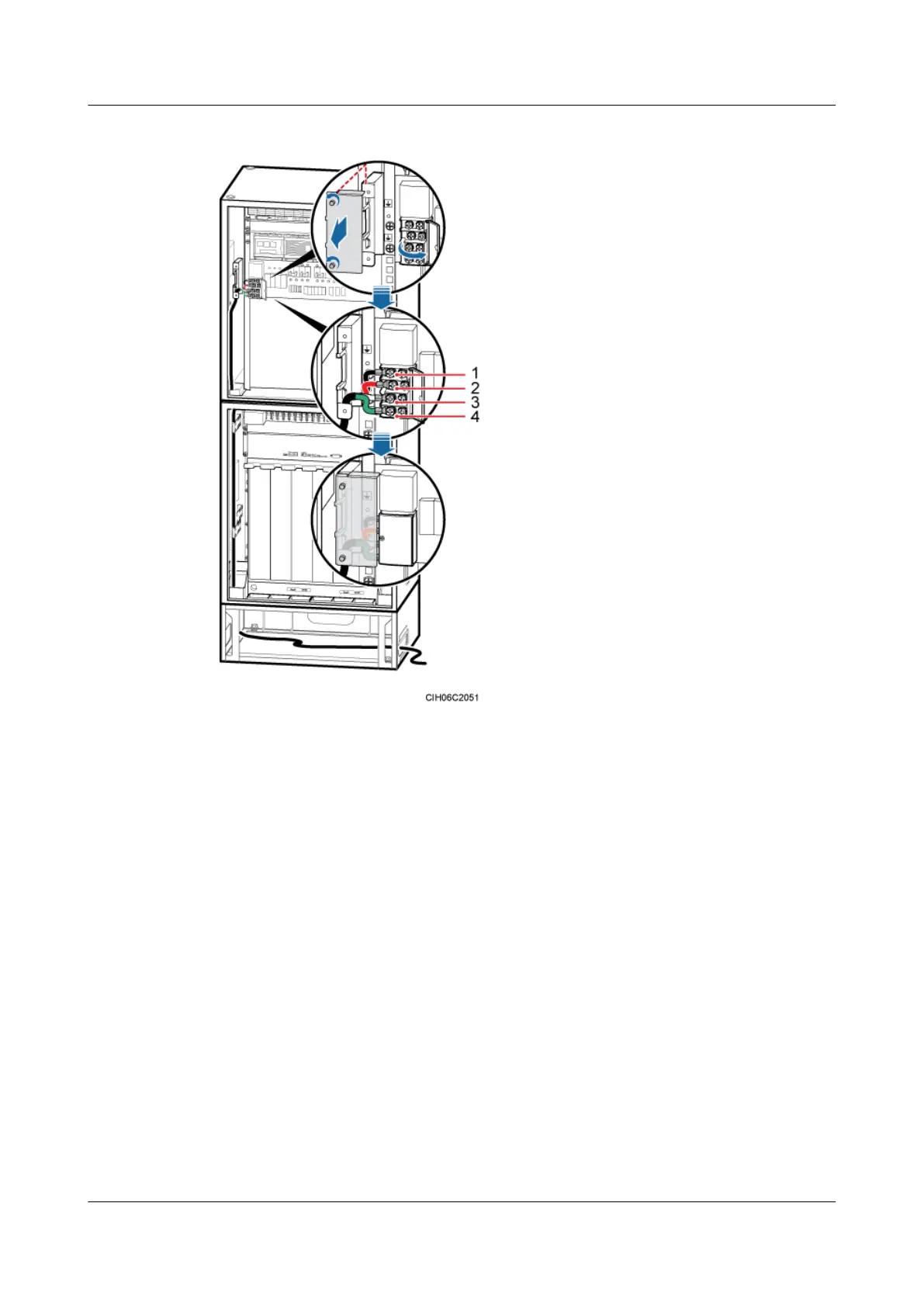
Figure 12-9 Installing the APM30H's 110 V AC dual-live-wire power cable on the EPS
(1) L1 wire (2) L2 wire (3) N wire (4) PE wire
Step 3 Route the cable by referring to 12.1 Cabling Requirements, and then use cable ties to bind the
cable.
Step 4 Run each cable that leaves the cabinet in the PVC corrugated pipe, and then tie the pipe to the
cable hole in the cabinet.
Step 5 Label the installed cables by referring to Attaching a Sign Plate Label.
----End
Installing the Power Cable Between the APM30H and the TMC11H
The power cables between the APM30H and the TMC11H are the input power cable for the
TMC11H and power cable for the junction box in the TMC11H. The power cables are used to
feed power to the TMC11H and other equipment from the APM30H. The power cables between
the APM30H and the TMC11H are optional, which are delivered and used with the TMC11H.
BTS3900A(Ver.B)
Installation Guide 12 Installing the Cables
Issue 01 (2011-10-25) Huawei Proprietary and Confidential
Copyright © Huawei Technologies Co., Ltd.
91












 To Next Page