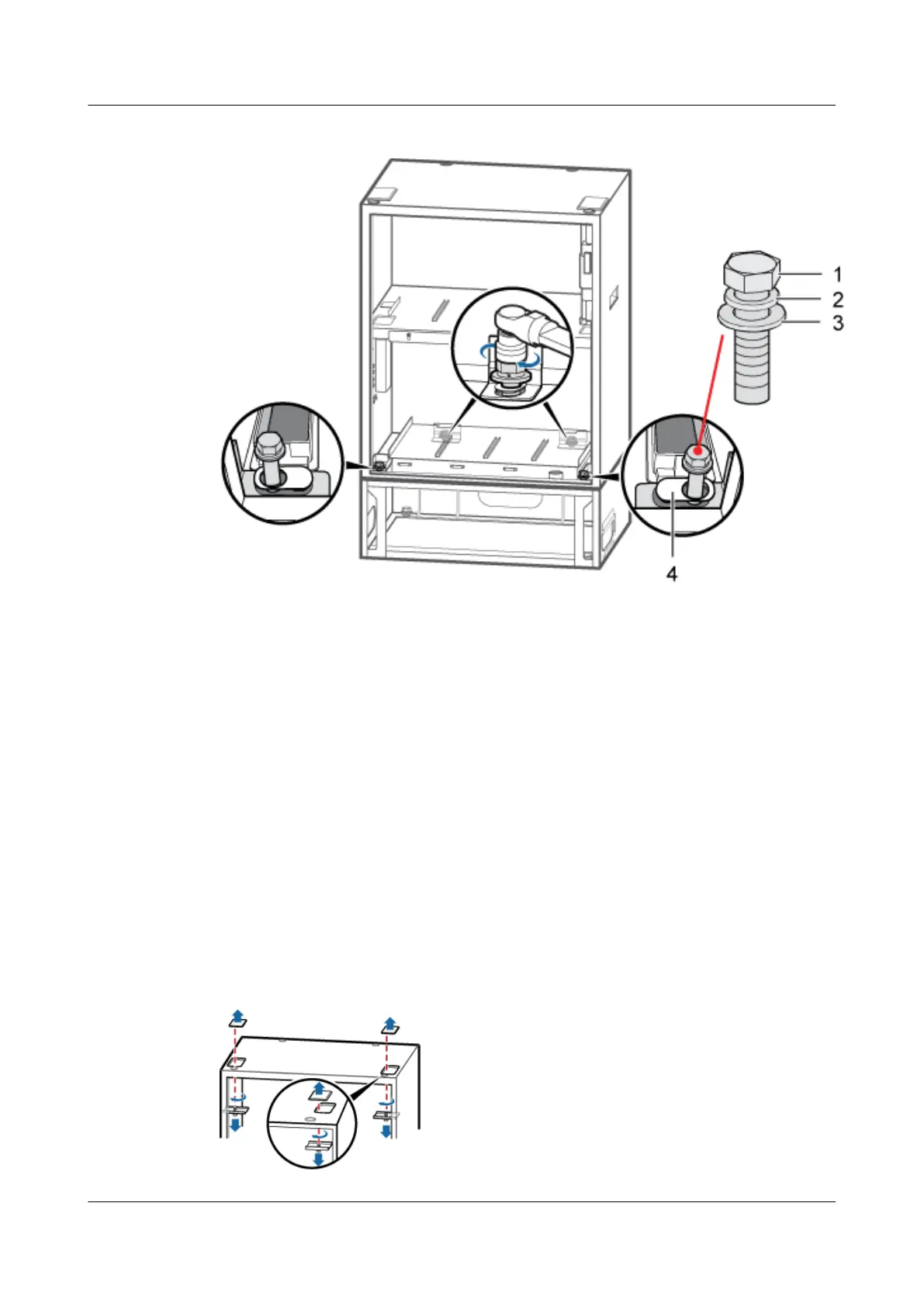
Figure 9-7 Securing the IBBS200D on the base
(1) M12x30 bolt (2) Spring washer (3) Flat washer (4) Gasket with an oblong hole
----End
9.2 Installing Cabinets in Stack Mode
The BTS3900A cabinets can be stacked as follows: the APM30H/TMC11H is stacked on the
RFC, the TMC11H is stacked on the IBBS200D/IBBS200T, or two IBBS200Ds/IBBS200Ts
are stacked.
Procedure
Step 1 Install the lower cabinet on the base by referring to 9.1 Installing a Cabinet on the Base.
Step 2 Remove the cover plates for cable holes from the top of the lower cabinet, as shown in Figure
9-8.
Figure 9-8 Removing the cover plates for cable holes
BTS3900A(Ver.B)
Installation Guide 9 Installing the Cabinet
Issue 01 (2011-10-25) Huawei Proprietary and Confidential
Copyright © Huawei Technologies Co., Ltd.
50












 To Next Page