70
8 MEMORY/CALL CHANNELS
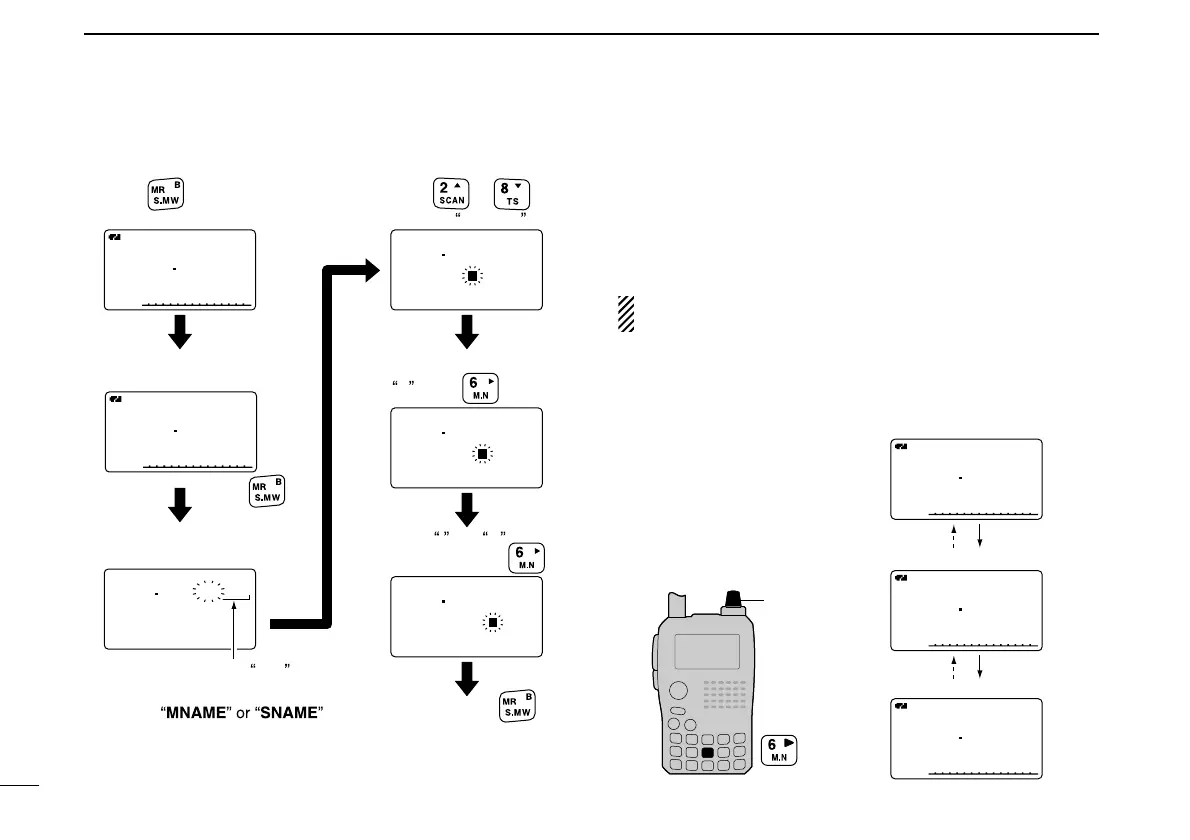
[EXAMPLE]: Programming the bank name “AIR” into the
scan edge channel 03A.
■ Selecting memory/bank name
indication
During memory mode operation, either the programmed
memory name or bank name can be displayed below the fre-
quency indication.
NOTE: The programmed scan name is displayed during
the programmed scan edge channel selection.
qPush [MR] to select memory mode.
wWhile pushing [M.N](6), rotate [DIAL] to select display in-
dication type from bank name, memory name and OFF.
127 500
BANKBANK :A-01:A-01
BNAME: BNAME:
MNAME:MNAME:
SNAME:SNAME:
AMAM
r
µ
03A
A
µ
AMAM
127 500
03A
A
µ
FMFM
145 870
011
127 500
BANKBANK :A-01:A-01
BNAME:AIR BNAME:AIR
MNAME:MNAME:
SNAME:SNAME:
AMAM
r
µ
03A
127 500
BANKBANK :A-01:A-01
BNAME:AI BNAME:AI
MNAME:MNAME:
SNAME:SNAME:
AMAM
r
µ
03A
127 500
BANKBANK :A-01:A-01
BNAME:A BNAME:A
MNAME:MNAME:
SNAME:SNAME:
AMAM
r
µ
03A
Enter select memory
write mode.
Push
for 1 sec.
Push and hold
for 1 sec. to program.
Push
to select memory mode.
Rotate [DIAL] to select
scan edge channel 03A.
Push
to select BNAME *.
or
Scan edge channel 03A
Rotate [DIAL] to enter
A , push .
Enter I and R
with [DIAL] and .
*Select
when programming the mem-
ory name or the scan name,
respectively.



 To Next Page