13
4
MENU SCREEN
New2001
1
2
3
4
5
6
7
8
9
10
11
12
13
14
15
16
■ Selecting a Menu item
Follow the procedures described below
to select a Menu item.
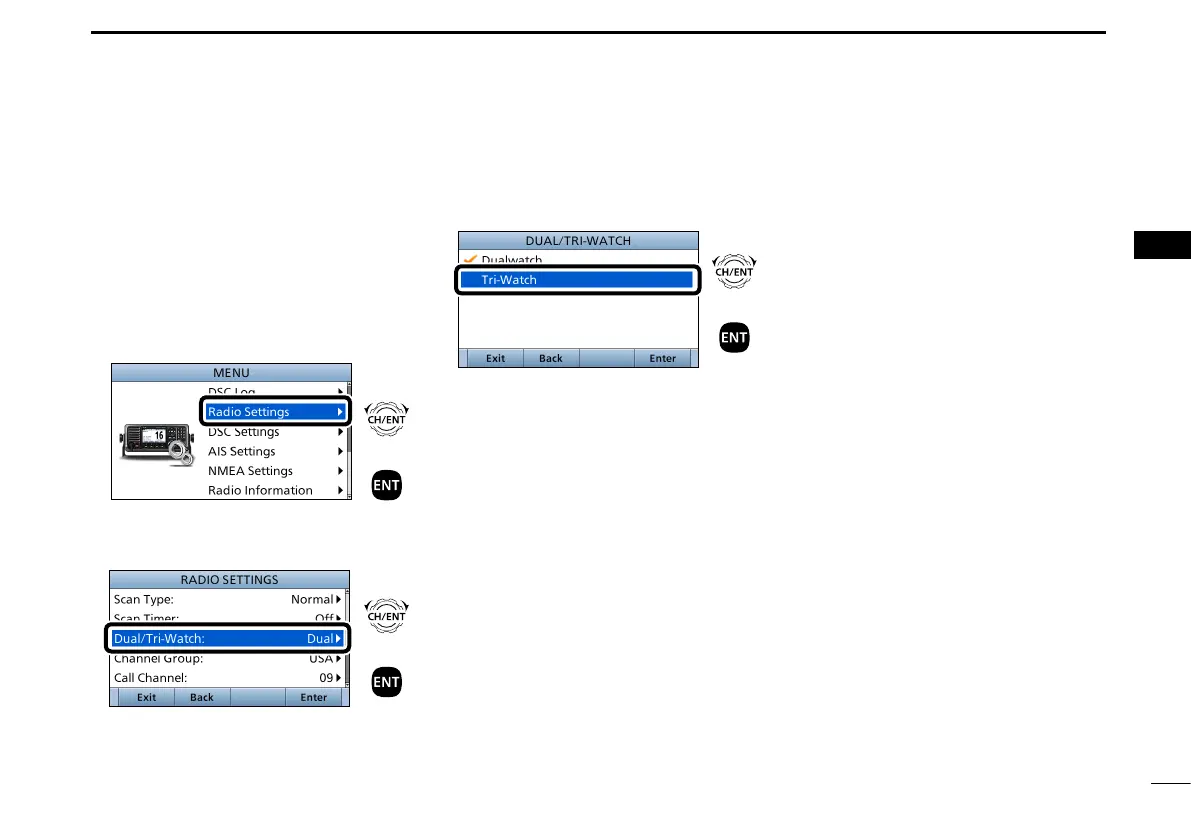
Example: Set the Tri-watch function.
1. Push [MENU] to display the MENU
screen.
2. Rotate [CH/ENT] to select
“Radio Settings,” then push [ENT].
+
Push
Rotate
3. Rotate [CH/ENT] to select
“Dual/Tri-Watch,” then push [ENT].
+
Push
Rotate
4. Rotate [CH/ENT] to select
“Tri-Watch,” and then push [ENT].
+
Push
Rotate
• Sets the Tri-watch function, and then
goes back to the RADIO SETTINGS
screen, after pushing [ENT].
5. Push [MENU] to return to the Main
screen.


 To Next Page