37
8
DSC OPERATION
New2001
1
2
3
4
5
6
7
8
9
10
11
12
13
14
15
16
■ Sending a Non-Distress call
To ensure correct operation of the DSC
function, conrm you correctly set the
Channel 70 squelch level. (p. 61)
NOTE:
• Emergency channel (Channel 70) is
automatically selected for calling.
• If Channel 70 is busy, the transceiver
stands by until the channel becomes
clear.
D Sending an Individual call
The Individual call function enables
you to transmit a DSC call to only
a specic coast station or to a ship.
After transmission, wait for an
acknowledgement from the receiving
station.
You can communicate by voice after
receiving the acknowledgement ‘ACK
(Able).’
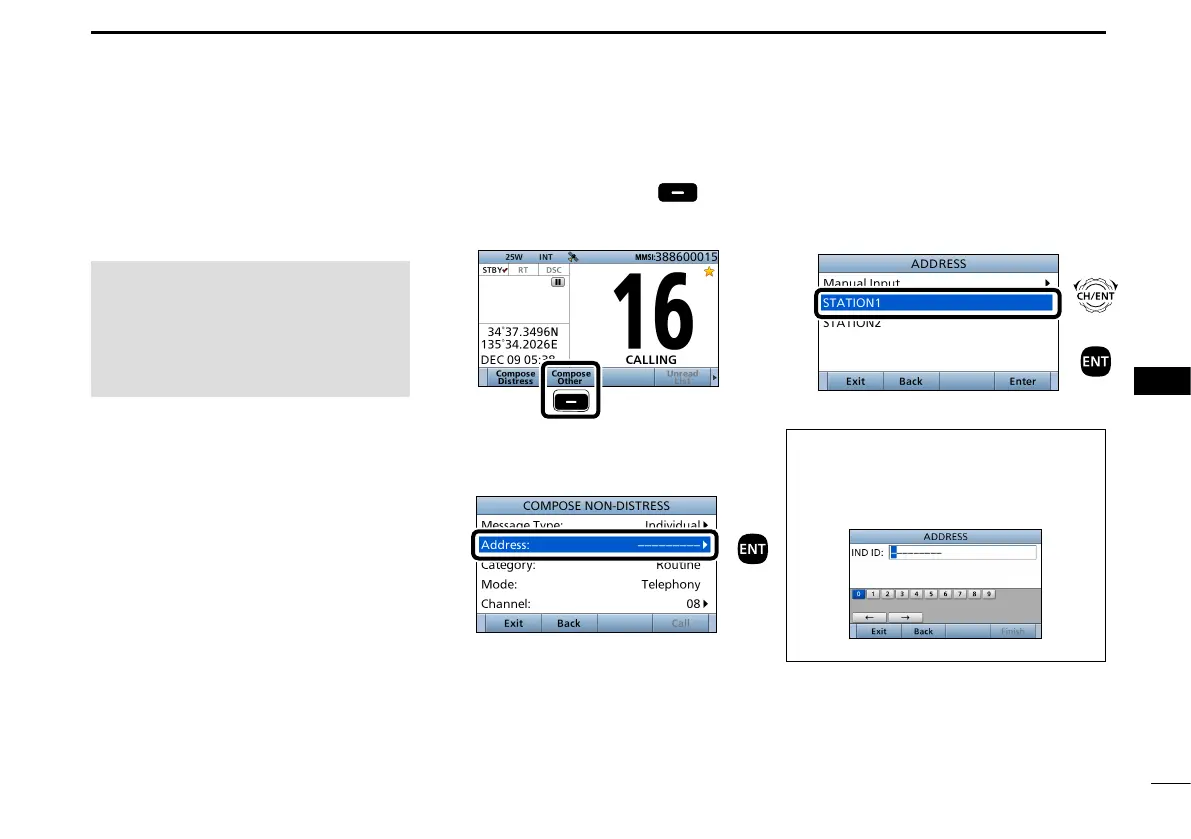
1. Push [
Compose Other]
to
display the COMPOSE NON-
DISTRESS screen.
Push
L To display the screen from the Menu
screen:
([MENU] >
Compose Non-Distress
)
2. Push [ENT].
3. Select the individual address, or
“Manual Input,” then push [ENT].
(Example: STATION1)
When you select “Manual Input” in step
3, push the keypad to manually enter
the Individual ID that you want to call.
(p. 25)
Push
+
Push
Rotate


 To Next Page