25
8
DSC OPERATION
New2001
1
2
3
4
5
6
7
8
9
10
11
12
13
14
15
16
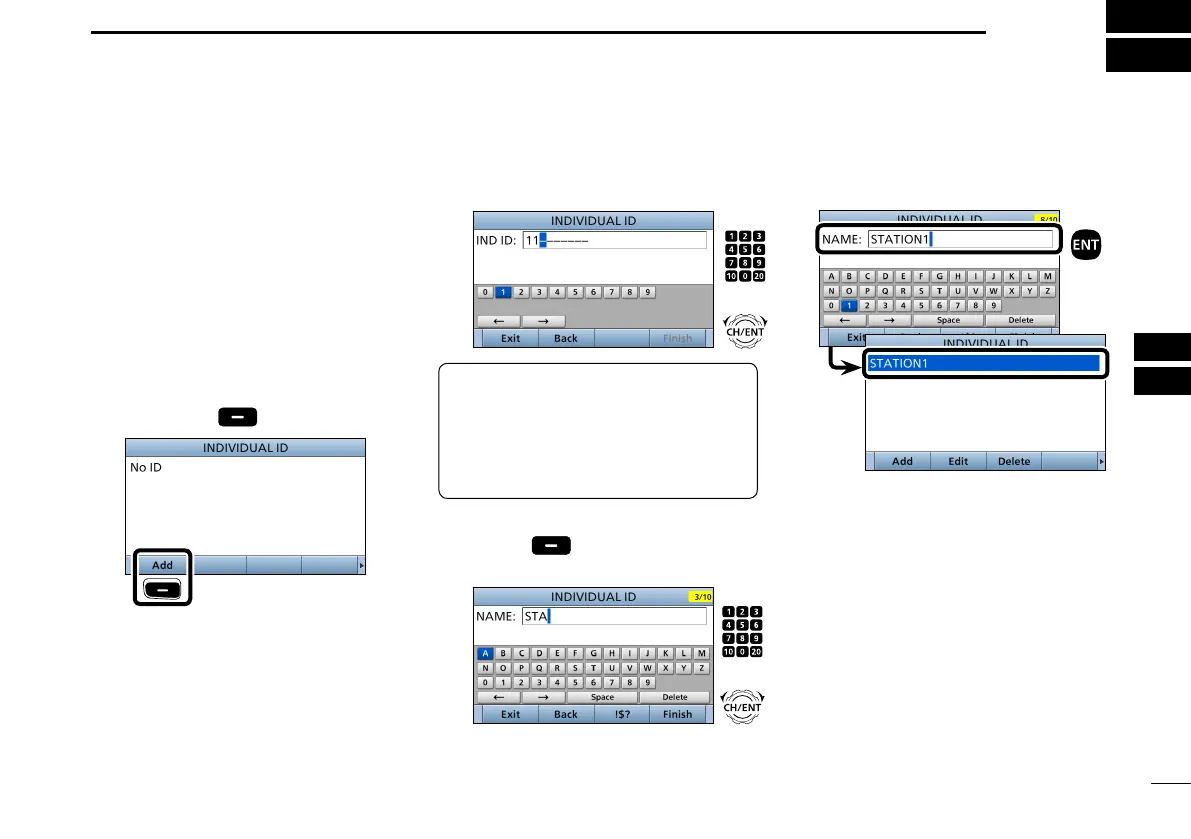
■ DSC address ID
D Entering an Individual ID
1. Push [MENU].
2. Select “Individual ID,” then push
[ENT].
( DSC Settings > Individual ID)
3. Push [Add]
.
Push
4. Enter a 9 digit Individual ID.
TIP: You must set the rst digit for the
Individual ID to between ʻ1ʼ and ʻ9.ʼ
• A ‘0’ in the rst digit is used for a Group
ID.
• A ‘0’ in the rst two digits is used for any
Coast station ID.
5. After entering all 9 digits, push
[Finish]
.
6. Enter the ID name.
L See page 20 for text entry details.
You can enter a total of 100 DSC
address IDs (Individual ID: 75, Group
ID: 25), and assign a name of up to 10
characters to each ID.
7. After entering, push [ENT].
• The entered Individual ID and name
are added to the ID list.
8. Push [MENU] to return to the Main
screen.
+
Rotate
Push
+
Rotate
Push


 To Next Page