31
8
DSC OPERATION
New2001
1
2
3
4
5
6
7
8
9
10
11
12
13
14
15
16
■ Sending a Distress call
You should send a Distress call if, in
the opinion of the Master, the ship or
a person is in distress and requires
immediate assistance.
L Emergency channel (Channel 70) is
automatically selected to send a Distress call.
D
Simple call
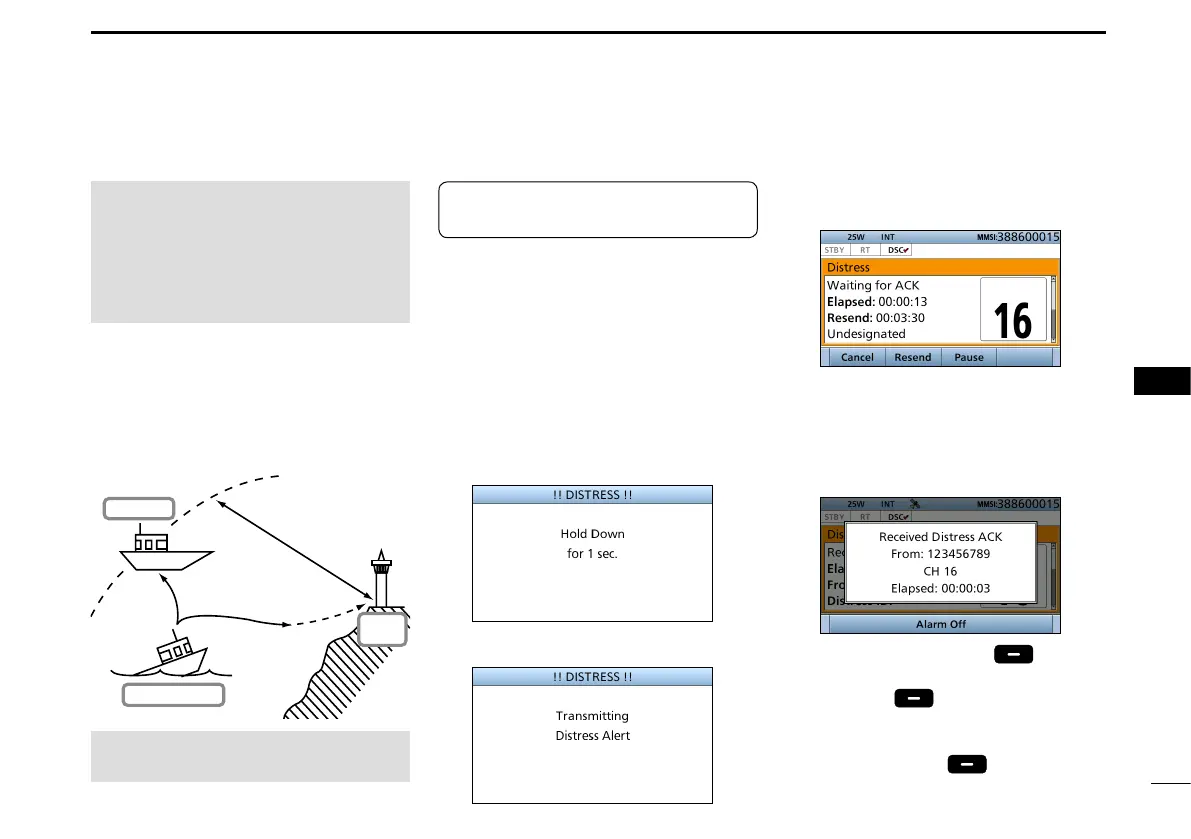
1. Confirm no Distress call is being
received.
2. Lift up the key cover, then
hold down [DISTRESS] until
“Transmitting” is displayed to send
the Distress call.
• While holding down [DISTRESS],
count down beeps sound and both
the key and display backlighting blink.
•
•
•
3. After sending, the following screen
is displayed.
• Channel 16 is automatically selected.
4. When receiving the
acknowledgement:
• Alarm sounds.
• The following screen is displayed.
5. Push any [Alarm Off] .
6. Push any [Close Call RCVD
Window]
.
7. Hold down [PTT] to announce your
situation.
8. Push [Standby]
to return to
the Main screen.
About 20 to 30 miles
(Sea area A1)
Distress Alert
Transmission
Ship in Distress
Other ship
Coast
Station
See NOTE on page 33 for a
Distress call.
NEVER MAKE A DISTRESS CALL IF
YOUR SHIP OR A PERSON IS NOT
IN AN EMERGENCY.
A DISTRESS CALL SHOULD BE
MADE ONLY WHEN IMMEDIATE
HELP IS NEEDED.
TIP: If you want to compose a Distress
call, see ʻRegular call.ʼ (p. 32)


 To Next Page