66
9
OTHER FUNCTIONS
New2001
■ Using the RX Hailer
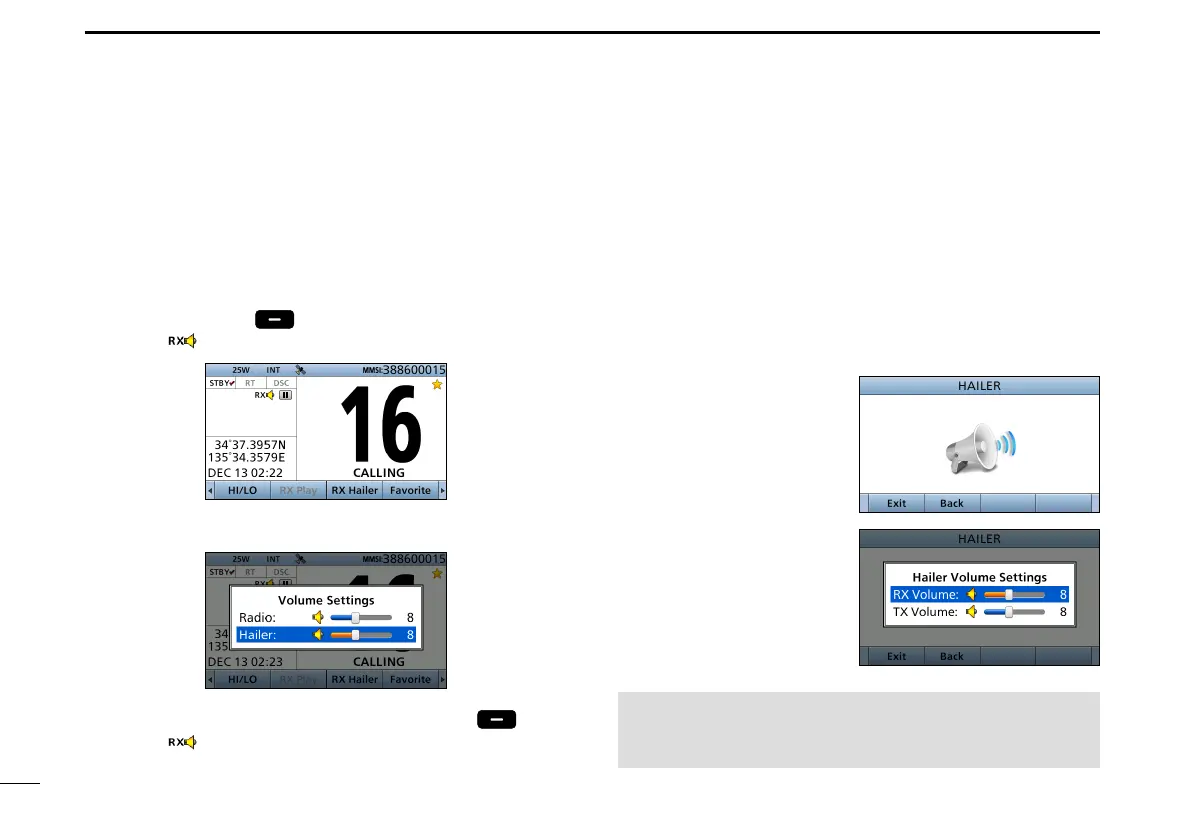
The RX Hailer function enables you to hear the received
audio on the deck or bridge through a Hailer speaker.
Connect an external hailer speaker as described on page 92.
1. Push [Ω] or [≈] until [
RX Hailer
] is displayed in the
Software Key area.
2. Push
[RX Hailer]
to enter the RX Hailer mode.
• The “ ”icon is displayed.
L Push [VOL/SQL] to open the volume adjustment screen.
3. To exit the RX hailer mode, push
[RX Hailer] .
• The “ ”icon disappears.
■ Using the Hailer
You can talk without leaving the bridge by using the 2 way
hailer function.
Connect an external hailer speaker as described on page 92.
• You cannot transmit while using the hailer.
1. Push [MENU].
2. Select “Hailer,” then push [ENT].
• Hailer screen is displayed.
3. Hold down [PTT] and speak at your normal voice level.
4. While holding down
[PTT], the screen shown
to the right is displayed.
L Push [VOL/SQL] to open
the volume adjustment
screen.
NOTE: While in the hailer mode, the transmit and
receive functions are disabled. When the transceiver is
transmitting, the hailer function is disabled.



 To Next Page