36
8
DSC OPERATION
New2001
You can send the Distress Relay
acknowledgment only when a Distress
Relay call is received.
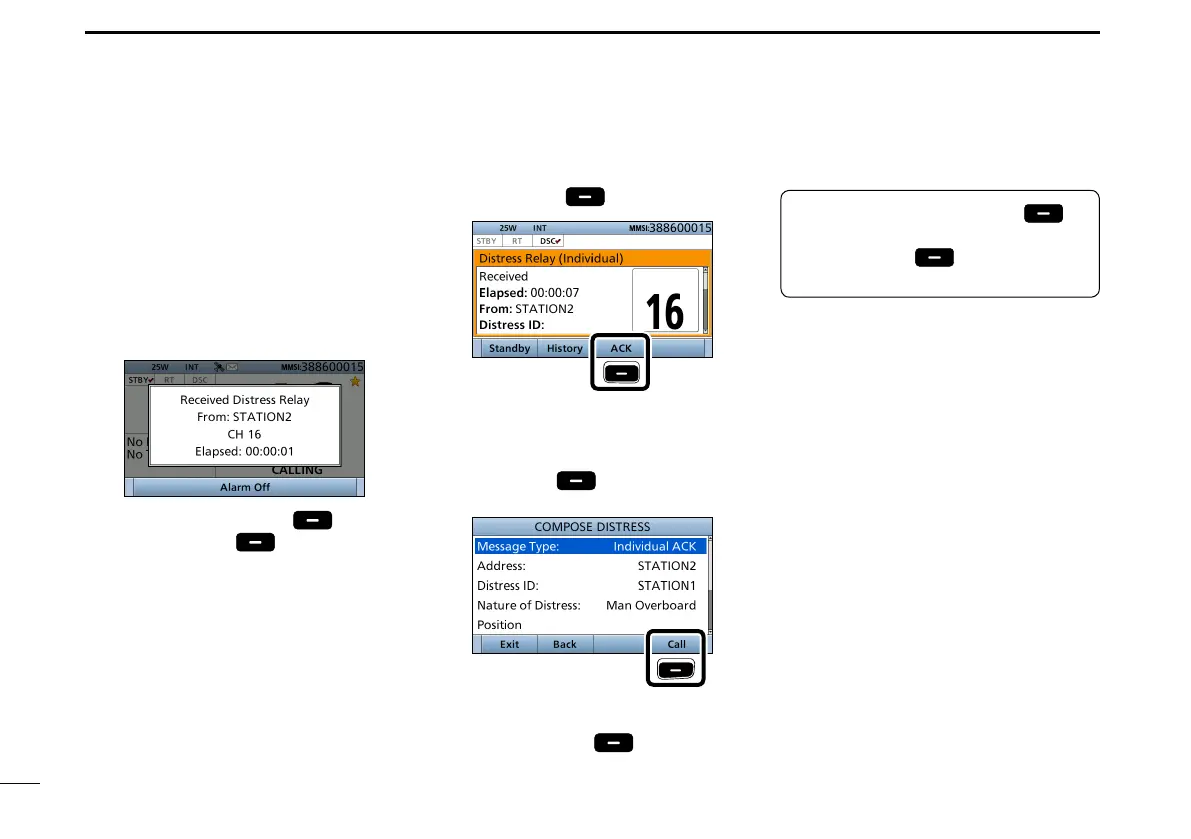
1. When a Distress Relay call is
received:
• Alarm sounds.
• The following screen is displayed.
2. Push any [Alarm Off] .
3. Push [Accept]
.
• Enters the DSC Task mode.
4. Push [≈] to scroll the software key
functions.
5. Push [ACK]
.
Push
• The call contents screen is displayed.
L Rotate [CH/ENT] to view the call
contents.
6. Push [Call]
to s
end the
Distress Relay acknowledgement.
Push
7. Hold down [PTT] to communicate.
8. Push [Standby]
to return to
the Main screen.
D Sending a Distress Relay acknowledgement
TIP: When you push [Pause] in
step 3, the countdown will be paused.
Push [Resume]
to resume the
countdown.
■ Sending a Distress call (Continued)


 To Next Page