60
8
DSC OPERATION
New2001
■ DSC Settings (Continued)
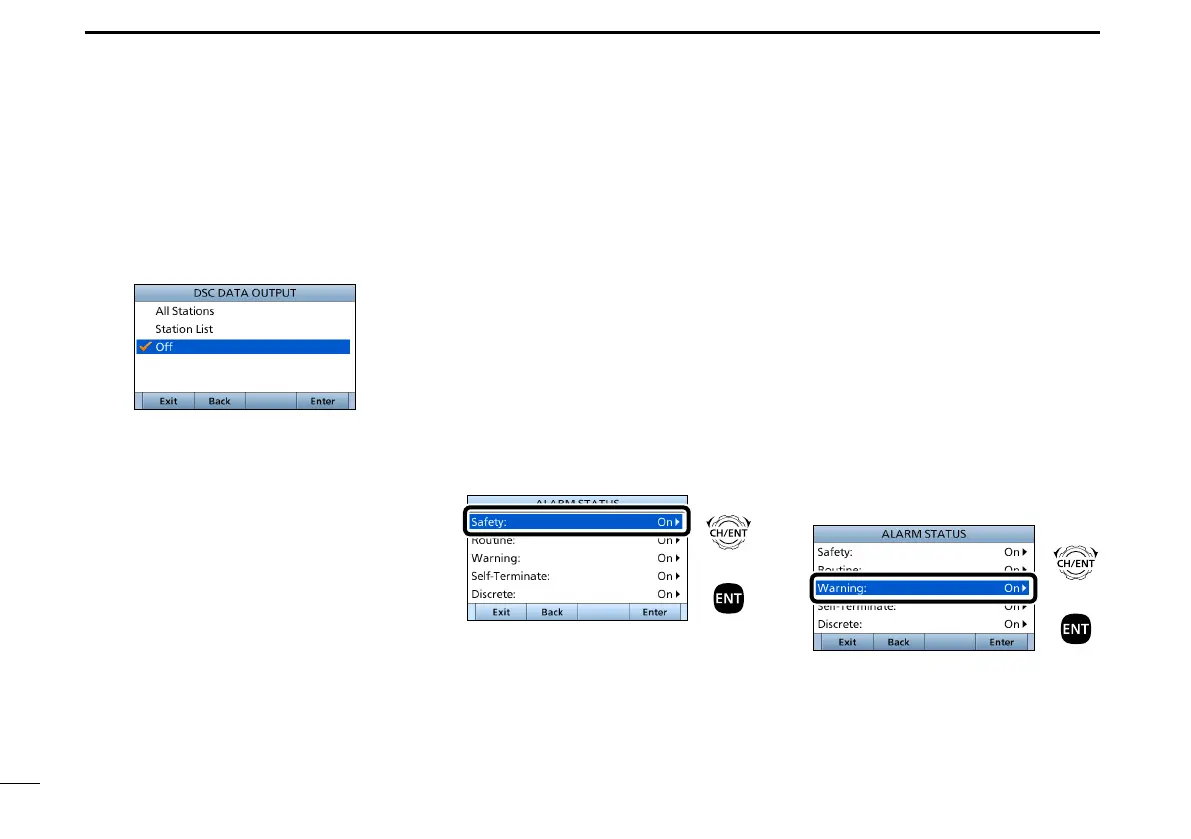
D DSC data output
When receiving a DSC call, this
function makes the transceiver send the
DSC data from its NMEA Output port to
an external device.
All Stations: Outputs the call from any
vessel from the NMEA
Output port.
Station List: Outputs the call from
any vessels listed on the
Individual ID screen.
OFF: Does not output any call
to an external device
(Default).
D Setting the Alarm Status
• Safety
• Routine
Select whether or not to sound an alarm
when receiving a Safety or Routine
DSC call.
1. Push [MENU].
2. Select the item, then push [ENT].
( DSC Settings > Alarm Status >
Safety)
( DSC Settings > Alarm Status >
Routine)
(Example: Safety)
+
Push
Rotate
3.
Select the option
, then push [ENT].
• On: Alarm sounds. (Default)
• Off: Alarm does not sound.
4. Push [MENU] to return to the Main
screen.
• Warning
Select whether or not to sound an alarm:
• When no MMSI code is entered.
• When the position data has not been
updated for 10 minutes.
• When the position data has not been
manually updated for 4 hours.
• After the invalid GPS position data or
manually entered position data has not
been updated for 23.5 hours.
1. Push [MENU].
2. Select “Warning,”
then push [ENT].
( DSC Settings > Alarm Status >
Warning)
+
Push
Rotate
3.
Select the option,
then push [ENT].
• On: Alarm sounds. (Default)
• Off: Alarm does not sound.
4. Push [MENU] to return to the Main
screen.


 To Next Page