33
8
DSC OPERATION
Transmitting an All Ships call D
All ships, that have DSC transceiver, use Channel 70 as their
‘listening channel.’ When you want to announce a message
to these ships within range, use the ‘All Ships Call’ function.
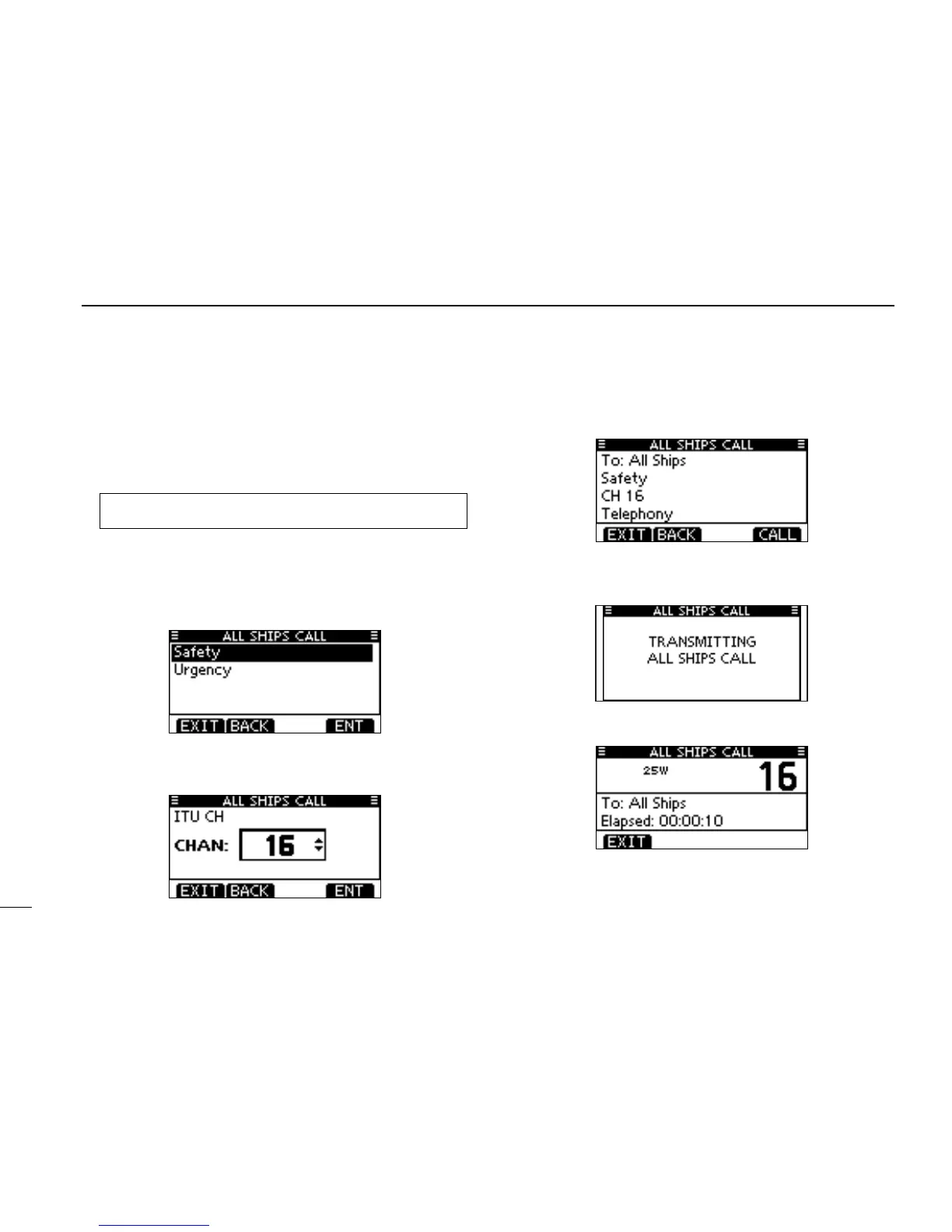
Enter “ALL SHIPS CALL” in the DSC CALLS menu. q
Select a desired category, using [ w Y]/[Z], then push
[ENT].
•The selectable categories may differ, depending on the pro-
grammed setting. Ask your dealer for the selectable catego-
ries.
Select a desired traffic channel, using [ e Y]/[Z], then push
[ENT].
•Theselectedchannelisdisplayed.
A confirmation screen appears. r
•Conrmthecallcontents.
Push [CALL] to transmit the All Ships call. t
•IfChannel70isbusy,thetransceiverstandsbyuntilthechan-
nel becomes clear.
After the All Ships call has been transmitted, the following y
screen is displayed.
Announce the message using the microphone. u
After the announcement, push [EXIT] to return to the nor- i
mal operating mode.
MENU ➪ DSC Calls ➪ All Ships Call
(Push [MENU])
(Push
[Y]/[Z]
, then push [ENT].)



 To Next Page