34
8
DSC OPERATION
1
2
3
4
5
6
7
8
9
10
11
12
13
14
15
16
Transmitting a Position request call D
Transmit a Position request call when you want to know a
specific ship's current position.
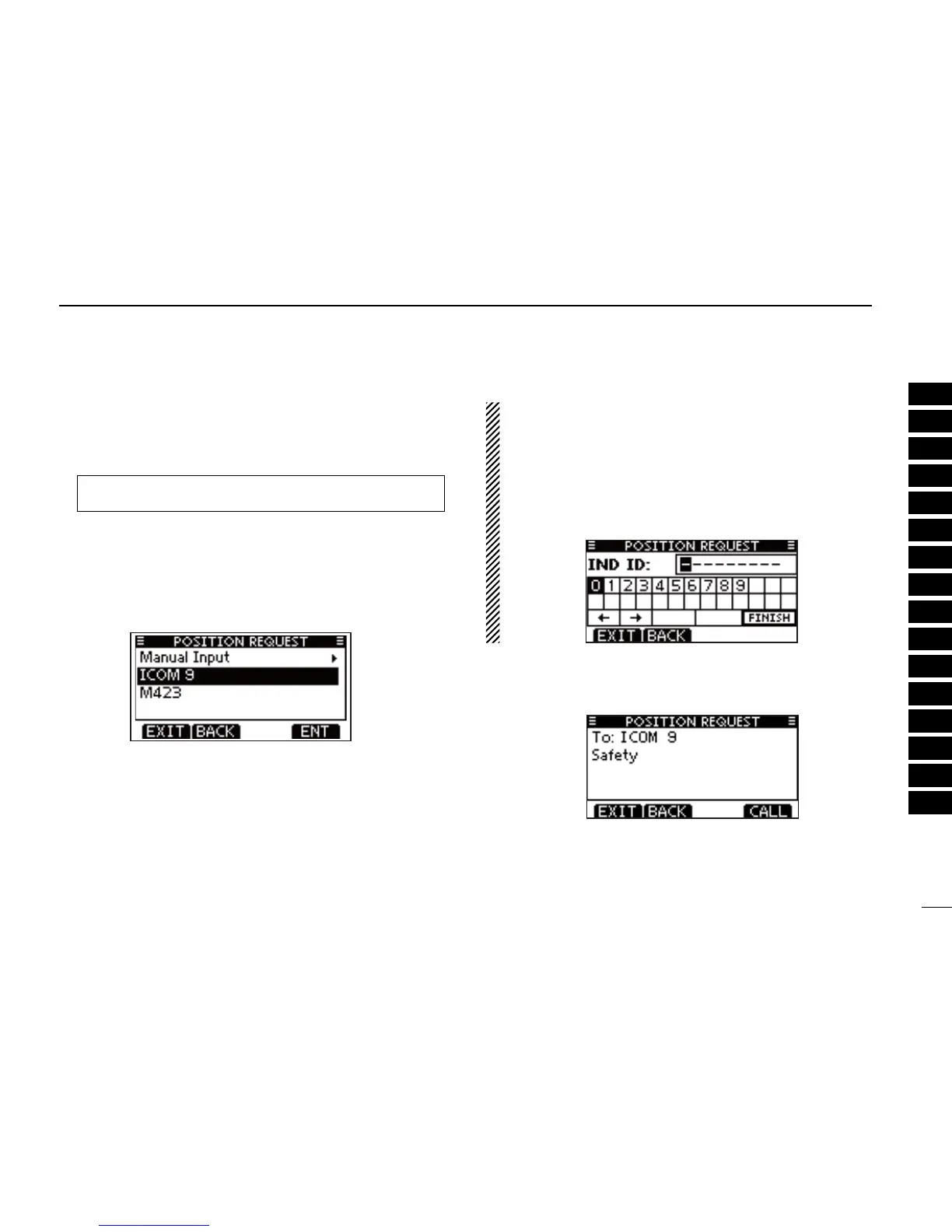
Enter “POSITION REQUEST” in the DSC CALLS menu. q
Select the desired preprogrammed Position request ad- w
dress or “Manual Input,” using [Y]/[Z], then push [ENT].
•TheIDcodeforthePositionrequestcallcanbesetrst.
(p. 20)
•When“ManualInput”isselected,setthe8digitIDcodeforthe
group you wish to call.
About Manual Inputting:
Enter a desired address ID in the following way:
•Selectthedesirednumberusuing[Y]/[Z]/[Ω]/[≈].
•Push[ENT]tosetit.
•Tomovethecursor,selecteitherarrow,“←” or “→,” then push
[ENT].
•Therstdigitisspeciedas‘0’foraGroupID.
•Thersttwodigitsare‘0’foranyCoaststationID.
A confirmation screen appears. e
•Conrmthecallcontents.
☞ Continued on the next page.
MENU
➪ DSC Calls ➪ All Ships Call
(Push [MENU])
(Push
[Y]/[Z]
, then push [ENT].)



 To Next Page