10
3
BATTERY PACKS
■ Battery charging
D Regular charging with the BC-146
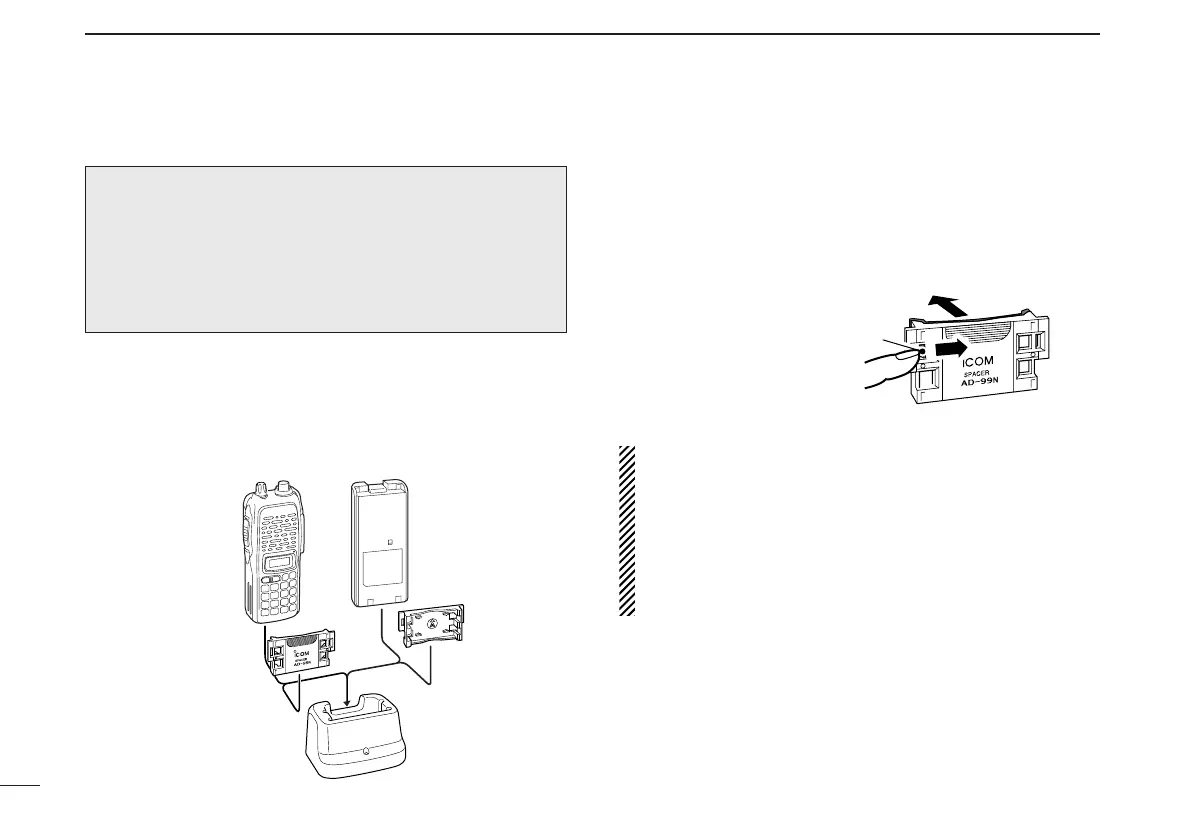
The optional BC-146 provides regular charging of an optional
battery pack with or without a transceiver attached. The fol-
lowing is additionally required:
• An optional AC adapter. (An AD-99N is supplied with BC-146.)
D About AD-99N
The adapter (Spacer A) only is required for IC-V82/U82 se-
ries. When removing the spacer (Spacer B/C),
push the latch
carefully with your finger to remove the spacer (Spacer B/C)
from the adapter (Spacer A).
R CAUTION!
• DO NOT push or force the latch with a screw driver, etc.,
to remove it.
• DO NOT bend the latch when the adapter and spacer are
not joined together. This will cause weakening of the latch
plastic.
• Both cases may break the latch and it may not be able to
be reattached.
Recommendation:
Charge the BP-211N (Li-Ion) by BC-119N (or BC-121N) for
a maximum of 2.5 hours. Li-Ion batteries are different from
Ni-Cd batteries in that it is not necessary to completely
charge and discharge them to prolong the battery life.
Therefore, charging the battery in intervals, and not for ex-
tended periods is recommended.



 To Next Page