qPush [D•
CLR
] to select VFO mode, if necessary.
wSet the desired frequency.
eSet other information, such as tone, duplex, as desired.
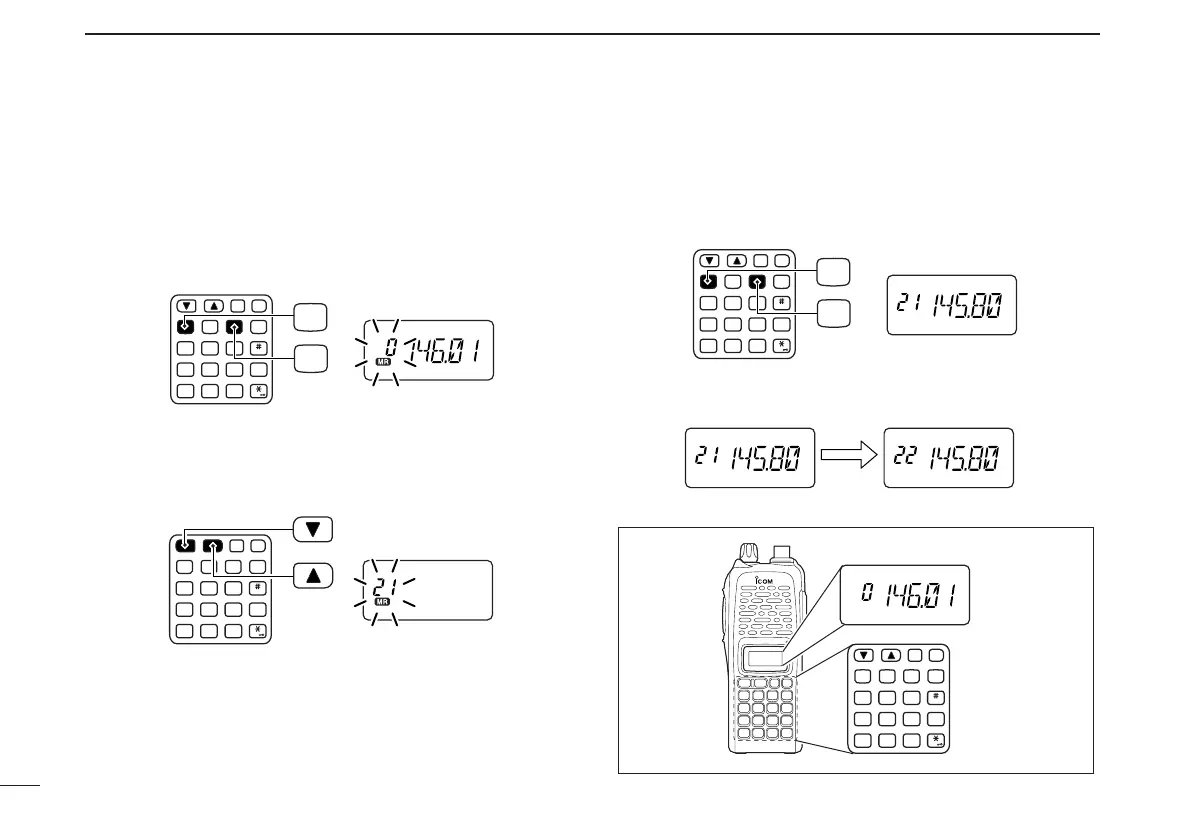
rPush [A•
FUNC
], then [C•
MR
] momentarily.
•“
X
” and memory channel number blink.
tPush [
YY
] or [
ZZ
] to select the desired memory channel.
• When programming the call channel, select “C.”
• When [VOL] is assigned as tuning dial, rotate [VOL] to select
the memory channel. (pgs. 14, 65)
yPush [A•
FUNC
], then push and hold [C•
MR
] for 1 sec., when
3 beeps will sound to program the information into the se-
lected memory channel and return to VFO.
• After 3 beeps are emitted, continue to hold [C•
MR
] to increment
the displayed memory channel number.
T. SCANP. B EEP
T. SCANP. BEEP
T. SCANP. BEEP


 To Next Page