EasyManua.ls Logo

ID Technology ClearMark - I;O Status

ID Technology ClearMark
116 pages
Print Icon
To Next Page IconTo Next Page
To Previous Page IconTo Previous Page
Loading...
ClearMark™ Installation, Operation & User Manual Page 68
V 1.S.10 January 2021
V-1.S.1
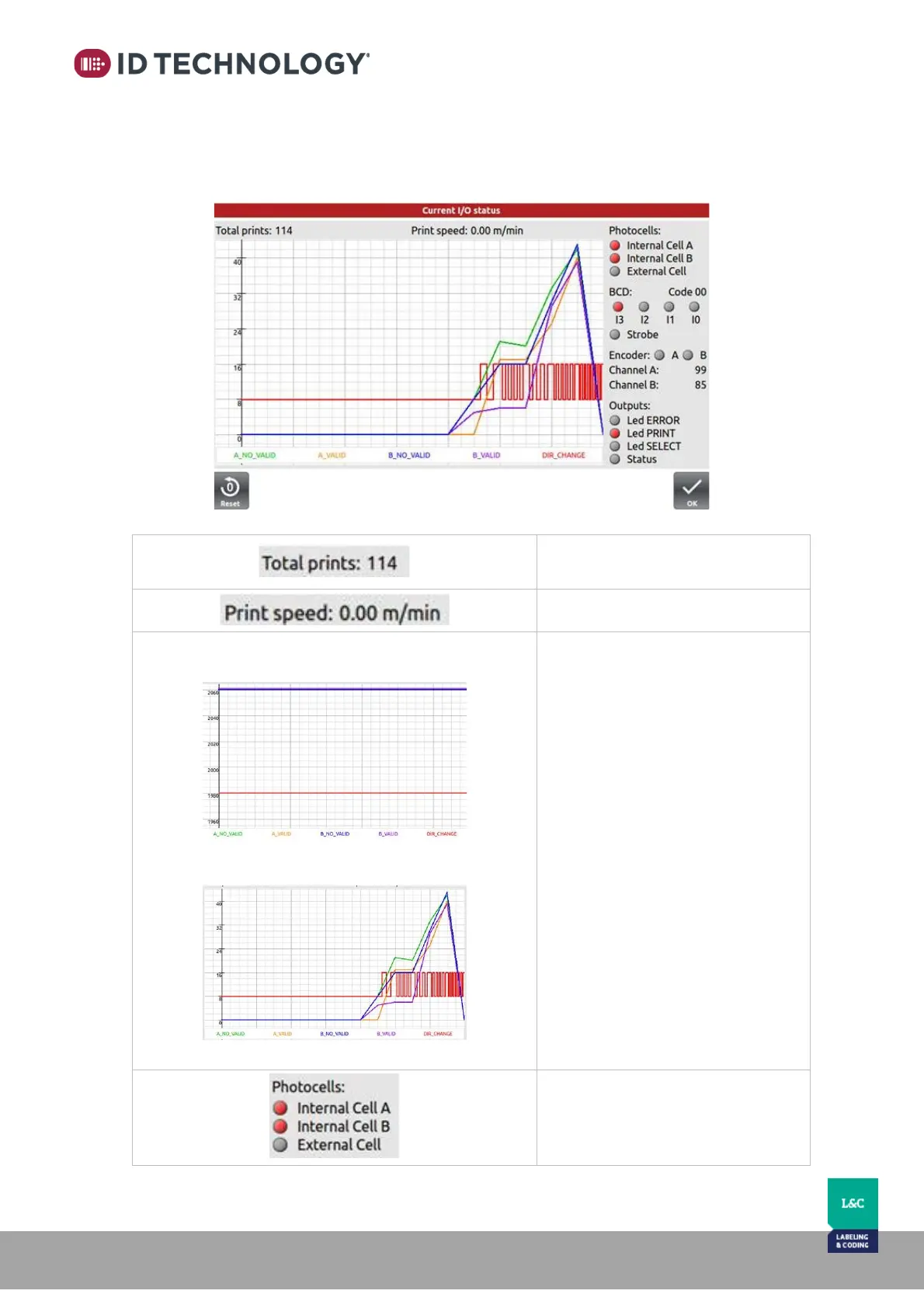
I/O Status:
This screen shows the status of the inputs and outputs and plots the encoder’s behaviour.
Total number prints the coder has
performed.
Current print speed [m/min].
Sample of no vibration on the encoder:
Sample of several vibrations:
Graph of the encoder’s behaviour
over 15 seconds. The encoder is
sensitive to vibrations that can
cause false inputs and produce poor
quality print.
Each red pulse’s edge is a direction
change of the encoder. It is a
straight line when no vibration is
present.
Coloured lines are the valid/invalid
pulses of each encoder’s channel
(see legend). In good conditions, the
four lines will be very similar (Keep
in mind the graph’s vertical scale).
Note: Only available when external
encoder is setup.

Photocell input status.

Table of Contents