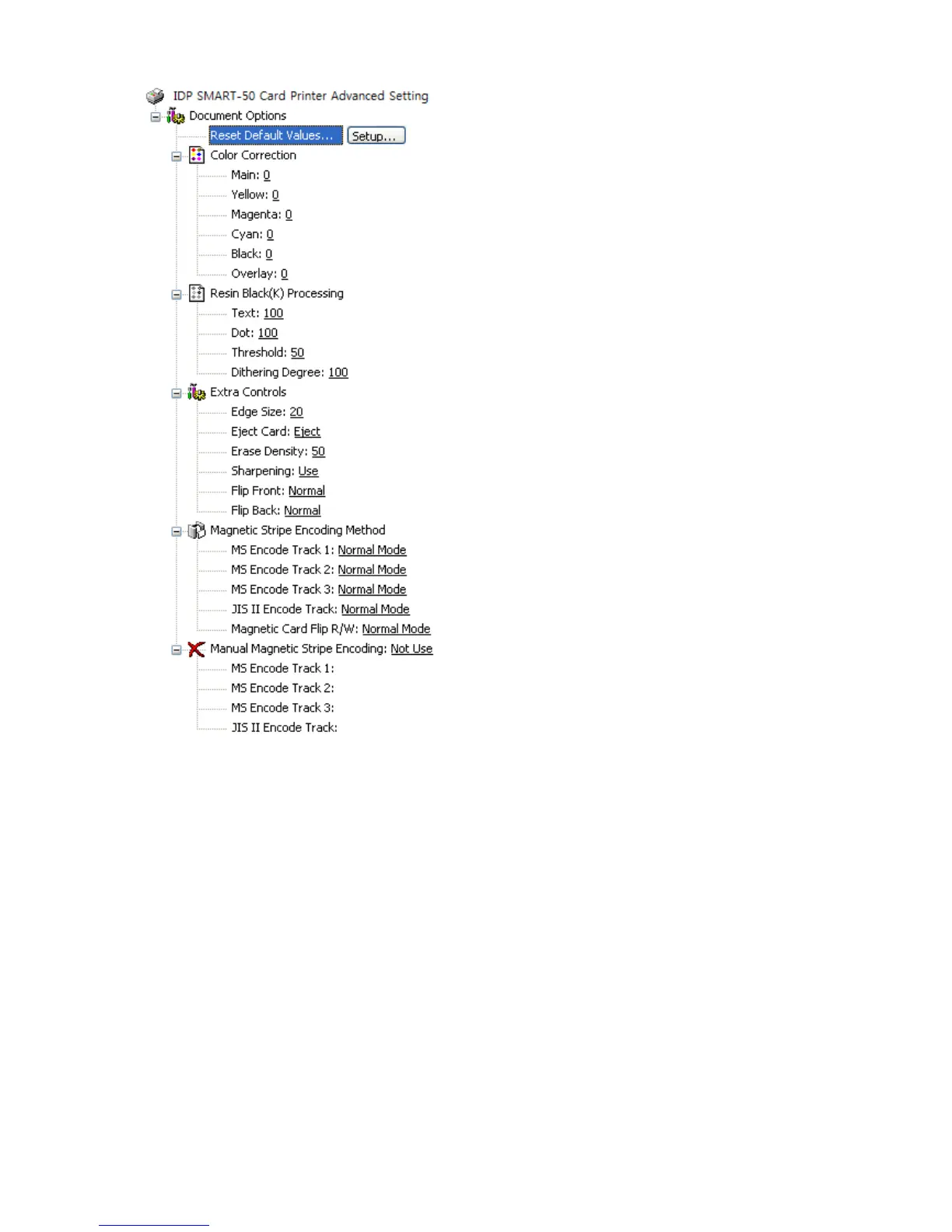
Reset Default Values: Reset to default.
Color Correction:
You can correct gamma for
colors. You need to use CardPrinterSetup to adjust
color densities.
Resin Black (K) Processing: Set criteria
to set density criteria for extracting black
objects
Dot: to set density criteria for extracting black dots
Threshold: to set density criteria on dithering
Dithering Degree: to set sharpness on dithering
Extra Controls :
Edge Size:
to set not printed area in case of not
using Edge-To-Edge
Eject Card: to set if eject a card after printing
Erase
Density : to set erase density for
SMART-30 R Erase
Sharpening: to calibrate image sharpened
Flip Front:
to set printed direction of image on
to set printed direction of image on
back side.
Magnetic Strip Encoding Method:
stripe encoding method for each track
Normal: to encode on LoCo Card forwards
Reverse: to encode on LoCo Card backwards
Bit: to encode on LoCo Card in Bit
HiCo Normal: to encode on HiCo Card forwards
HiCo Reverse:
backwards
HiCo Bit: to encode on HiCo Card in Bit
Magnetic Card Flip R/W:
printing when magnetic encoding
Manual Magnetic Stripe encoding:
magnetic stripe manually
Not Use: not to use magnetic stripe encoding
Encoding and Printing:
stripe encoding
Encoding or Laminating only:
magnetic or laminating. without printing



 To Next Page