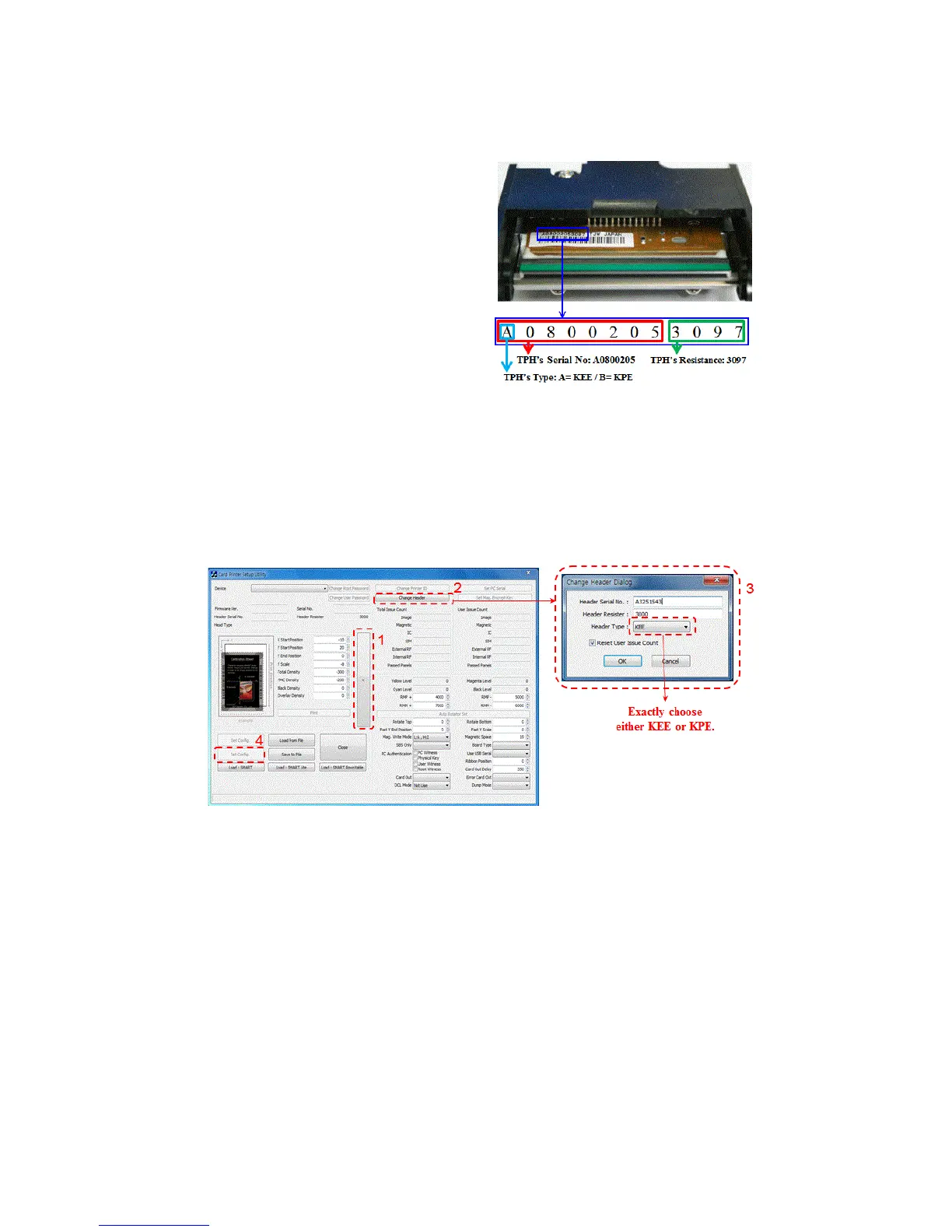
resistance of new Thermal Print Head
as the Pic. 141
TPH type: A = KEE, B = KPE
Serial No.: see the red box.
TPH resistance: see the green box.
Pic.141 Thermal Print Head
2. Set up the new TPH’s configuration using CardPrinterSetup program.
Step1: Run ‘Card Printer Setup’ in Utilities of the installation CD and click expansion button.
Step2: Click “Change Header” in the extended setup.
Step3: Input the TPH’s Serial No., Resistance and Type (choose KEE or KPE) on the TPH’s label,
and click “OK”.
Step4: Click “Set Config” to set the new TPH’s configuration.
Pic.142 Print head setup
3. Replacing the new TPH
Step1: Remove the old TPH from the top cover.
(1) Turn off the printer and open the top cover.
(2) Hold the TPH and press the locked hook, then the TPH is disconnected as the Pic. 143.
(3) Disconnect the TPH from print head wire carefully.
(Caution: TPH is possible to HOT.)
Step2: Installing the new TPH
(1) Connect new TPH to the print head wire.
(2). Put the new TPH on the Shift and pull it up until be locked as the Pic. 143.



 To Next Page