EasyManua.ls Logo

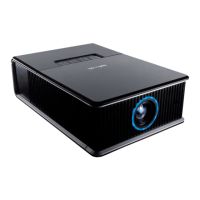
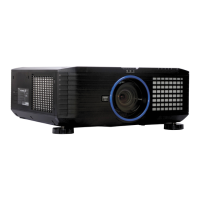
InFocus IN5132c - User Manual

InFocus IN5132c
167 pages
Print Icon
To Next Page IconTo Next Page
Loading...
Projector
IN5132/IN5132c/IN5142/IN5142c/IN5134/
IN5134a/IN5134c/IN5144/IN5144a/IN5144c/
IN5135/IN5135c/IN5145/IN5145c
ENGLISH
FRANÇAIS
DEUTSCH
ESPAÑOL
ITALIANO
NORSK
NEDERLANDS
PORTUGUÊS
ѣᮽ
뼑霢꽩
SVENSKA
ɊɍɋɋɄɂɃ
SUOMI
POLSKI
INDO
BAHASA
Users Manual (concise)
Please read this users manual thoroughly to ensure the proper use of this product.
Manuel d’utilisation (résumé)
Nous vous recommandons de lire attentivement ce manuel pour bien assimiler le fonctionnement de
l'appareil.
Bedienungsanleitung (Kurzform)
Um zu gewährleisten, dass Sie die Bedienung des Geräts verstanden haben, lesen Sie dieses Handbuch
bitte sorgfältig.
Manual de usuario (resumen)
Lea atentamente el manual de usuario del proyector para garantizar un uso adecuado del mismo.
Manuale d'istruzioni (breve)
Vi preghiamo di leggere attentamente il manuale d'istruzioni per garantire una corretta comprensione delle
istruzioni.
Brukerhåndbok (konsis)
Vennligst les denne brukerhåndbok grundig for å være garantert driftssikker bruk.
Gebruiksaanwijzing (beknopt)
Lees deze gebruikershandleiding grondig door, zodat u de werking ervan begrijpt en correct gebruik
verzekerd is.
Instruções do proprietário (concisas)
Leia atentamente o presente manual do utilizador para garantir a utilização correcta por via da sua
compreensão.
∎䞷広㢝󱂖 丏㢢䓗
庆Ⅳ兕梔床㦻ᇵ∎䞷広㢝󱂖ᇶ᧨⦷䚕屲䤓⪉䫏ₙ㷲䫽∎䞷ᇭ
ꩡ끞꫙ꐺ꫑ 샩鲵끞
ꚭꩡ끞녅꫙ꐺ꫑ꌱ녍넲냱겑隕넩뼩뼍겕쁹 꿡ꗉꌩ陁ꩡ끞뼩늱겢겑꿙
Bruksanvisning (koncis)
Läs denna bruksanvisning noga för att förstå alla instruktionerna för ett korrekt bruk.
Ɋɭɤɨɜɨɞɫɬɜɨɩɨɥɶɡɨɜɚɬɟɥɹɤɪɚɬɤɨɟ
ɉɨɠɚɥɭɣɫɬɚɜɧɢɦɚɬɟɥɴɧɨɩɪɨɱɬɢɬɟɞɚɧɧɨɟɪɭɤɨɜɨɞɫɬɜɨɩɨɥɴɡɨɜɚɬɟɥɹɞɥɹɨɡɧɚɤɨɦɥɟɧɢɹɢ
ɧɪɚɜɢɥɶɧɨɢɫɩɨɥɶɡɨɜɚɧɢɹ
Käyttäjän ohjekirja (suppea)
Lue käyttäjän ohjekirja huolellisesti varmistaaksesi, että ymmärrät miten laitetta käytetään oikein.
3RGUĊF]QLNXĪ\WNRZQLNDVNUyFRQ\
3U]HF]\WDMGRNáDGQLHL]H]UR]XPLHQLHPQLQLHMV]\SRGUĊF]QLNXĪ\WNRZQLND
DE\]DSHZQLüSUDZLGáRZHXĪ\WNRZDQLHXU]ąG]HQLD
Panduan Pengguna (singkat)
Mohon dibaca panduan ini secara cermat untuk menjamin produk ini
digunakan dengan benar.
DŽƳȂŭ¦¿ƾƼƬLjŭ¦DzȈdz®
ƲƬǼŭ¦¦ǀŮDzưǷȋ¦¿¦ƾƼƬLJȏ¦ÀƢǸǔdzƨȇƢǼǠƥ¿ƾƼƬLjŭ¦DzȈdz®¨¦ǂǫȄƳǂȇ

Table of Contents

Other manuals for InFocus IN5132c

Questions and Answers

  • A
    Ana ThomasAug 21, 2025
    How to fix InFocus IN5132c Projector Intelligent Stack when it does not function?
    • K
      kburgessAug 22, 2025
      If the Intelligent Stack feature isn't working on your InFocus Projector, there might be several reasons: * **Power:** Ensure both the Main and Sub projectors are receiving AC power. * **RS-232 Cable:** Verify that the RS-232 null modem cable is correctly connected between the Main and Sub projectors. * **Menu Settings:** Confirm that the STACK menu settings are properly configured on both projectors, with one set to Main and the other to Sub. * **Signal Cables:** Check that all signal cables are correctly connected and that the cable connections match the port settings in the menu.
  • G
    Gina JonesSep 4, 2025
    What to do if InFocus Projector does not respond to the remote control?
    • K
      Kelly CarpenterSep 4, 2025
      If your InFocus Projector isn't responding to the remote control while using Intelligent Stack, it's likely because only the Main projector can receive remote control signals. Make sure to point the remote control directly at the Main projector.
  • J
    Jennifer BennettSep 2, 2025
    Why does my InFocus Projector have flickering or stripes on screen?
    • A
      Andrew HarmonSep 3, 2025
      If you see flickering or stripes on the screen of your InFocus Projector, and it's in Eco mode, set ECO MODE to NORMAL and AUTO ECO MODE to OFF in the SETUP menu. Also, adjust the OVER SCAN ratio smaller in the IMAGE menu.
  • J
    jduncanSep 1, 2025
    How to fix faded colors on InFocus Projector?
    • M
      Mark BowersSep 1, 2025
      If the colors on your InFocus Projector appear faded or the color tone is poor, adjust the COLOR TEMP, COLOR, and/or TINT settings in the menu. Also, check the COLOR SPACE setting and change it to AUTO, RGB, SMPTE240, REC709, or REC601 as needed.
  • M
    Marcus RodgersAug 30, 2025
    Why do pictures appear blurry on my InFocus IN5132c Projector?
    • R
      Robert PughAug 30, 2025
      If your InFocus Projector's pictures appear blurry, first remove the lens cover. Then, adjust the focus using the FOCUS + / - buttons and/or H PHASE in the menu. If the lens is dirty, clean it.
  • W
    Warren KimAug 29, 2025
    Why do pictures appear dark on my InFocus IN5132c?
    • C
      Christopher HernandezAug 29, 2025
      If your InFocus Projector displays a dark picture, increase the BRIGHTNESS and/or CONTRAST in the menu. If it's in Eco mode, set ECO MODE to NORMAL and AUTO ECO MODE to OFF in the SETUP menu. If the lamp is old, consider replacing it.
  • T
    Tracie EvansAug 27, 2025
    What to do if InFocus Projector images do not superimpose properly?
    • R
      Reginald OlsonAug 27, 2025
      If the images from the two projectors do not superimpose properly even after finely adjusting the image, try the following steps: 1. Press the AUTO button on the remote control or execute AUTO ADJUST EXECUTE on each of the projectors. 2. Adjust H POSITION and V POSITION on each of the projectors. 3. Check the RESOLUTION setting in the INPUT menu, and change the setting to match if the setting differs between Main and Sub.
  • H
    hickmancoreyAug 26, 2025
    Why my InFocus IN5132c Projector Main and Sub projector do not operate in synchronization?
    • R
      rodriguezsusanAug 27, 2025
      If the Main and Sub projectors aren't synchronizing, the RS-232 cable connecting them might be the issue. Ensure the RS-232 cable is properly connected and then restart the Main projector.
  • S
    Scott JonesAug 25, 2025
    How to fix InFocus IN5132c when it does not turn on?
    • J
      jameswellsAug 26, 2025
      If your InFocus Projector isn't turning on, first, ensure the power cord is properly connected. If there was a power interruption, disconnect the power plug, let the projector cool for at least 10 minutes, and then try turning it on again. Also, make sure the lamp and lamp cover are securely attached, allowing the projector to cool for 45 minutes before checking.
  • B
    briananewmanAug 23, 2025
    How to fix InFocus Projector images when they are out of focus?
    • M
      Matthew GarzaAug 23, 2025
      If the images from your InFocus Projector are out of focus or not well-superimposed, use the ZOOM, FOCUS, and LENS SHIFT features to fine-tune the superimposed images. If necessary, adjust PERFECT FIT and KEYSTONE as well.

InFocus IN5132c Specifications

General IconGeneral
Display TechnologyDLP
Video CompatibilityNTSC, PAL, SECAM, HDTV (720p, 1080i, 1080p)
Projection TechnologyDLP
ConnectivityHDMI, VGA, USB
Projection Size30" - 300"
Native Resolution1024 x 768
Keystone Correction± 40° Vertical

Related product manuals