6
INTRODUCTION
Home Screen
Home Screen
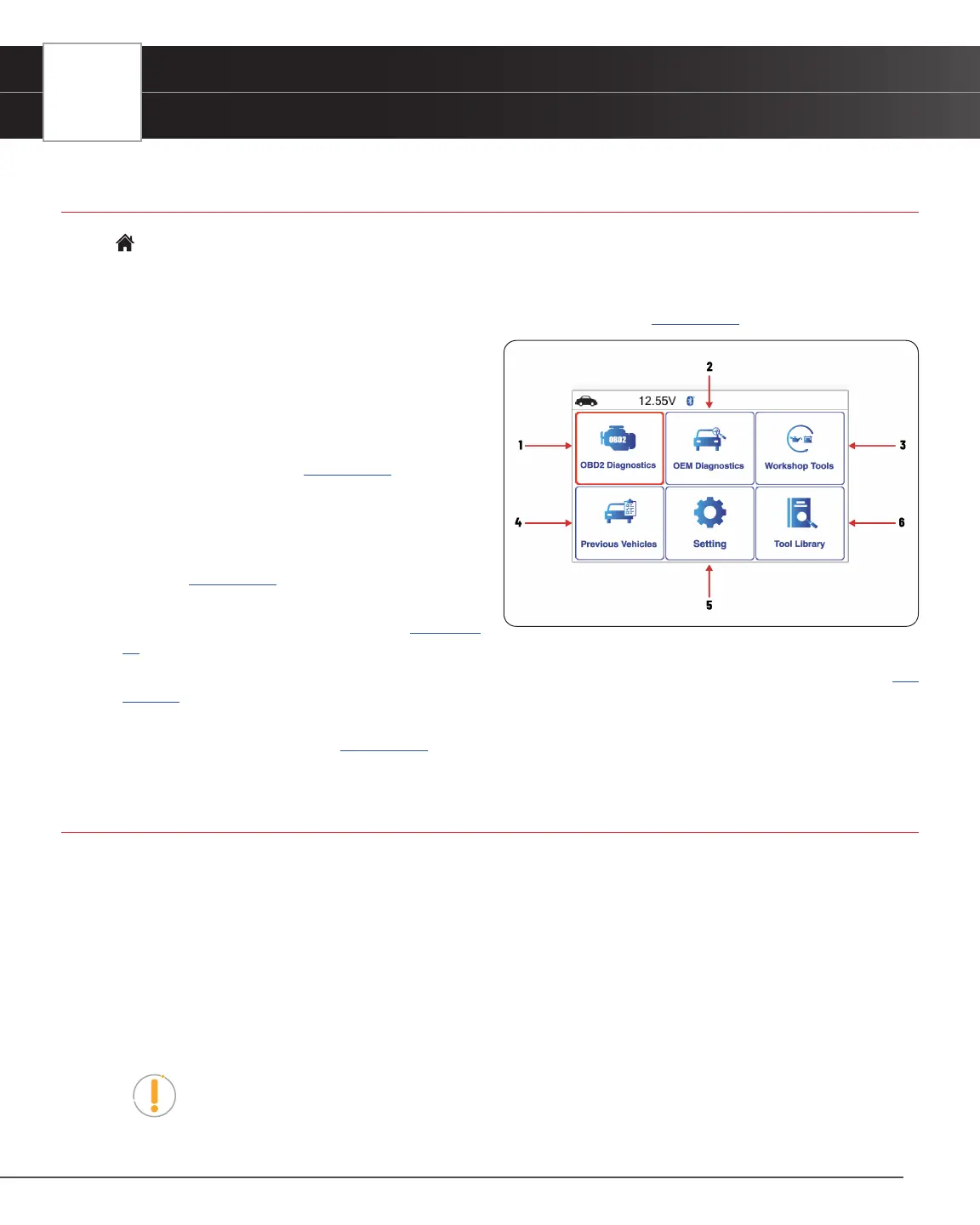
The Home Screen provides access to all the Tablet Scan Tool’s primary functions.
See Figure 3 for the explanation of items 1 through 6, below:
1. OBD2 Diagnostics Tab – Perform OBD2 menu, display 10 modes of OBD2. [See page 12]
2. OEM Diagnostics Tab – Provide enhanced OEM
level diagnostics that are not available over generic
OBD2. Access ABS, Airbag, Transmission, Tire
Pressure, Battery, and all modules to view and erase
their DTCs. Also provides a Vehicle Inspection that
shows Diagnostic Report, Customer Report and
Collision Industry Report. [See page 28]
3. Workshop Tools Tab – Perform several OEM services,
including Vehicle Inspection, Oil Maintenance Reset,
Battery Reset, Battery Initialization, EV/HEV/PHEV
Battery Health, Battery/Alternator Test and TPMS
Relearn. [See page 32]
4. Previous Vehicles Tab – Access and view reports
for the 30 previously tested vehicles. [See page
37]
5. Settings Tab – Displays the Tool Settings menu, which lets you congure the Tablet to your particular needs. [See
page 38]
6. Tool Library Tab – Access the tablet’s tool library for DTC and tool icon denitions, Smog Check or I/M Program LED
Denition, Monitor Icon Status. [See page 41]
Tablet Display Functions
See Figure 2 for the locations of items 1 through 17 below.
1. I/M MONITOR STATUS: SINCE DTCs CLEARED (SDC) or THIS DRIVE CYCLE (TDC) eld - Identies the I/M
Monitor status area.
2. Monitor icons - Indicate which Monitors are supported by the vehicle under test, and whether or not the associated
Monitor has completed its diagnostic testing (Monitor status). When a Monitor icon is solid green, it indicates that
the Monitor has completed both Since DTCs Cleared and This Drive Cycle. When a Monitor icon is ashing red, it
indicates that the Monitor has not completed testing Since DTCs Cleared. When a Monitor is Green-Gray, it indicates
that the monitor has not completed testing This Drive Cycle. When a Monitor is Red-Gray, it indicates that the monitor
has been disabled This Drive Cycle.
NOTE: The I/M Monitor Status icons are associated with INSPECTION and MAINTENANCE
(I/M) READINESS STATUS. Some states require that all vehicle Monitors have run and
completed their diagnostic testing before a vehicle can be tested for Emissions (Smog
Check). A maximum of fteen Monitors are used on OBD2 systems. Not all vehicles support
Figure 3� Home Screen


 To Next Page