USING THE TABLET
OBD2 Diagnostics
23
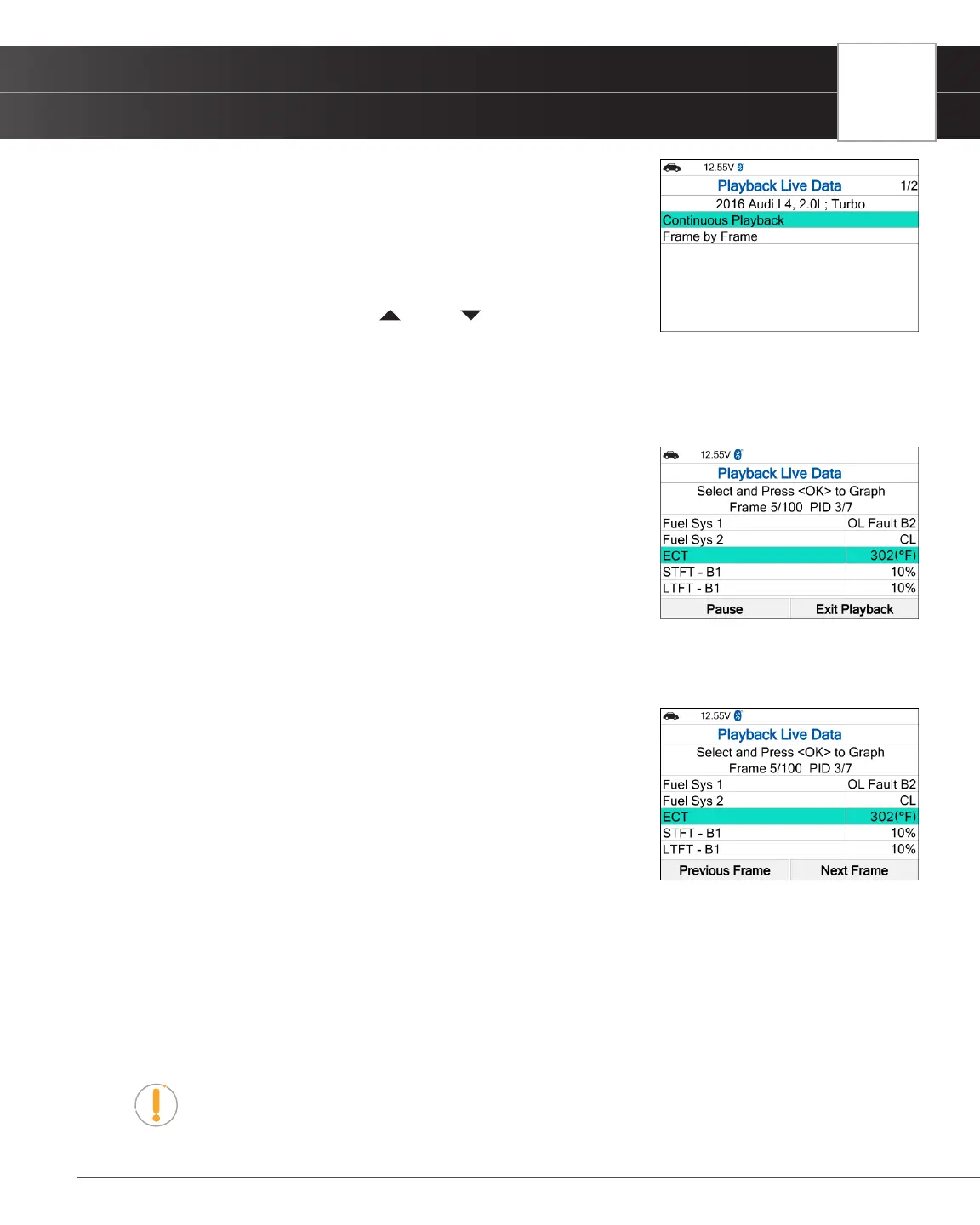
3. Select Continuous Playback or Frame by Frame, as desired, then
press OK.
n The display shows the recorded Live Data, beginning with the
“trigger” frame.
n Only a limited amount of PID data can be displayed on the screen
at one time. If additional PID data is available, a small arrow is
shown on the display. Press UP and DOWN, as necessary,
to view all available PID data.
n When viewing recorded Live Data, look for any irregularities in any of the PID values/signal
information (LTFT %, RPM, MAP, TEMP, etc.). If any PIDs are not within specication, or irregularities
are detected, follow the procedures in the vehicle’s service repair manual to perform additional
troubleshooting and repair.
4. When you select Continuous Playback, the Tablet Scan Tool plays
recorded data at a rate of one frame per 2 seconds.
n Press OK on any selected PID to open a graph view for that PID.
n Select Pause, to “pause” the Live Data playback. Select Play to
resume the playback mode.
n Select Exit Playback to exit the Live Data Playback mode and
return to the Playback Live Data menu.
n Once playback nishes, the Tablet Scan Tool automatically returns to the Playback Live Data menu.
━ To replay the data again, select Continuous Playback or Frame by Frame, as desired, then
press OK.
5. When Frame by Frame is selected, you must scroll the individual
frames manually.
n When you have viewed all PID information for the current frame of
Live Data, choose Next Frame or Previous Frame, as desired.
n Press OK on any PID to open a graph view for that PID.
n To exit Live Data Playback mode, select Exit Playback at the
bottom of the list, then press OK.
O2 Sensor Monitor - $05
The O2 Sensor Monitor lets you view the test results of the vehicle’s two or more O2 sensors. These sensors are designed
to help identify problems that can reduce fuel efciency or increase emissions. Each O2 sensor has a unique name that
identies its location in the exhaust system – cylinder bank location (bank 1 or bank 2) and its location in relation to the
catalytic converter (upstream or downstream). Please reference the vehicle’s service manual for further information.
NOTE: Service Mode $05 is not supported in ISO 15765-4 (CAN) applications – it
includes the majority of 2008 and older vehicles. For CAN applications, the functionality
of Service Mode $05 was revised and implemented in Service Mode $06.


 To Next Page