USING THE TABLET
OBD2 Diagnostics
17
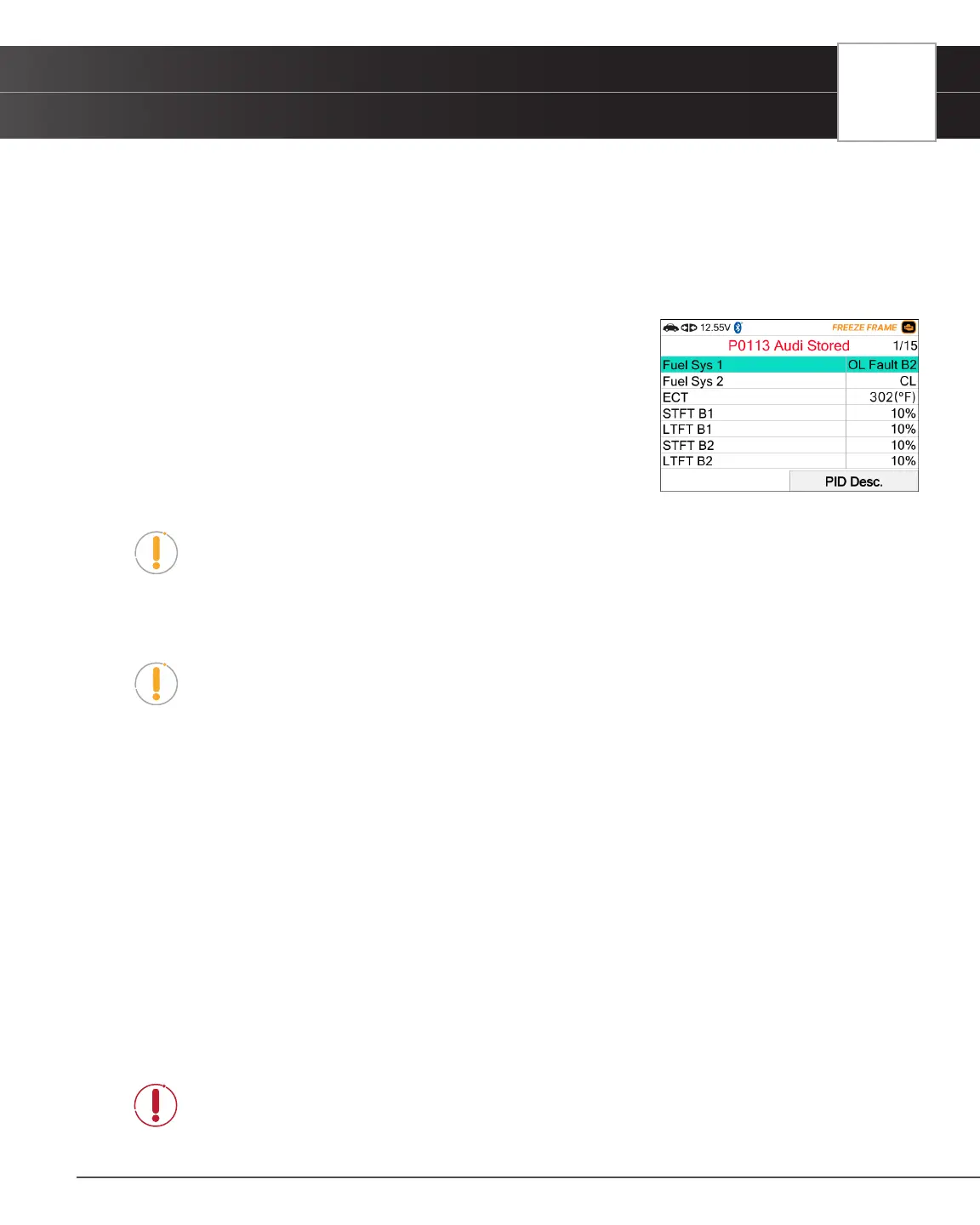
Freeze Frame - $02
If more than one Diagnostic Trouble Code (DTC) was retrieved and to view Freeze Frame Data, following procedures
bellow:
1. From OBD2 Menu, select Freeze Frame - $02 and press the OK button.
n The Freeze Frame data displays.
n In OBD2 systems, when an emissions-related engine malfunction
occurs that causes a DTC to set, a record or snapshot of engine
conditions at the time that the malfunction occurred is also saved
in the vehicle’s computer memory. The record saved is called
Freeze Frame data. Saved engine conditions include, but are
not limited to: engine speed, open or closed loop operation, fuel
system commands, coolant temperature, calculated load value,
fuel pressure, vehicle speed, air ow rate, and intake manifold
pressure.
NOTE: If more than one malfunction is present that causes more than one DTC to
be set, only the code with the highest priority will contain Freeze Frame data. The
code designated “01” on the Tablet display is referred to as the PRIORITY code and
Freeze Frame data always refers to this code. The priority code is also the one that has
commanded the MIL (Check Engine) lamp on.
NOTE: Retrieved information can be uploaded to a Personal Computer (PC) with the use
of optional software (see instructions included with the software for more information).
n To view a description of the displayed PID, select and press PID Desc.
Live Data- $01
The Tablet lets you view “real-time” Live Data. This information includes values (volts, rpm, temperature, speed etc.) and
system status information (open loop, closed loop, fuel system status, etc.) generated by the various vehicle sensors,
switches, and actuators. These are the same signal values generated by the sensors, actuators, switches and/or vehicle
system status information used by the vehicle’s computer when calculating and conducting system adjustments and
corrections.
The real time (Live Data) vehicle operating information (values/status) that the computer supplies to the Tablet for each
sensor, actuator, switch, etc. is called Parameter Identication Data (PID).
Each PID (sensor, actuator switch, status, etc.) has a set of operating characteristics and features (parameters) that serve
to identify it. The Tablet displays this information for each sensor, actuator, switch, or status that is supported by the vehicle
under test.
DANGER: If the vehicle must be driven in order to perform a troubleshooting procedure,
ALWAYS have a second person help you. One person should drive the vehicle while the
other person observes the Tablet data. Trying to drive and operate the Tablet at the same
time is dangerous and could cause a serious trafc accident.


 To Next Page