GA02118 User Manual BV20
<< Back to Contents
Copyright © Innovative Technology Ltd 2018 Doc: GA02118/1 User Manual BV20
Version: 1.0
Page 59 of 60
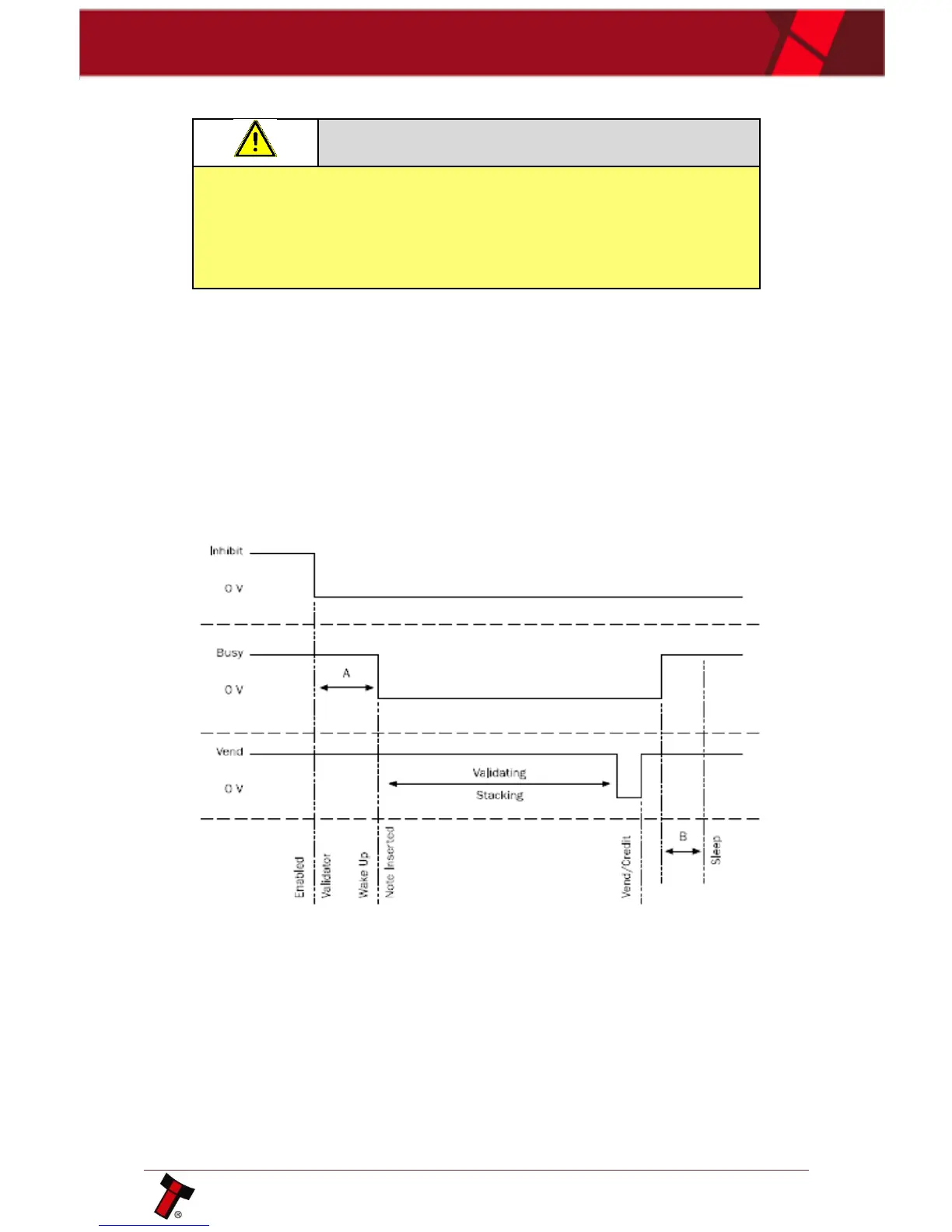
11.7 Low Power Mode Timing Diagram
Low Power Mode can ONLY be used with the above Parallel, Pulse and
Binary protocols and only be enabled by correctly completing the
configuration cards or Validator Manager program
Low Power Mode can be used with all none serial communication protocols to reduce
the power consumption of the BV20 when idle. When the BV20 is in this state the
current consumption is reduced to approximately 1.2mA. The BV20 goes into low
power mode approximately 4 seconds after the validator is powered up and remains
in this state until a note is entered (Time A). Following a note insertion the BV20
returns to Low Power mode approximately 1 second after the Busy line goes High
(After credit is given or note is rejected). (Time B)
Low Power mode uses 3 control lines: Vend – Pin 1, Inhibit – Pin 5 and Busy – Pin 9
When the Validator is enabled the Inhibit Line is Low and the Busy Line is High. This
remains the same until a note is inserted (Time A).
When a note is inserted under the front sensor the BV20 wakes up and the busy line
goes low to indicate that the validator is in use. The busy line remains low during
the validating and stacking process and once the note has been successfully
validated and stacked the vend line goes low to issue the credit.
After the credit is issued the busy line goes high and approximately 1 second after
the busy line goes high (Time B) the BV20 goes back into low power mode.















 To Next Page