Quick Start Guide
36 Intel Confidential User Guide
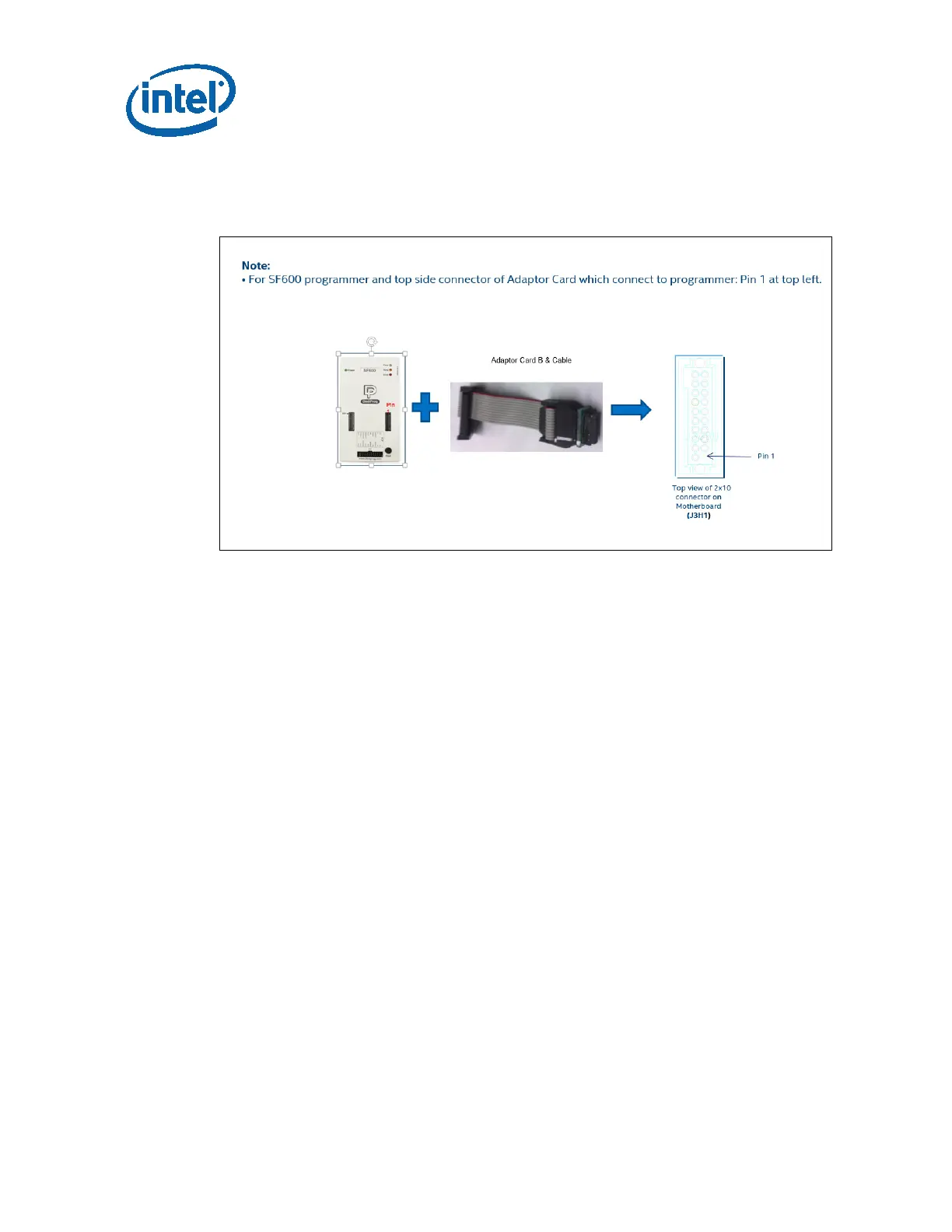
7.3.1 SPI through Dediprog SF600
Figure 14 SPI through Dediprog SF600
7.3.2 Steps for SPI Programming
1. Location: Identify the position of SPI connector for programming the BIOS on
board.
Note: Make sure the AC power is off before continue.
2. Connect Dediprog: Connected Dediprog cable to Dediprog Header, J7H2. Ensure
orientation is correct i.e. Pin 1 of header is connected to Red strap of cable.
3. Launch Dediprog Software: launch Dediprog software from Start->Dediprog->
SF600->Dediprog Engineering after installed.
4. Dediprog Software: Make sure the program is able to detect correct type of SPI
Note: SPI can be damaged if program with different algorithm. Good practice to restart the
program when different board is used. Verify that “Application Memory Chip” is selected.
5. Load File: After blank check operation is completed without problem, click File
button. Find and open the file. If the suffix of your image is .rom, select the Data
Format: ROM. If the suffix is .bin, select Data Format: Raw Binary. Finally, click
Ok button.




 To Next Page