45 Advanced Features
,QFOXGLQJ5HFHLYHULQWRD1RQ0XOWL:DYH&RQWUROOHU
Follow this procedure to include the PE653 receiver into another manufacturer’s controller:
1. Activate the manufacturer’s controller INCLUDE function.
2. Press the INCLUDE button on the PE653 receiver. The red ashing LED on the PE653 receiver
changes to steady ON.
NOTE: The steady ON LED ashes when it is communicating with another device.
6HWWLQJ8S=:DYH$VVRFLDWLRQVZLWK&DSDEOH'HYLFHV
An Association is a Z-Wave device other than the MultiWave controller that can be used to control
other Z-Wave devices in a MultiWave PE653 or PE953 network. Setting up an association with
a Z-Wave device in the PE653/PE953 network makes it possible to turn Circuit 1 ON/OFF along
with lighting and other features controlled by another Z-Wave device (not including the MultiWave
controller). Follow this procedure to set up an association:
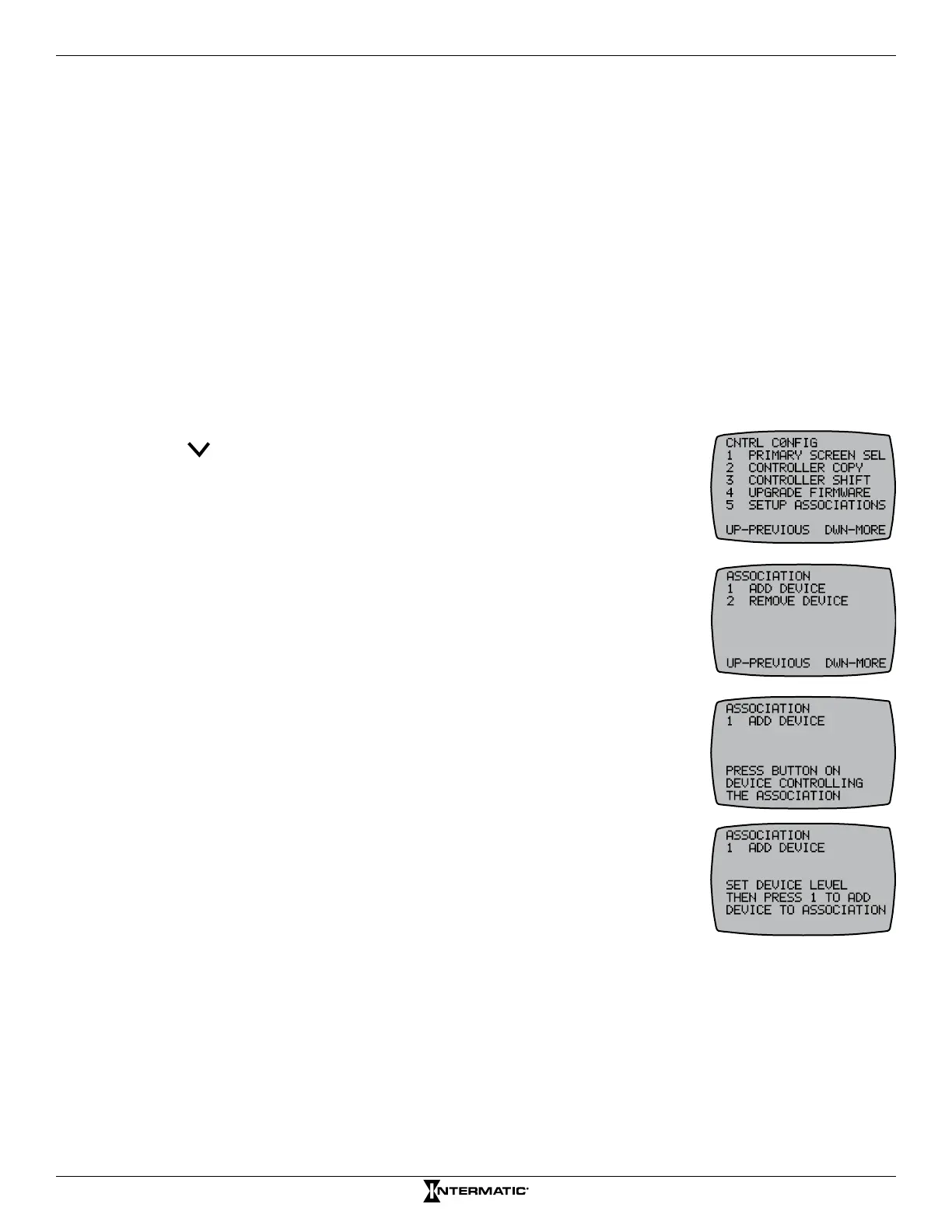
1. Press P/S and ENTER simultaneously to access LEARN MODE.
2. Press to scroll to the CNTRL CONFIG screen.
3. Press 5 to select SETUP ASSOCIATIONS.
4. Press 1 to select ADD DEVICE. The screen displays PRESS BUTTON
ON THE DEVICE CONTROLLING THE ASSOCIATION.
NOTE: This is the association-capable Z-Wave device you want to use
to control the other devices that you plan to add to the association.
5. Press the INCLUDE button on the device. See manufacturer’s
instructions. The MultiWave controller screen displays PRESS THE
BUTTON ON THE DEVICE TO ADD THE ASSOCIATION.
6. Press the button on the device to add to the association. The screen
displays SET DEVICE LEVEL THEN PRESS 1 TO ADD THE DEVICE
TO THE ASSOCIATION.
7. Congure the device as needed to turn units ON and OFF.
NOTE: There are instances where you may need to turn certain lights
ON and other lights OFF when the scene is activated.
NOTE: If you are controlling a light on a dimmer switch,
preset the dimmer to the desired brightness at this time.
8. Press 1 on the controller. The screen displays SUCCESSFUL.
The device is included in the association.
NOTE: Only 1 circuit on the receiver can be controlled with an
association.
9. Repeat this procedure as necessary to add other devices to the
association.
10. Press ENTER to exit and return to the main screen.










 To Next Page