ASTRA
• Operation Manual • Rev. 0124C page 9
Chapter 2. Product Overview
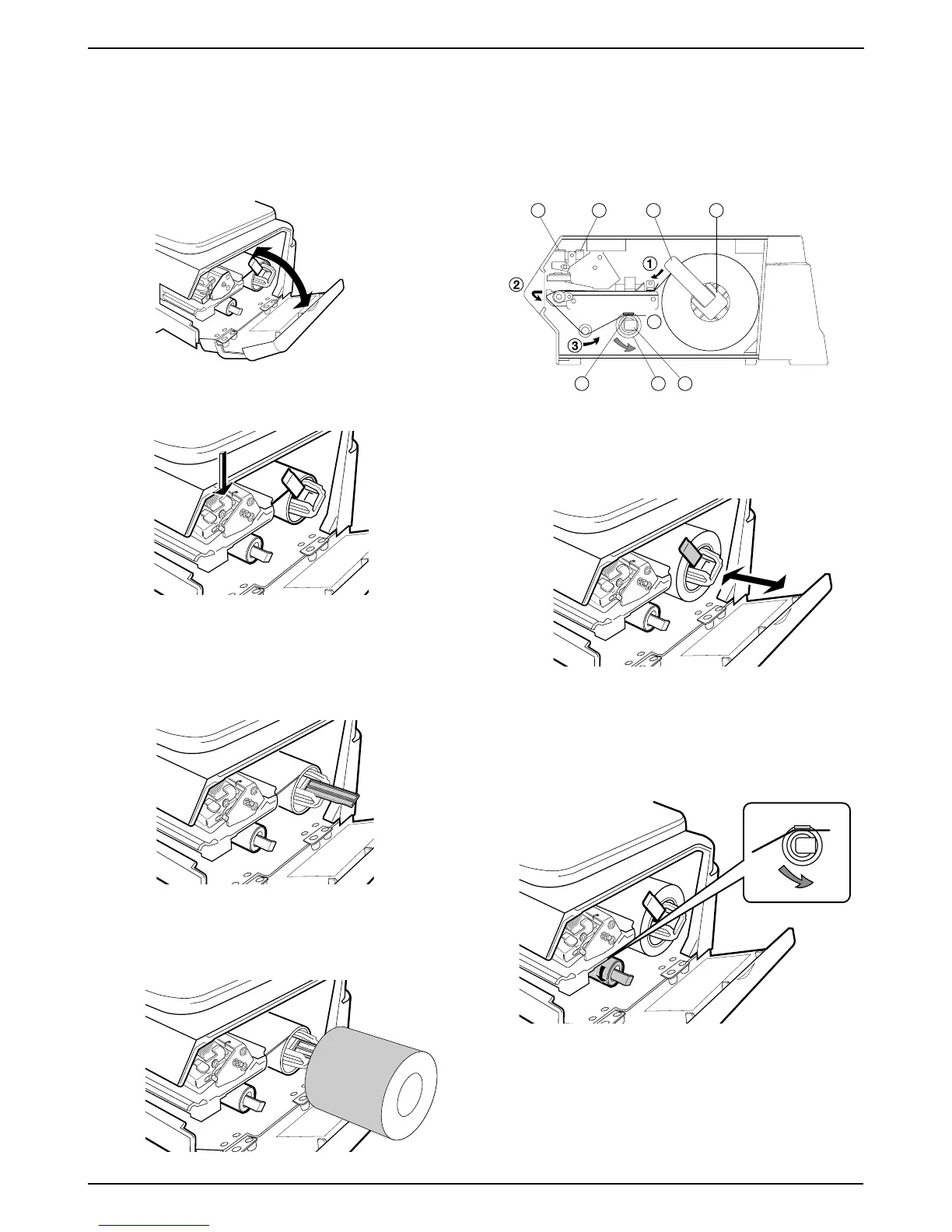
1. Open the side cover.
2. Release the printer head by pushing down the
release lever (D).
3. Check that the stopper lever (A) of the roll holder (B)
is in the down position.
If the lever is in an up position, push down until it lies
flat.
4. Remove approximately 12 inches of labels from the
end of the roll. Load the label roll around the roll holder
(B).
5. Insert the label paper from (1) through (4).
6. Pull up the stopper lever (A), then slide it in or out
depending on the width of the roll, making sure not
to move it too far in and bind the labels.
7. Turn the winding bobbin (E) counter-clockwise so that
the hook (G) is positioned up, push in lever (F), then
insert the tip of the paper in the hook (G).
F
4
B
A
G E F
DC
2.5 Loading/Unloading Label Roll
2.5.1 Loading



 To Next Page