ASTRA
• Operation Manual • Rev. 0124C page 15
Chapter 3. Setup Mode
➝
➝
➝
➝
or
➜
1
ENTER
ENTER
ENTER
ENTER
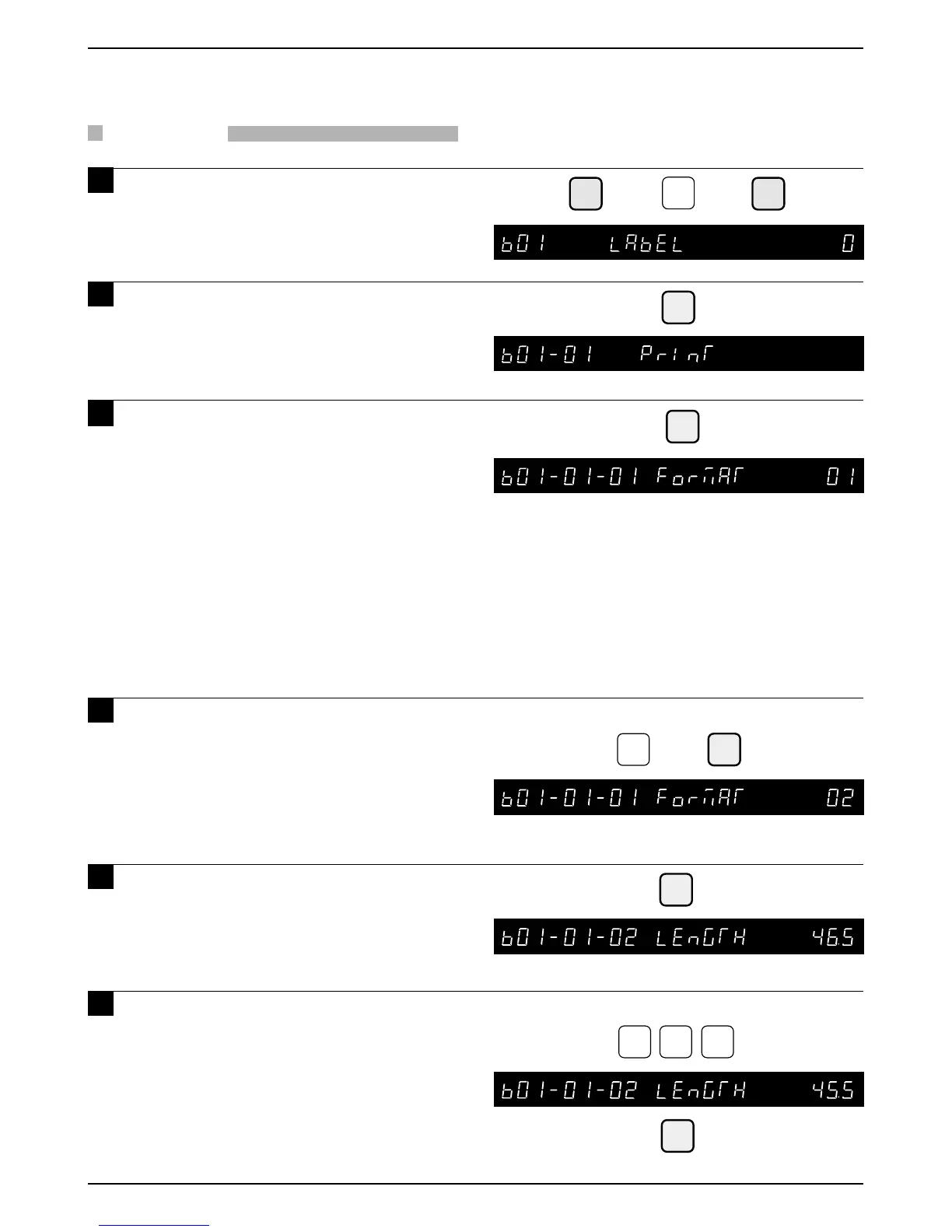
Example: Set label print format as “2”
➜
2
ENTER
Example: Set the label length to 45.5 mm.
4
5 5
NOTE
Note: Refer to page 14, Section 3.1 to enter the Setup Mode.
The Standard formats are:
1 – 60mm × 44mm
2 – 64mm × 47mm
3 – 64mm × 85mm
Safe Handling
4 – 64mm × 59mm
Safe Handling
5 – 64mm × 37mm
Non-barcode
3.2 Label Print
PROCEDURES
1 Press the DOWN ARROW key ( ) until
the Label menu (b01) appears or key
in “1” followed by the DOWN ARROW
key ( ) to enter the menu directly.
2 Press the ENTER key to enter the
Label Print menu (b01-01).
3 Press the ENTER key to enter the
Label Print Format menu.
• This menu is used to set the label print format
number.
• Standard label format numbers are “1” to “5”.
• When no label format number is set, label
format “1” is set as the default number.
• Additional label format numbers “20” to “99”
may be available.
4 Key in the required label print format
number and press the ENTER key.
5 Press the ENTER key to set the label
length.6
6 Key in the required label length and
label gap (XX.X mm), and then press
the ENTER key.
• 85mm is the maximum label size.
• Measure this distance from the top of one
label to the top of the next label.
• Butt-cut labels may not be used in the Astra.
6* – 64mm × 59mm
Extended Text
7* – 64mm × 85mm
Extended Text
8* – 64mm × 85mm
Reduced S.H.
*Not available in all versions



 To Next Page