page 38
ASTRA
• Operation Manual • Rev. 0124C
Chapter 4. Registration Mode
➝
ENTER
ENTER
➝
➝
or
➜
➝
4
Key location
Note: Refer to Section 4.1 to enter the Registration mode.
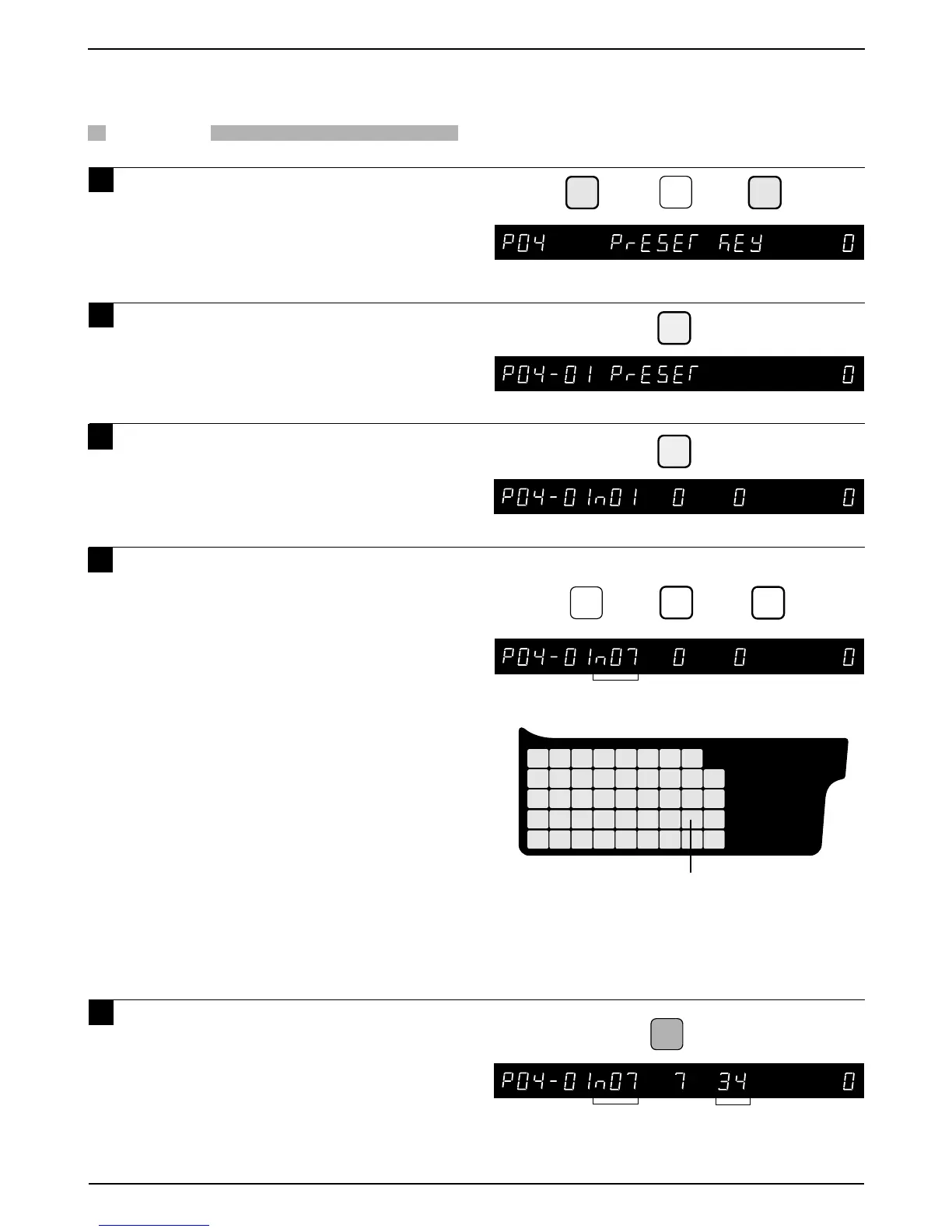
4.5.2 Preset Function Keys
PROCEDURE
1 Press the DOWN ARROW key ( ) until
the Preset Key menu (P04) appears or
key in “4” followed by the DOWN
ARROW key ( ) to enter the menu
directly.
2 Press the ENTER key to enter the
Preset menu (P04-01).
3 Press the ENTER key to set the preset
function keys.
4 Key in the desired preset key flag
number (3 to 14), and press the FEED
key, then press the "0" ZERO key to
recognize the entry as a function key.
Note: The default Flag No. is “1”.
Preset function key flag
13 : Fixed price
14 : X (Multiply)
15 : Special price discount
16:– $ price discount
17:– % price discount
18 : Save
19 : Extra message
10 : VOID
11 : Peel timer
12 : “99”
13 : “00”
14 : % Tare
Note: See Section 6.3 for an explaination of
function keys.
5 Press the desired preset key.
Repeat step 4 as needed to assign
more function keys.
Example: Preset key as “–%”
Preset Key
Key position 34
FEED
➜
7
➜
0
Flag No.
Flag No.



 To Next Page