ASTRA
• Operation Manual • Rev. 0124C page 17
Chapter 3. Setup Mode
3.3 Label Format
PROCEDURES
Note: Refer to page 14, Section 3.1 to enter the Setup Mode.
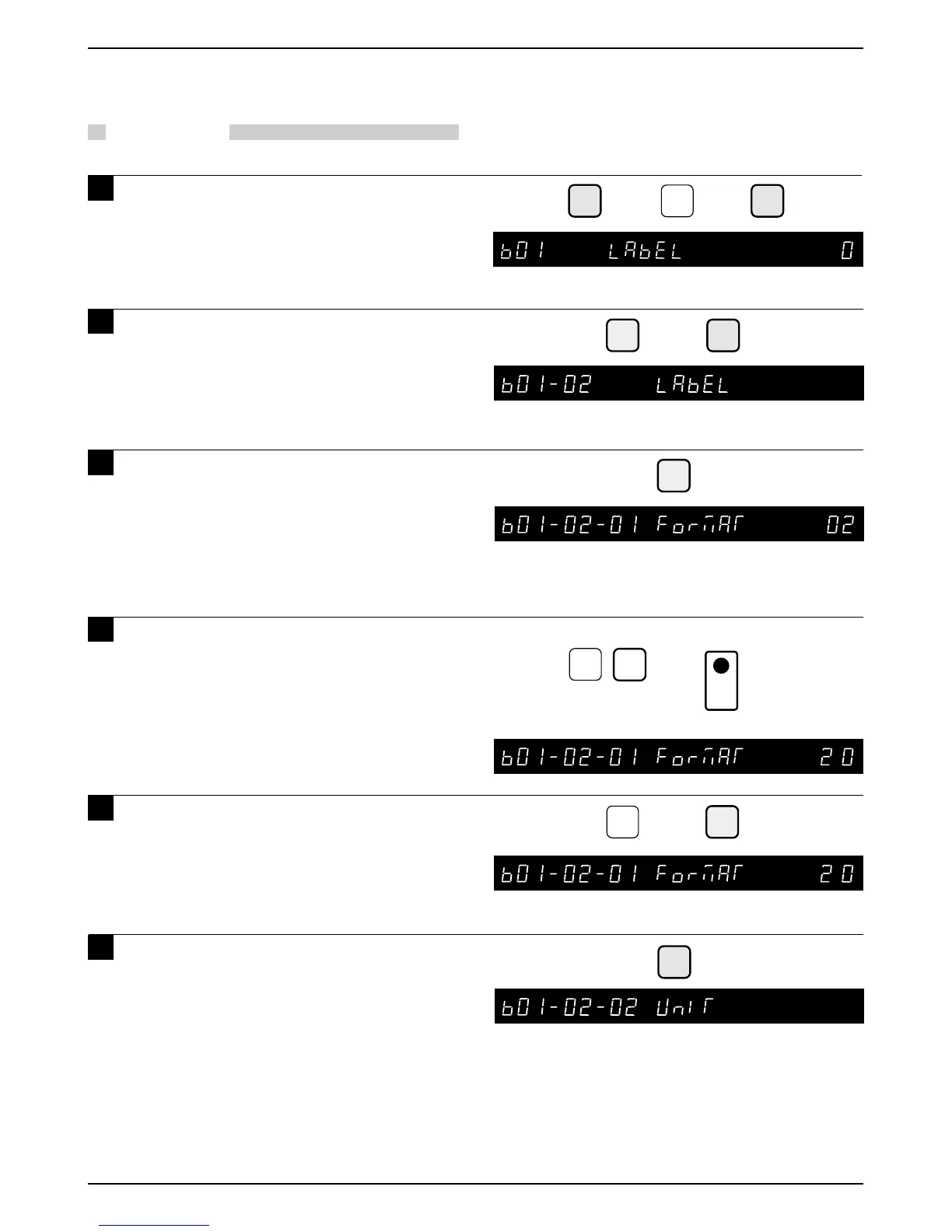
1 Press the DOWN ARROW key ( ) until
the Label menu (b01) appears or key
in “1” followed by the DOWN ARROW
key ( ) to enter the menu directly.
➝
➝
➝
➝
or
➜
1
➝
➝
ENTER
➜
➝
ENTER
Example: Set label format as “20”
➜
1
COPY
➜
PLU
0
2
➝
2 Press the ENTER key and then the
DOWN ARROW key ( ) to enter the
Label Format menu (b01-02).
3 Press the ENTER key to set up the
label format.
4 Key in the label format number to be
set and press the PLU key.
• Additional formats from “20” to “99” are
programmable.
(Number of label formats to be programmed
depends on the amount of available memory.)
5 Key in the desired format number
(standard label format number, 1 to 5)
and press the COPY key.
6 Press the DOWN ARROW key ( ) to set
the print position of each print unit.
6
Note: To prevent accidental changes to the
label format, this step is protected by an
additional password. Contact your Ishida
representative for assistance.



 To Next Page