page 20
ASTRA
• Operation Manual • Rev. 0124C
Chapter 3. Setup Mode
➝
➝
➝
➝
ENTER
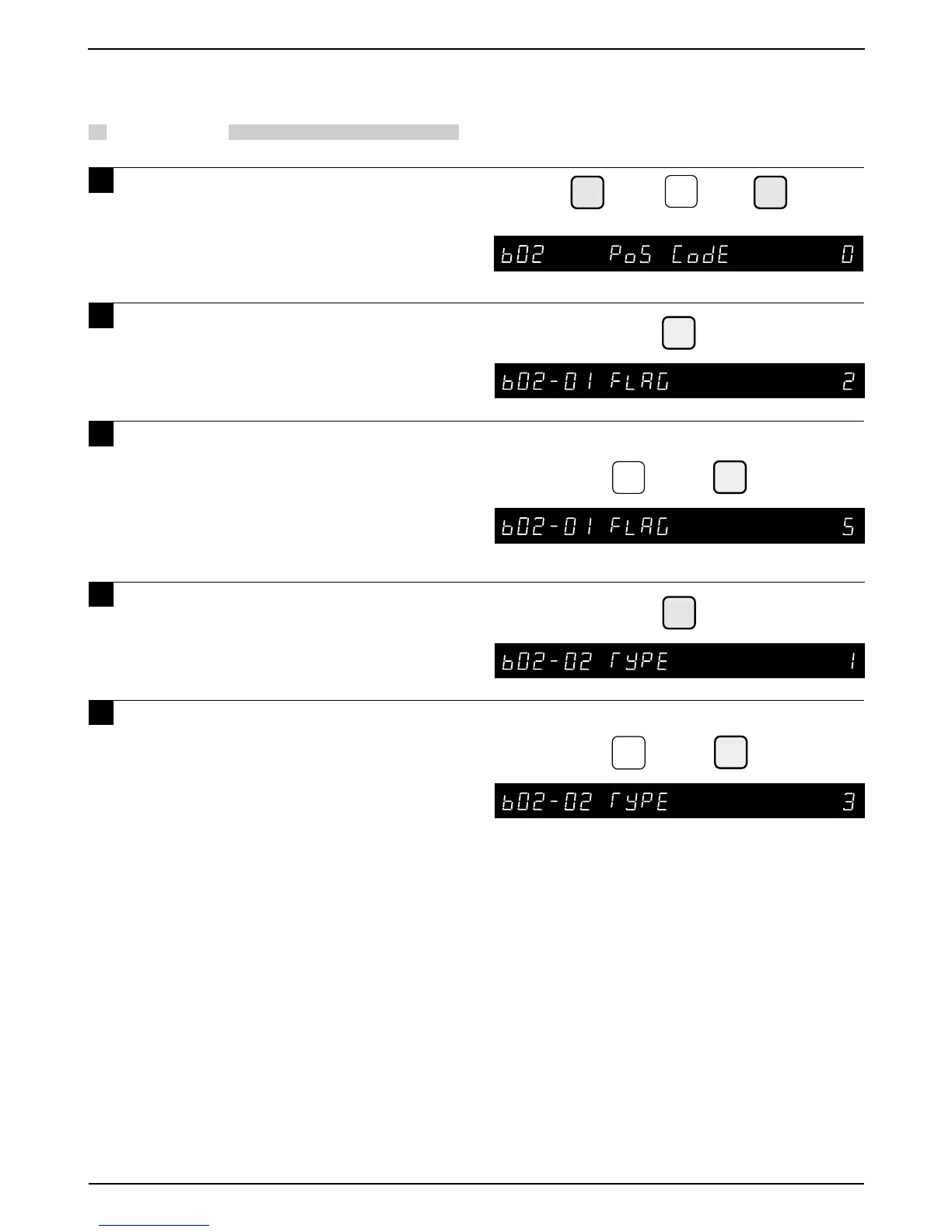
Example: POS code flag “5”
ENTER
5
➜
➝
Example: POS Code Type “3”
ENTER
➜
3
Note: F = Flag
C = Item code
P = Price
W = Weight
I = PLU no.
M = Manufacturer code
(C/P) = Check price
(C/D) = Check digit
➝
or
➜
2
Note: Refer to page 14, Section 3.1 to enter the Setup Mode.
• Default value is 2
3.4 POS Code
PROCEDURES
1 Press the DOWN ARROW key ( ) until
the POS Code menu (b02) appears or
key in “2” followed by the DOWN
ARROW key ( ) to enter the menu
directly.
2 Press the ENTER key to enter the
Flag menu (b02-01).
3 Key in the Flag Number (2 digits) and
press the ENTER key.
Note: In case a 3 digit or 4 digit code is keyed in
by mistake, the last 2 digits are
programmed as the flag code.
4 Press the DOWN ARROW key ( ) to
enter the Type menu.
5 Key in the POS Code Type (1 to 15)
and press the ENTER key.
■ POS Code Type
11 : FFCCCCC(C/P)PPPP(C/D)
12 : FFCCCCCCPPPP(C/D)
13 : FCCCCCC(C/P)PPPP(C/D)
14 : FFCCCCCPPPPP(C/D)
15 : FCCCCCCPPPPP(C/D)
16 : FFCCCC(C/P)PPPPP(C/D)
17 : FFCCCCCCWWWW(C/D)
18 : FCCCCCCWWWWW(C/D)
19 : FCCCCCIIIIII(C/D)
10 : FFCCCCCCPPPP(C/D) – EAN Code
11 : FFCCCCCCWWWW(C/D) – EAN Code
12 : FFCCCC(C/P)WWWWW(C/D)
13 : FFMMMCCPPPPP(C/D)
14 : FFMMCCCPPPPP(C/D)
15 : FFCCCCC(0)PPPP(C/D)
(0) = Fixed zero



 To Next Page