ASTRA
• Operation Manual • Rev. 0124C page 35
Chapter 4. Registration Mode
1
➝
ENTER
Example: “PLU 1”
➜
Example: “$1.89”
END
➝
Note: Refer to Section 4.1 to enter the Registration mode.
3
➝
➝
or
➜
PRICE
CHANGE
or
Press PRICE CHANGE key to enter the
menu directly.
current price
current price
ENTER
➜
1
8
9
6
MODE
Press the MODE key to return to
normal operation mode after all
operations of Registration Mode are
completed.
PLU
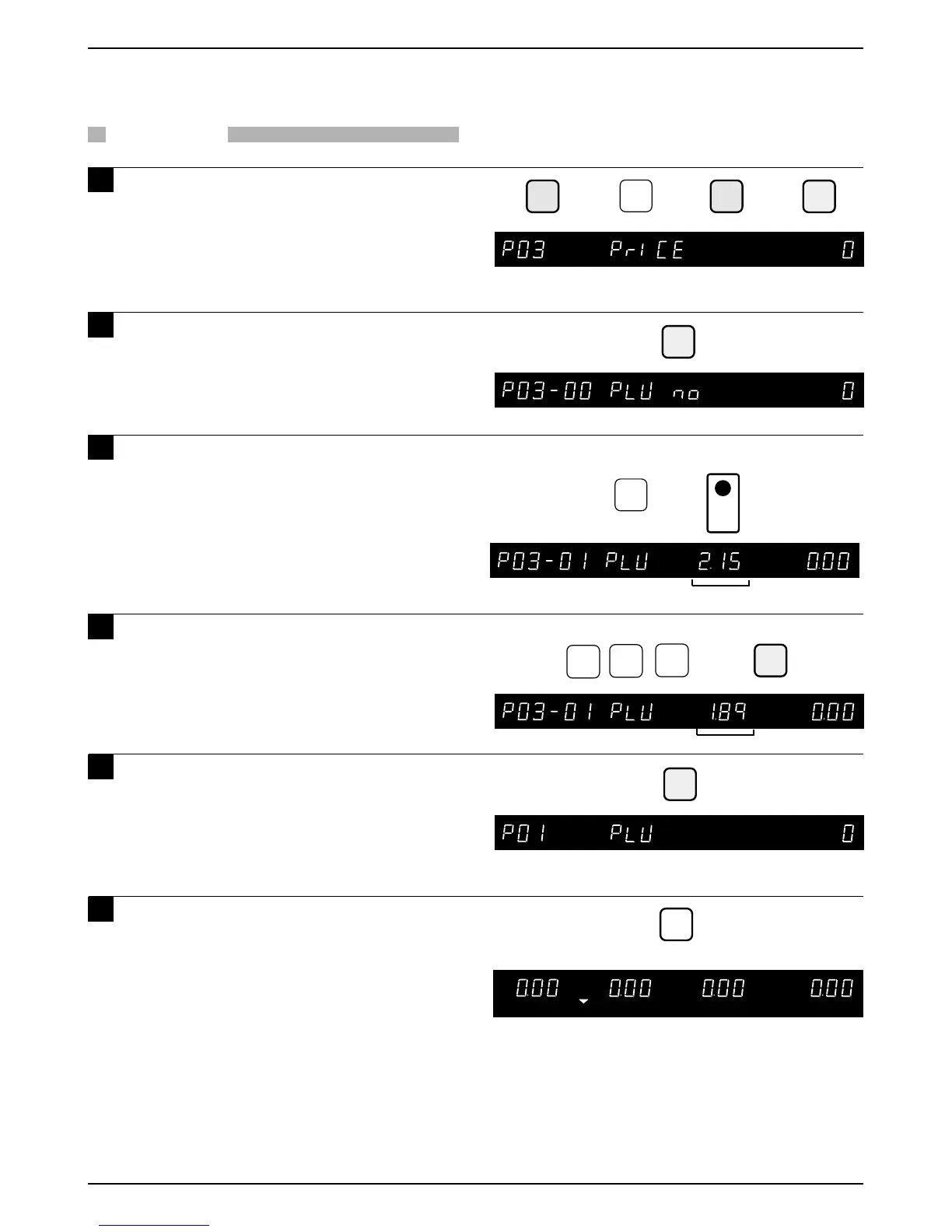
4.4 Price Change
PROCEDURES
1 Press the DOWN ARROW key ( ) until
the PRICE menu (P03) appears or key
in “3” followed by the DOWN ARROW
key ( ) to enter the menu directly.
2 Press the ENTER key to enter the PLU
Number menu.
3 Key in the PLU number and press the
PLU key.
4 Key in the unit price or the fixed price
(Max. 5 digits) and press the ENTER key.
5 Press the END key to return to the PLU
setup menu (P01).



 To Next Page