page 70
ASTRA
• Operation Manual • Rev. 0124C
Chapter 8. Subtraction Mode
8.1 Subtraction Mode Operations
These operations are performed in order to adjust the accumulated totals data.
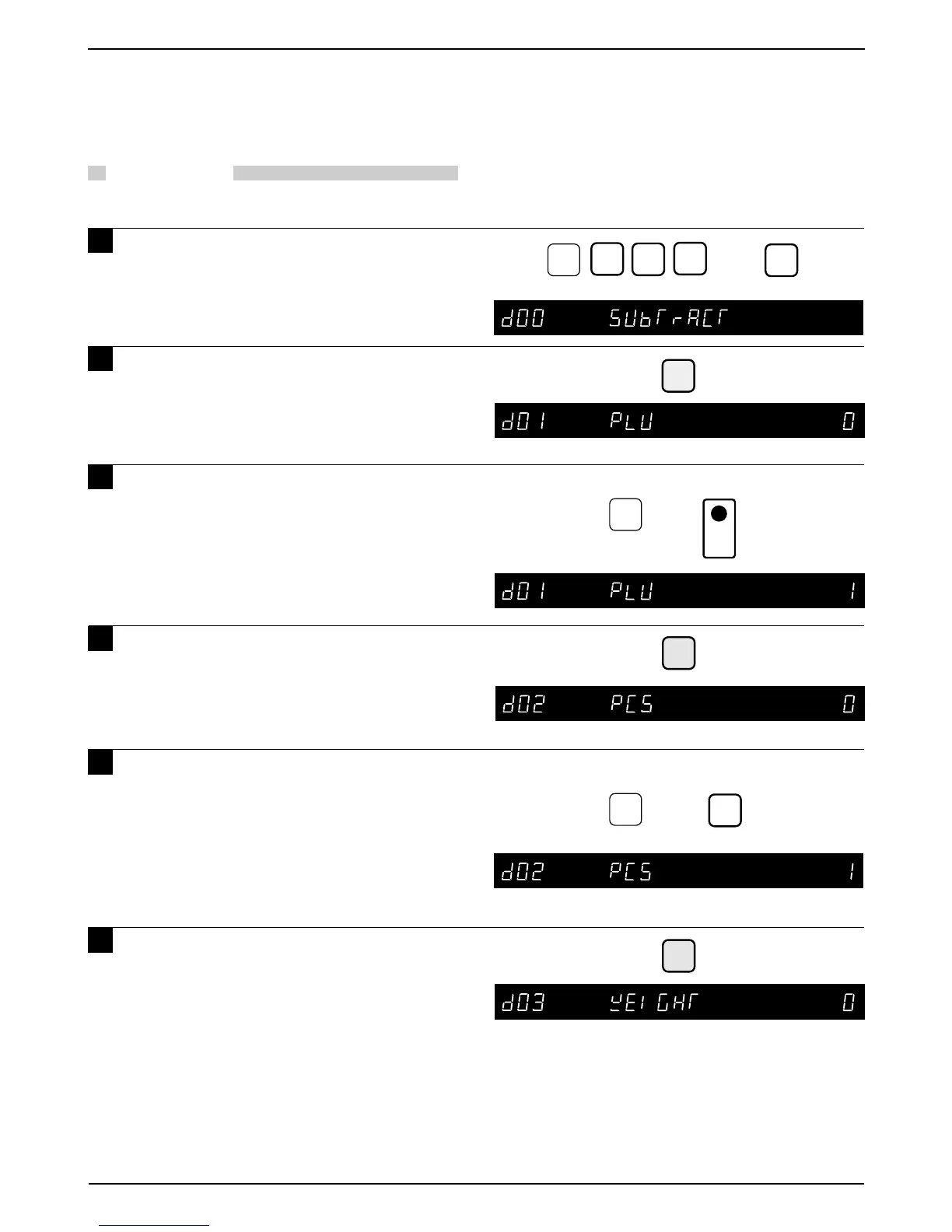
PROCEDURES
1 Key in 7000 and press the MODE key
to enter the Subtraction Mode.
2 Press the ENTER key to enter the
next step.
3 Key in the PLU number to be
subtracted and press the PLU key.
Note: If there is no data for the keyed in PLU,
the error buzzer sounds.
4 Press the DOWN ARROW key ( ) to
enter the next step.
5 Key in the number of pieces to be
subtracted and press the FEED key.
Note: If keyed in number of pieces to be
subtracted exceeds the actual total
number of items, all data is cleared.
6 Press the DOWN ARROW key ( ) to
enter the next step.
Note: If there is no data for the keyed in PLU,
the error buzzer sounds.
0
➜
7
MODE
ENTER
Example: PLU number “1”
➜
1
➝
➝
FEED
➜
1
Example: Subtract 1 piece from PLU “1”
➝
➝
0
0
PLU



 To Next Page