COMPLEX RADIO CONTROL SYSTEM
11.2. Activating the receiver's vario & altimeter function
2. disconnect all sensors from it and bind it with the transmitter
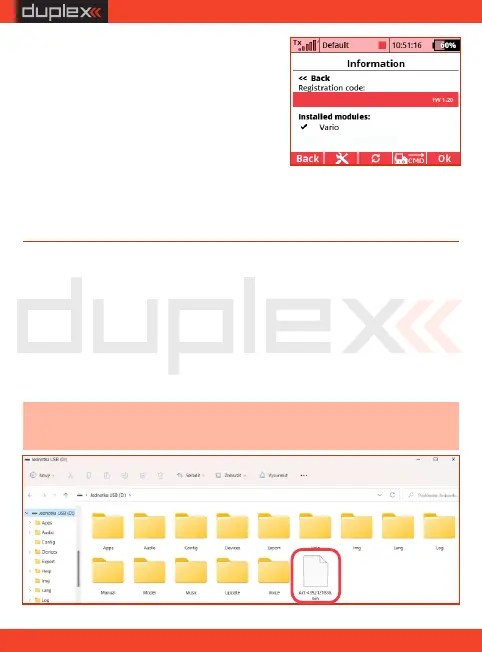
Note: the activation file must not be placed in any folder or
subfolder of the transmitter directory!
4. connect the transmitter to the PC via a USB cable. Copy the
activation file you received by email directly to the root folder of
the transmitter's SD card.
6. after payment verification, you will receive an activation file in
the format "Act-xxxxxxxxxx.bin" in your email
4. to get the registration code, connect
the paired receiver to the transmitter
and open the directory „Menu/
Model/ Device Explorer/REXxA/
Info”
1. check if your receiver has the latest firmware version
5. open the menu of the registered
receiver, selec t the expansion
module "Vario for REX ASSIST" and make the payment
3. turn off the receiver and the transmitter
54
xxxx-xxxx-xxxx-xxxx
EN


 To Next Page