17
X-Series Waterblast Unit
CONTROL PANEL
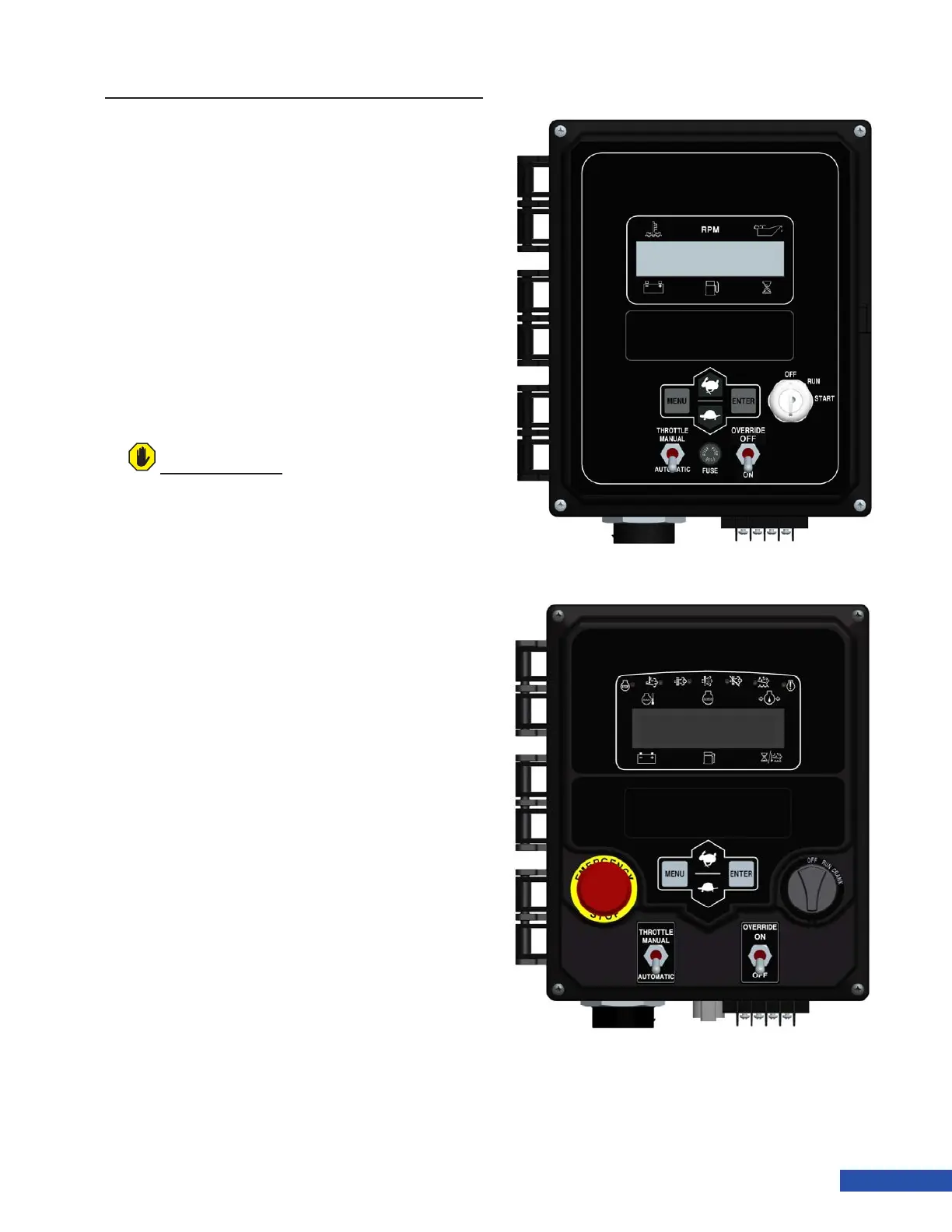
The control panel (examples shown in Figure
27) is used to start the engine and to control
engine speed. The panel displays engine pa-
rameters for monitoring engine condition.
Shutdown Override: When switched to
the ON position, the override switch will
ignore the low water level sensor and/or the
differential pressure switch (secondary lter)
and the engine will run without water in the
tank. When switched to the OFF position, the
unit will not start without water in the tank.
If no water is present, the panel will display
“Emergency Stop”.
Throttle Mode: When the switch is in the
Automatic position, the engine will switch
from the predened minimum speed to the
set operating speed as demand from the
pump changes.
When in the Manual position, the throttle
up and throttle down buttons must be used
to change engine speed.
For additional information, see the control
panel operations manual supplied with the
unit.
ATTENTION
Do not operate the unit in override mode. The
override feature is typically used for engine
service.
Figure 27: Main Control Panels (Tier III above, Tier IV below)


 To Next Page